Much research data is text: answers to open questions, interview transcripts, clinical notes, documents. To analyse it quantitatively, researchers use qualitative coding: reading each text and assigning it to one of a set of themes defined in a codebook. Coding is an act of judgement, and judgements differ. A central methodological question is therefore how to know whether a coder, whether a person, a keyword list, or a computer program, codes reliably. The standard answer is to compare the coder with another, and to measure how far they agree beyond what chance alone would produce.
In the wellbeing study, the final survey asked one open question: “What has been your biggest challenge during your studies?” 535 students answered in their own words, and the eleventh research question (RQ11) asks what those challenges are. Elaf coded 200 answers by hand, which took her most of two weeks, and the question is whether an AI tool could code the rest reliably.
Artificial intelligence (AI) tools now appear everywhere in research: assistants that write and explain code, and language models that read, summarise, and classify text. This chapter looks at both uses. It explains what these tools are and why they make mistakes, shows how to use an AI assistant to write R code and how to check what it produces, and then calls a language model from R with the ellmer package to code the students’ answers, testing the results against the hand coding exactly as Chapter 12 tested a classifier. It ends with the rules for using AI responsibly in research.
TipBy the end of this chapter you will be able to
Explain how the reliability of coding is measured, and why agreement must be corrected for chance.
Explain in plain terms how large language models work, and why they make confident mistakes.
Use an AI assistant to write, explain, and debug R code, and check its answers.
Call a language model from R with ellmer, and get structured answers for many texts.
Validate AI coding of text against human coding with accuracy and Cohen’s kappa.
Use AI responsibly: protect data, keep work reproducible, and disclose its use.
Two coders who read the same answers will not always choose the same theme. Their raw agreement, the share of answers on which they agree, seems the natural measure of reliability, but it can mislead. When one theme is very common, two coders will often agree simply because both choose it most of the time, even if they are guessing. A small example shows how much this matters. Two coders read 20 answers, 16 of which one coder puts under Workload:
coder_a <-c(rep("Workload", 16), rep("Family", 4))coder_b <-c(rep("Workload", 14), rep("Family", 2), # the first 16 answersrep("Workload", 2), rep("Family", 2)) # the last 4 answersobserved <-mean(coder_a == coder_b)chance <-sum(prop.table(table(coder_a)) *prop.table(table(coder_b)))c(observed = observed, chance = chance, kappa = (observed - chance) / (1- chance))
observed   chance    kappa
   0.800    0.680    0.375
The coders agree on 80% of the answers, which sounds good. But each coder puts 80% of the answers under Workload, so two coders who assigned themes at random in those proportions would agree on 68% of them by chance alone. Cohen’s kappa measures agreement beyond chance: the observed agreement minus the chance agreement, as a share of the most that could be gained over chance (Cohen 1960). Here it is only 0.37. A kappa of 0 means no better than chance, and 1 means perfect agreement. A common rule of thumb calls 0.41 to 0.60 moderate, 0.61 to 0.80 substantial, and above 0.80 almost perfect agreement (Landis and Koch 1977). The function kap() from the yardstick package gives the same result:
kap(tibble(a =factor(coder_a), b =factor(coder_b)), truth = a, estimate = b)
# A tibble: 1 × 3
  .metric .estimator .estimate
  <chr>   <chr>          <dbl>
1 kap     binary         0.375
Kappa is the standard measure of inter-rater reliability (Chapter 5), and it applies to any pair of coders. Later in this chapter, one of the coders is a keyword list and then a language model, and the other is Elaf.
18.2 How AI assistants work
The AI assistants that researchers use, such as ChatGPT, Claude, Gemini, and Copilot, are built on large language models (LLMs). A language model is a neural network (Chapter 15), with billions of weights, trained on an enormous amount of text: books, websites, and code. During training it learns to do one thing extremely well: predict the next word (strictly, the next token, a word or part of a word) given the text so far. Answering a question means generating a reply one token at a time, each time choosing a likely continuation. Further training on examples of helpful answers turns this into an assistant that follows instructions.
This explains both their strengths and their weaknesses. They are fluent in R, because a huge amount of R code and documentation was in their training text, so they can write, explain, and fix code well, especially for common tasks. But they produce what is plausible, not what is verified: a made-up function name that looks like a real one, a wrong argument, or an outdated way of doing something can be delivered with complete confidence. Such invented content is called a hallucination. Their knowledge also stops at the date their training data was collected, so packages that changed since then, as tidymodels and ggplot2 have, may be described as they used to be. And they know nothing about your data unless you tell them, and cannot run your code unless the tool is designed to do so.
The practical rule follows directly: use AI to draft, and check everything it produces. The checking is your job, and you remain responsible for the result.
18.3 AI as a coding assistant
18.3.1 Asking good questions
An assistant can only be as specific as the question. A good request for R code states the goal in words, such as “For each faculty, I want the percentage of students who considered dropping out”. It describes the data: the names and types of the relevant columns, for which the output of glimpse(students) (Chapter 3) is ideal, although real, identifiable data should never be pasted. It names the tools, such as “Use dplyr with the native pipe |>”, so that the answer matches a familiar style. And for errors, it gives the exact error message and the code that produced it.
18.3.2 Always check the answer
Suppose an assistant is asked for the percentage of students in each faculty who considered dropping out, and suggests:
students |>summarise(percent =100*sum(considering_dropout =="Yes") /nrow(students),.by = faculty)
           faculty  percent
1  Health Sciences 4.833333
2        Education 2.666667
3  Social Sciences 3.500000
4       Humanities 2.166667
5 Natural Sciences 1.833333
The code runs without an error and the numbers look reasonable. But they add up to only 15, the percentage of all students who considered dropping out: nrow(students) counts every student, not the students in each faculty. The question asked for the share within each faculty:
students |>summarise(percent =100*mean(considering_dropout =="Yes"),.by = faculty)
           faculty  percent
1  Health Sciences 18.83117
2        Education 10.81081
3  Social Sciences 18.10345
4       Humanities 13.68421
5 Natural Sciences 12.64368
The mean of a TRUE/FALSE condition is the proportion of TRUE values (Chapter 6), calculated here within each faculty. The first answer was not a hallucination; it was a plausible misunderstanding, the most dangerous kind of error, because nothing looks wrong. Four checks catch most such errors. Code can be run on a tiny example whose answer is known, as every chapter of this book does. A number can be checked by another route; here, students |> count(faculty, considering_dropout) gives the counts to check against. The help page of any unfamiliar function (?summarise) confirms that it exists and does what the assistant says. And the assistant can be asked to explain each line, to see whether the explanation matches what was wanted.
Assistants are also excellent teachers: “explain this code line by line”, “why does this give NA?”, and “what does this error mean?” are among their most useful questions.
18.3.3 AI inside the editor
Assistants can also work inside RStudio and Positron. GitHub Copilot, which can be switched on in RStudio’s options, suggests code as you type, completing a line or a whole block from a comment such as # plot wellbeing by semester. Positron Assistant and similar tools add a chat that can see your open files and, with permission, your data’s structure. Such suggestions arrive quickly and look authoritative, so the same rule applies: read each suggestion before accepting it. These tools change fast; the ideas in this chapter apply to whichever one you use.
18.4 Coding the open-ended answers
A few of the answers show what the coding must handle:
[1] "most of my income goes on tuition fees. Besides that, I work alone all the time. Things are slowly improving."
[2] "I moved to a city where I know no one for my studies and I feel lonely. And I never have enough time."
[3] "Supervisor."
[4] "The direction of my thesis changed twice after comments from my supervsor. Sometimes I rewrite the same section again and again without knowing if it is right."
They vary in length and style, often mention more than one challenge, and sometimes contain spelling mistakes, as real answers do. The codebook has seven themes, and Elaf coded a random sample of 200 answers into the theme that each student presents as their main challenge:
open_responses_coded |>count(theme, sort =TRUE)
        theme  n
1 Supervision 68
2    Workload 45
3   Isolation 31
4      Health 20
5      Family 14
6    Finances 14
7       Other  8
The hand-coded sample is the benchmark for any automatic method, exactly like the test set of Chapter 11.
18.4.1 Coding by keywords
The simplest automatic method is a dictionary: a list of keywords for each theme. Each answer is assigned to the theme whose keywords it contains most often, and to “Other” if it contains none. The function str_count() from stringr counts the matches of a regular expression, a text pattern in which | means “or” and \\b marks the start of a word:
keywords <-c(Supervision ="\\b(supervis|feedback|guidance|meeting)",Workload ="\\b(time|deadline|workload|too much|assignment|reading|busy)",Finances ="\\b(money|fee|scholarship|rent|afford|salary|income|funding|stipend|loan)",Family ="\\b(famil|child|kid|son\\b|daughter|baby|parent|mother|father|husband|wife)",Health ="\\b(sleep|tired|stress|anxi|health|ill\\b|burnout|headache|coffee|exhaust)",Isolation ="\\b(lonel|alone|friends|outsider|miss (home|my)|far from|know no one)",Other ="\\b(ethic|participant|statistic|library|procedure|english|power cut|laptop|internet|software)")code_by_keywords <-function(answer) { hits <-sapply(keywords, \(pattern) str_count(str_to_lower(answer), pattern))if (all(hits ==0)) "Other"elsenames(keywords)[which.max(hits)]}code_by_keywords("I miss my family and I cannot afford the fees.")
[1] "Finances"
The example answer matches one Family keyword (“family”), one Isolation phrase (“miss my”), and two Finances keywords (“afford” and “fees”), so it is coded as Finances, although a human reader might well code it differently. Applying the function to the hand-coded answers:
# A tibble: 1 × 3
  .metric .estimator .estimate
  <chr>   <chr>          <dbl>
1 kap     multiclass     0.512
The keywords agree with the hand coding for 61% of the answers, and their Cohen’s kappa, the agreement beyond chance explained at the start of the chapter, is 0.51: moderate agreement. They fail because meaning is not in single words: “my supervisor” in “I feel I am letting down both my family and my supervisor” is about family, and “I never have enough time” can be about workload or about children. Reading for meaning is exactly what language models are good at.
18.4.2 Calling a language model from R
The ellmer package connects R to language models of two kinds.
Online models from providers: chat_anthropic() for Claude, chat_openai() for ChatGPT’s models, and chat_google_gemini() for Gemini. They are the most capable, but using them from code requires an API key, a secret password linked to your account, and each request costs a small amount. Store the key in your personal .Renviron file (usethis::edit_r_environ() opens it), never in a script that others may see:
ANTHROPIC_API_KEY=your-key-here
Local models, which run on your own computer through Ollama (ollama.com), a free program that downloads and runs open models. They need no key and cost nothing, and the text never leaves your computer. Install Ollama, download a model once in the Terminal (for example ollama pull gemma4:e4b, a model of about 10 GB), and use chat_ollama(). A computer with a graphics card (GPU) makes them much faster.
Either way, a chat then works much like a chat website, from R:
library(ellmer)chat <-chat_ollama(model ="gemma4:e4b") # local# chat <- chat_anthropic(model = "claude-sonnet-5") # online, needs a keychat$chat("In one sentence, what does Cohen's kappa measure?")
The model argument names the exact model. Always set it explicitly and record it: models are updated and retired, and different models give different answers.
For the study, a local model was chosen, Google’s Gemma 4 (the e4b version), for two reasons: the students’ answers never leave the computer, and anyone can repeat the analysis for free.
18.4.3 Structured answers for many texts
Coding needs two things that a chat on a website does not give: the same instructions for every answer, and a reply in a fixed format that R can use. The system prompt holds the instructions: the task and the codebook, with a definition of each theme. With an online model, a type describes the required answer: here, an object with one field, theme, which must be one of the seven themes:
codebook <-"You are helping a researcher code open-ended survey answers from graduatestudents, who were asked: 'What has been your biggest challenge during yourstudies?' Assign each answer to exactly ONE theme: the main challenge thestudent describes. If several challenges are mentioned, choose the one thestudent presents first or as most important.Themes:- Supervision: the supervisor; feedback, guidance, meetings, disagreements.- Workload: too much work or too little time; deadlines, coursework, reading.- Finances: money, fees, scholarships, living costs, paid work to pay for study.- Family: children, partners, parents, caring duties, studying at home.- Health: physical or mental health, sleep, stress, anxiety, burnout, illness.- Isolation: loneliness, being far from home, no colleagues or friends.- Other: anything else, such as ethics approval, statistics, academic English."theme_type <-type_object(theme =type_enum(themes, "The single main theme of the answer."))chat <-chat_anthropic(system_prompt = codebook, model ="claude-sonnet-5",params =params(temperature =0))ai_codes <-parallel_chat_structured( chat,prompts =as.list(open_responses$biggest_challenge),type = theme_type)
The function type_enum() restricts the answer to the listed themes, so the model cannot invent a new one or reply with a paragraph. The setting temperature = 0 asks the model to choose its most likely answer every time, rather than sampling more freely, which makes the results as repeatable as possible. parallel_chat_structured() sends one request per answer, several at a time, and returns a data frame with one row per answer and a theme column.
Smaller local models do not always follow such a format. When parallel_chat_structured() was tried with the local model, it answered correctly (“Finances”, “Workload”) but as plain words, not in the structured format, and ellmer could not read the replies. The solution is to add one line to the end of the codebook, “Reply with the name of the theme only”, to ask for plain text with parallel_chat_text(), and to let R check each reply against the list of themes:
The function gsub() removes anything that is not a letter, such as a full stop, and match() finds the reply in the list of themes, ignoring capital letters. A reply that is not one of the themes becomes NA, so it is counted rather than silently accepted. Checking a model’s output in code like this is good practice with any model.
The full script, data-raw/run_ai_coding.R in the book’s repository, also records the provider, the model, the date, the software versions, and the time taken, and codes the 200 hand-coded answers a second time to check that the model gives the same answers when asked again. It was run once, and the results were saved to a file, so that this chapter can analyse them without calling the model again.
18.4.4 Agreement with the hand coding
The script used the model gemma4:e4b, run locally through Ollama, on 24 September 2026. The 735 requests took about 3 minutes, at no cost, and every reply was one of the seven themes. The results are joined to the hand-coded answers:
# A tibble: 1 × 3
  .metric .estimator .estimate
  <chr>   <chr>          <dbl>
1 kap     multiclass     0.874
The model agrees with the hand coding on 90% of the answers, with a kappa of 0.87 (almost perfect agreement), against 61% and 0.51 for the keywords. The confusion matrix of Chapter 12 shows where the two disagree:
             Truth
Prediction    Supervision Workload Finances Family Health Isolation Other
  Supervision          60        2        0      0      0         2     0
  Workload              2       39        0      0      1         0     0
  Finances              1        0       14      0      0         0     0
  Family                2        1        0     14      1         0     0
  Health                2        1        0      0     16         0     0
  Isolation             1        2        0      0      1        29     0
  Other                 0        0        0      0      1         0     8
The diagonal holds the answers on which the hand coding and the model agree. The disagreements are worth reading one by one, because they show whether the model is wrong, the codebook is unclear, or the answer is genuinely ambiguous:
Getting feedback on my draft took over a month, and by then I had lost momentum. Also, home is not a quiet place to study.
Supervision
Isolation
Combining coursework, my job at a school and my thesis leaves me no time to rest. And my mental health has suffered. Things are slowly improving.
Workload
Health
I stopped exercising and I can feel the difference. The doctor told me to slow down, but I do not see how. On top of that, the university paperwork is slow. Things are slowly improving.
Health
Other
Writing my literature review took far longer than I planned. And I do not have friends in the department. I am coping, but only just.
Workload
Isolation
Nobody in my group works on anything close to my topic. At the same time, my supervisor is hard to reach. Otherwise the programme is fine.
Isolation
Supervision
Look especially at answers that mention two challenges. If the model and the human coder chose different ones as the main challenge, that is a question for the codebook, not only for the model: a clearer rule (“code the challenge mentioned first”) helps both human and machine coders.
Asked a second time, the model gave exactly the same theme for every answer: with a temperature of 0, this local model is repeatable. That is not guaranteed for every model or setting (online models, in particular, can be updated between runs), which is why the outputs are saved and analysed from the file.
18.4.5 What the students said
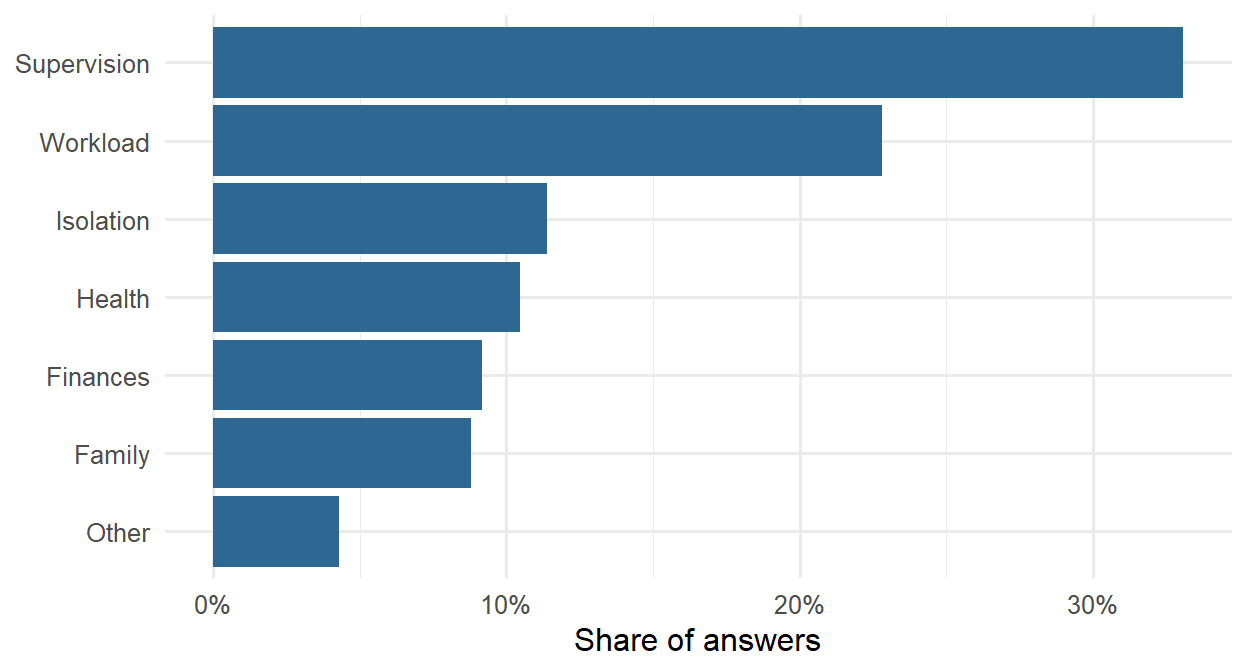
With its agreement checked, the model’s coding is used for all 535 answers:
ai |>count(ai_theme) |>mutate(share = n /sum(n)) |>ggplot(aes(x = share, y =reorder(ai_theme, share))) +geom_col(fill ="#2f6793") +scale_x_continuous(labels = scales::label_percent()) +labs(x ="Share of answers", y =NULL) +theme_minimal(base_size =12)
Figure 18.1: Main challenge described by the students, coded by a language model.
Because the themes are now data, they can be linked to the rest of the study. Students whose main challenge is supervision should report less supervisor support in the questionnaire:
     ai_theme students support
1 Supervision      177    2.82
2   Isolation       61    3.30
3       Other       23    3.31
4      Health       56    3.33
5      Family       47    3.43
6    Finances       49    3.45
7    Workload      122    3.46
This is a check of validity: the text and the numbers tell the same story. It also answers RQ11 in a way neither source could alone: what students struggle with, in their own words, and how that relates to their situation.
18.5 Using AI responsibly
18.5.1 Check, and stay responsible
Everything an AI tool produces is a draft. Check code by running it on known cases, check facts and references against their sources (assistants are known to invent plausible references that do not exist), and check coding against human coding, as this chapter did. Whatever appears in your thesis is your responsibility, whoever or whatever drafted it.
18.5.2 Protect your data
Text sent to an online AI service leaves your computer and is processed, and possibly stored, by the provider. Before research data is sent, the ethics approval and consent forms must be checked: participants who agreed to have their answers read by the research team did not necessarily agree to have them sent to a company. The provider’s terms matter too; many offer research or enterprise agreements under which data is not stored or used for training, but free accounts often do not. Identifying information must be removed before anything is sent: names, places, and details that could identify a person (Chapter 17). For sensitive data, a local model that runs on your own computer, through Ollama and chat_ollama(), keeps the data on the machine; local models are smaller and usually less accurate, so they must be validated in the same way.
The answers in the wellbeing study are anonymous, but a local model was used anyway, so they never left the computer: the simplest way to stay within any consent form.
18.5.3 Keep it reproducible
Language models can give different answers to the same question on different days, and models are updated and retired. To keep AI-assisted work reproducible, the provider, the exact model name, the date, and the settings (such as the temperature) should be recorded, and the prompts (the system prompt and codebook) saved with the code. The model’s outputs should be saved too, as in this chapter, and the saved outputs analysed rather than the model called again. Coding a sample twice checks consistency.
18.5.4 Disclose it
Journals and universities increasingly require authors to disclose how they used AI. The consensus of publishers and of the Committee on Publication Ethics (COPE) is that an AI tool cannot be an author, because it cannot take responsibility for the work, and that its use must be described. A methods section might say: “Answers were coded into seven themes by a large language model (Gemma 4, e4b version, run locally with Ollama and the ellmer R package, temperature 0) using the codebook in Appendix X. Agreement with the author’s hand coding of a random sample of 200 answers was assessed with Cohen’s kappa.” For help with code or language, a sentence in the acknowledgements or methods is usually enough; check your university’s and journal’s policy.
18.5.5 Be aware of bias
Language models learn from human text, and they can reproduce its biases: in how they describe groups of people, in which answers they find typical, and in how well they understand non-standard English or answers written by non-native speakers. Check whether the model’s accuracy differs between groups, as Chapter 11 recommended for any model that makes decisions about people.
NoteIn your field: medicine and public health
Clinical notes, discharge letters, and incident reports hold information that is written as free text but needed as data: diagnoses, medications, doses, and dates. Language models can extract it into a fixed structure. With ellmer, the type describes the fields to extract:
medication_type <-type_object(drug =type_string("Name of the medication"),dose_mg =type_number("Dose in milligrams"),times_per_day =type_integer("How many times a day it is taken"))chat <-chat_anthropic(model ="claude-sonnet-5")chat$chat_structured("Patient to continue metformin 500 mg twice daily with meals.",type = medication_type)
The result is a list with drug, dose_mg, and times_per_day, ready to become a row of a data frame. Studies in this area validate the extraction against records checked by clinicians, report agreement for each field, and use local models or secure institutional services, because patient data must not be sent to public AI services.
18.6 Common misconceptions
AI tools invite both too much trust and too little, and a few misunderstandings are especially common.
“High agreement means reliable coding.” Raw agreement can be high by chance when one theme is common; kappa shows the agreement beyond chance.
“The AI knows the answer.” A language model produces plausible text, not verified facts; its coding must be validated against human coding.
“A model’s answers are always the same.” They can change with the model version, the settings, and the date, which is why models, prompts, and outputs are recorded and saved.
“Using AI must be hidden, or is not allowed.” Most journals and universities allow it with disclosure; what they do not allow is presenting AI output as unchecked fact, or listing an AI as an author.
18.7 Chapter review
18.7.1 Summary
The reliability of coding is measured by agreement between coders, corrected for chance with Cohen’s kappa; raw agreement can look high even when coders agree little beyond chance.
Large language models generate text by predicting the next token; they are fluent in R but produce what is plausible, not what is verified. They hallucinate, they may be out of date, and they know nothing about your data unless told.
Ask assistants specific questions (goal, data structure, tools, exact error), and check every answer: run it on a tiny example, verify numbers by another route, and read the help.
A dictionary of keywords is a simple, transparent baseline for coding text, but it misses meaning.
ellmer calls language models from R. Store the API key in .Renviron; set the model explicitly; use a system prompt with a codebook, a type to fix the format of the answer, and parallel_chat_structured() for many texts.
Validate AI coding against human coding with accuracy, a confusion matrix, and Cohen’s kappa, and examine the disagreements.
Use AI responsibly: you are responsible for the result; protect participants’ data (consent, anonymisation, local models); record models, prompts, and outputs; disclose AI use; and watch for bias.
18.7.2 Key terms
Artificial intelligence, large language model, token, hallucination, training cut-off, prompt, system prompt, AI coding assistant, qualitative coding, codebook, inter-rater reliability, dictionary method, regular expression, Cohen’s kappa, API, API key, structured output, temperature, local model, disclosure.
18.8 Exercises
The playground has these and more, with hints and solutions.
Ask an AI assistant to write code that calculates the average sleep in each faculty and semester. Check the answer with a tiny example and by another route, and check whether it handled missing values.
Add three keywords to the dictionary that you think would fix some of its mistakes, and report whether the kappa improves. Discuss whether you are now fitting the dictionary to these answers (Chapter 11’s overfitting).
Read ten answers where the keyword coding disagrees with the hand coding, and say whether you would agree with the hand coding in every case.
Code 20 of the hand-coded answers with a language model (local or online), using the codebook in this chapter, and count how many agree with the hand coding. Then change one theme definition and code them again.
Write the paragraph for your own methods section describing how you would use and validate AI coding in a study of your own.
In the two-coder example at the start of the chapter, change the second coder so that it puts every answer under Workload. Calculate the raw agreement and kappa, and explain the result.
18.9 Further reading
The ellmer documentation at ellmer.tidyverse.org covers providers, structured data, and tools, with many examples.
Gilardi and colleagues compared language models with human coders for text annotation (Gilardi et al. 2023), a study that prompted much of the current interest in using them for research.
Cohen’s original paper on kappa (Cohen 1960) and Landis and Koch’s benchmarks (Landis and Koch 1977) are the standard references for agreement between coders.
References
Cohen, Jacob. 1960. “A Coefficient of Agreement for Nominal Scales.”Educational and Psychological Measurement 20 (1): 37–46. https://doi.org/10.1177/001316446002000104.
Gilardi, Fabrizio, Meysam Alizadeh, and Maël Kubli. 2023. “ChatGPT Outperforms Crowd Workers for Text-Annotation Tasks.”Proceedings of the National Academy of Sciences 120 (30): e2305016120. https://doi.org/10.1073/pnas.2305016120.
Landis, J. Richard, and Gary G. Koch. 1977. “The Measurement of Observer Agreement for Categorical Data.”Biometrics 33 (1): 159–74. https://doi.org/10.2307/2529310.