flowchart TB A["report.qmd<br/>text + Python code"] --> B["Jupyter runs<br/>the Python code"] B --> C["report.md<br/>text + results"] C --> D["Pandoc<br/>converts"] D --> E["HTML"] D --> F["Word (.docx)"] D --> G["PDF"]
17 Reproducible Research
A research finding is credible only if it can be checked. A reader who doubts a result should be able to see exactly how it was obtained, and a second researcher who repeats the analysis should arrive at the same numbers. When that is not possible, the reader has to take the result on trust, and science is built on not having to. The failures that make results uncheckable are rarely dramatic. A table is copied into a draft before the data is corrected, a decision made while exploring is forgotten, a package changes its behaviour between versions, and nobody can say afterwards which of several analyses produced the published number. Reproducibility is therefore a matter of research integrity, not of technical tidiness.
The problem is easy to meet in a thesis. Three weeks before the deadline, Elaf’s supervisor spots that twelve students appear twice in an early version of the survey export. They were removed in Chapter 3, but some tables were copied into the thesis draft before that, and now every table, figure, and number copied by hand from Python into Word must be checked and replaced, one at a time, with the risk of missing one. This chapter shows a way of working in which that problem cannot happen. In a reproducible workflow, the text, the code, and the results live together, and the whole report is rebuilt from the raw data with one command, so every number is always up to date. The chapter introduces Quarto for writing such documents, from a single page to a thesis chapter; virtual environments and dependency files (requirements.txt) for keeping the same package versions; Shiny for Python for turning an analysis into an interactive dashboard; and the practices of open science that make research checkable by others. An optional section introduces git for keeping the history of a project.
TipBy the end of this chapter you will be able to
- Explain why reproducibility is a matter of research integrity, and why copying results by hand and flexible analyses are risky.
- Write a Quarto document that combines text, Python code, results, tables, figures, citations, and equations, and render it to HTML, Word, and PDF.
- Keep a project’s package versions with virtual environments and
requirements.txt, and report software versions. - Build a small Shiny for Python dashboard with inputs, outputs, and reactive code.
- Apply open science practices: sharing data and code, protecting participants, preregistration, and citing software.
17.1 Reproducibility and credibility
An analysis is reproducible if someone else, or you in a year’s time, can take the same data and code and get exactly the same results. It is replicable if a new study, with new data, reaches the same conclusions. Reproducibility is the minimum standard: if the original results cannot even be recomputed, there is little point asking whether they replicate (Peng 2011).
Most irreproducibility is not fraud but everyday friction: a table copied before the data was corrected, a spreadsheet cell edited by hand, a result produced by clicking through menus that nobody wrote down, a package that changed its default between versions. The previous chapters have already built good habits against these. Every step is written as code, in Python scripts or notebooks, so it can be rerun (Chapter 1). Each analysis lives in a dedicated project directory with relative paths, so it runs on any computer (Chapter 1). The raw data is never edited by hand, and every cleaning decision is made and recorded in code (Chapter 3). Random steps use np.random.seed() or explicit random state generators, so they give the same answer every time (Chapter 7).
This chapter adds the last links: putting the results into the report automatically, fixing the software versions, and sharing everything responsibly. Good practices do not need to be perfect to be useful; even a few of them make research far easier to check (Wilson et al. 2017).
17.2 Documents that contain their own analysis
Quarto is a modern publishing system for documents that mix text and executable code. A Quarto document is a plain text file with the extension .qmd. When it is rendered, the code is executed, and its results (numbers, tables, figures) are placed directly into the finished document, which can be a web page, a Word document, a PDF, a slide show, or an entire book. This book itself is written in Quarto: every number, table, and figure in it was produced by the Python code shown next to it.
NoteJupyter Notebooks and Quarto
In Python data science, Jupyter Notebooks (.ipynb files) are very popular for interactive exploration. However, notebooks store raw output and metadata as bulky JSON, which makes version control in Git difficult. Quarto (.qmd files) combines the best of both worlds: plain-text Markdown that is clean to track in Git, paired with a Jupyter kernel underneath that runs your Python code when rendering. Quarto works natively with Python, R, Julia, and Observable JavaScript. For reproducible thesis chapters and reports, Quarto plain text is the gold standard.
17.2.1 A small example
A complete Quarto document can be very short:
---
title: "Three friends' sleep"
author: "Elaf"
format: html
jupyter: python3
---

My three friends slept 6.3 hours on average last night.

```{python}
import numpy as np
sleep = [6.5, 7.0, 5.5]
print(round(np.mean(sleep), 1))
```
It has the three parts of every Quarto document:
- The YAML header, between the two
---lines, holds settings: the title, the author, the output format, and the Python kernel (jupyter: python3). - The text is written in Markdown, a simple way of styling text:
**bold**,*italic*,# Heading, and-for bullet points. - The code chunks, between
{python}and```, are executed when the document is rendered, and their outputs appear in the document.
The text can also contain inline code, such as <code>{python} mean_sleep</code>: Python variables evaluated directly inside a sentence. When the document is rendered, the inline code is evaluated and replaced by its numerical or text result. If a friend’s number changes in the data, the sentence changes with it. Inline code is the cure for the problem at the start of the chapter: numbers in the text are never typed by hand.
In VS Code or Positron, you can edit Quarto documents with syntax highlighting, run code chunks interactively, and render them with a single click or keyboard shortcut.
17.2.2 What happens when you render
Figure 17.1 shows the steps. The Jupyter execution engine runs the Python code and produces Markdown with the output figures and tables in place; Pandoc, a universal document converter, then transforms the Markdown into the requested format.
Because the code is run from the beginning every time, a rendered document is a test of reproducibility in itself: if the code depends on an unrecorded variable created in an interactive console, rendering fails immediately, alerting you to the missing step.
17.3 A results chapter in Quarto
The descriptive results chapter of the thesis, written as a Quarto document, begins like this:
---
title: "Chapter 4: Results"
author: "Elaf"
format: docx
jupyter: python3
bibliography: references.bib
execute:
  echo: false
---

```{python}
#| label: setup
#| message: false
import pandas as pd
import data2thesis as dt

students = dt.students
semesters = dt.semesters

n_students = len(students)
n_faculties = students['faculty'].nunique()
mean_wb = round(semesters.loc[semesters['semester'] == 1, 'wellbeing'].mean(), 1)
```

The sample included 600 graduate students from 5 faculties. Their average wellbeing in the first semester was 60.5 on the wellbeing index (0 to 100). Table @tbl-faculty shows wellbeing by faculty.

```{python}
#| label: tbl-faculty
#| tbl-cap: "Wellbeing in the first semester, by faculty."
merged = semesters[semesters['semester'] == 1].merge(students, on='student_id')
summary_table = (
    merged.groupby('faculty')
    .agg(
        Students=('student_id', 'count'),
        Mean=('wellbeing', 'mean'),
        SD=('wellbeing', 'std')
    )
    .reset_index()
    .round(1)
)
summary_table.columns = ['Faculty', 'Students', 'Mean', 'SD']
summary_table
```

Wellbeing declined over the programme (@fig-wellbeing), as found in
earlier studies [@author2020].
Several features appear:
- In the header,
format: docxproduces a Word document (the format most supervisors prefer for track-changes feedback), andbibliography:names a file of references. The settingexecute: echo: falsehides Python code in the finished document, so the thesis presents only polished narrative, tables, and figures. - In the body, chunk options, the lines starting with
#|, control each chunk:labelgives it a unique identifier, andtbl-caporfig-capprovides a caption. - A chunk labelled
tbl-...orfig-...becomes a numbered table or figure. In the text,@tbl-facultybecomes a dynamic cross-reference (“Table 1”). [@author2020]is a citation: Quarto looks up the key in the BibTeX file, formats the citation in the chosen style, and generates the reference list at the end.
When the document is rendered, the first paragraph displays:
The sample included 600 graduate students from 5 faculties. Their average wellbeing in the first semester was 60.5 on the wellbeing index (0 to 100). Table 1 shows wellbeing by faculty.
and the table chunk produces Table 17.1:
| Faculty | Students | Mean | SD | |
|---|---|---|---|---|
| 0 | Education | 148 | 61.9 | 13.2 |
| 1 | Health Sciences | 154 | 59.0 | 11.6 |
| 2 | Humanities | 95 | 61.7 | 11.7 |
| 3 | Natural Sciences | 87 | 61.3 | 10.5 |
| 4 | Social Sciences | 116 | 58.9 | 12.1 |
If the underlying dataset updates, the document is re-rendered, and every number, table, and figure updates in unison. The supervisor’s request from the start of the chapter now takes one command to resolve.
17.3.1 References and citations
The bibliography file uses the standard BibTeX format, which almost every reference manager (Zotero, Mendeley, EndNote) can export, and Google Scholar can provide for any paper:
@book{mckinney2022,
  author    = {McKinney, Wes},
  title     = {Python for Data Analysis: Data Wrangling with pandas, NumPy, and Jupyter},
  edition   = {3},
  publisher = {O'Reilly Media},
  year      = {2022}
}
The citation key, mckinney2022, follows the @ symbol in the text. A csl: line in the YAML header chooses the citation style (APA 7th, Vancouver, Harvard, IEEE, or journal-specific styles), meaning that changing target journals never requires reformatting references by hand.
17.3.2 Equations
Equations are written in standard LaTeX notation between dollar signs: $\bar{x} = \frac{1}{n}\sum x_i$ inside a sentence gives \(\bar{x} = \frac{1}{n}\sum x_i\), and double dollar signs set an equation on its own line:
$$
\text{logit}(p) = \beta_0 + \beta_1 \times \text{stress} + \beta_2 \times \text{support}
$$
\[ \text{logit}(p) = \beta_0 + \beta_1 \times \text{stress} + \beta_2 \times \text{support} \]
The same LaTeX notation renders identically across HTML, Word, and PDF output.
17.3.3 Output formats
Changing one line in the YAML header switches the entire document’s target:
| Format | YAML | Notes |
|---|---|---|
| Web page | format: html |
Interactive; ideal for supplementary websites and sharing findings |
| Word | format: docx |
For supervisory review; reference-doc: template.docx applies university formatting |
format: pdf or format: typst |
Typeset PDF; Typst is lightning-fast and modern | |
| Slides | format: revealjs |
For conference presentations and thesis defenses |
Multiple formats can be specified at once, allowing a single quarto render call to generate both an accessible HTML web page and a formal Word thesis draft.
17.3.4 Parameterised reports
Suppose the dean of each faculty requests a tailored summary for their faculty. Rather than maintaining five separate files, one report with a parameter serves them all:
---
title: "Faculty Wellbeing Report"
format: html
jupyter: python3
params:
  faculty: "Education"
---

```{python}
import data2thesis as dt
import pandas as pd

students = dt.students
semesters = dt.semesters

faculty_name = params['faculty']
merged = semesters.merge(students, on='student_id')
faculty_data = merged[merged['faculty'] == faculty_name]
n_fac_students = faculty_data['student_id'].nunique()
```

This report describes the 148 students of the Faculty of Education.
In Python, Quarto passes the parameters into a dictionary named params. Rendering from the command line with -P outputs customized reports for each faculty:
quarto render faculty-report.qmd -P faculty:"Health Sciences"17.4 Keeping the same package versions
Python libraries evolve rapidly. A function default may change, or a method may be deprecated, causing code that runs today to break or produce different estimates two years later. Reproducibility requires pinning exact software dependencies.
17.4.1 Virtual environments and requirements.txt
A virtual environment is an isolated Python directory containing a specific Python interpreter and its installed packages. By creating an environment per project, updates to packages in one project never break another:
# 1. Create a dedicated virtual environment
python -m venv .venv

# 2. Activate it (Windows PowerShell)
.venv\Scripts\Activate.ps1

# 2b. Activate it (macOS/Linux)
source .venv/bin/activate

# 3. Install required packages
pip install pandas numpy scipy statsmodels scikit-learn matplotlib seaborn

# 4. Save exact versions to a lockfile
pip freeze > requirements.txt
Sharing requirements.txt alongside your thesis repository allows another researcher to recreate your exact environment with one command:
pip install -r requirements.txtModern Python tooling also offers lockfile tools such as uv (uv pip compile / uv.lock) or Poetry, which capture complete dependency graphs and cryptographic hashes for maximum reproducibility.
17.4.2 Reporting software versions
Even without a formal lockfile, always report the versions of Python and key analysis libraries in your thesis methods section. In Python, you can inspect versions directly:
import sys
import statsmodels
import sklearn
import pandas as pd

print(f"Python: {sys.version.split()[0]}")
print(f"pandas: {pd.__version__}")
print(f"statsmodels: {statsmodels.__version__}")
print(f"scikit-learn: {sklearn.__version__}")
Python: 3.12.15
pandas: 3.1.0
statsmodels: 0.15.0
scikit-learn: 1.9.117.5 Interactive dashboards with Shiny for Python
A static thesis report answers only the questions its author anticipated. Readers, reviewers, and policymakers often want to ask their own questions: “What does the trend look like for my faculty?” or “What if we examine sleep duration rather than overall wellbeing?”
Shiny for Python turns Python data analysis into an interactive web dashboard without requiring HTML, CSS, or JavaScript expertise.
A Shiny app is organized around three concepts:
- Inputs: The interactive UI widgets the user controls (drop-downs, radio buttons, sliders).
- Outputs: The visual elements the app displays (plots, dynamic tables, text cards).
- Reactivity: The engine that links them. When an input changes, Shiny automatically re-executes only the outputs and calculations that depend on that specific input (Figure 17.2).
flowchart LR
  F["Input:<br/>faculty"] --> S["@reactive.calc<br/>selected() filtered data"]
  S --> P["Output:<br/>trend plot"]
  S --> T["Output:<br/>summary table"]
  M["Input:<br/>measure"] --> P
  M --> T
17.5.1 A wellbeing dashboard
Here is the complete application code, saved as app.py:
from shiny import App, render, ui, reactive
import pandas as pd
import matplotlib.pyplot as plt
import seaborn as sns
import data2thesis as dt

students = dt.students
semesters = dt.semesters

wellbeing_data = semesters.merge(
    students[["student_id", "faculty", "study_mode"]],
    on="student_id"
)

measure_choices = {
    "wellbeing": "Wellbeing (0-100)",
    "sleep_hours": "Sleep (hours a night)",
    "study_hours": "Study (hours a week)"
}

app_ui = ui.page_sidebar(
    ui.sidebar(
        ui.input_select(
            "faculty", "Faculty",
            choices=sorted(wellbeing_data["faculty"].unique().tolist())
        ),
        ui.input_radio_buttons(
            "measure", "Measure",
            choices=measure_choices
        )
    ),
    ui.card(ui.output_plot("trend")),
    ui.card(ui.output_table("summary")),
    title="Graduate Student Wellbeing Dashboard"
)

def server(input, output, session):
    @reactive.calc
    def selected():
        return wellbeing_data[wellbeing_data["faculty"] == input.faculty()]

    @render.plot
    def trend():
        df = selected()
        meas = input.measure()
        summary = (
            df.groupby(["semester", "study_mode"])[meas]
            .mean()
            .reset_index()
        )
        fig, ax = plt.subplots(figsize=(6.5, 3.8))
        sns.lineplot(
            data=summary, x="semester", y=meas, hue="study_mode",
            marker="o", linewidth=2.5, markersize=8, ax=ax
        )
        ax.set_xlabel("Semester")
        ax.set_ylabel(measure_choices[meas])
        ax.set_xticks([1, 2, 3, 4])
        ax.grid(True, linestyle="--", alpha=0.5)
        plt.tight_layout()
        return fig

    @render.table
    def summary():
        df = selected()
        meas = input.measure()
        tbl = (
            df.groupby("semester")
            .agg(
                students=("student_id", "nunique"),
                mean=(meas, "mean")
            )
            .reset_index()
            .round(2)
        )
        tbl.columns = ["Semester", "Students", "Mean"]
        return tbl

app = App(app_ui, server)
The structure is clear:
app_uidefines the layout:page_sidebar()creates a modern sidebar containinginput_select()andinput_radio_buttons(), alongside two content cards reserving spots foroutput_plot("trend")andoutput_table("summary").serverholds the logic:@reactive.calcdefinesselected(), an intermediate filtered DataFrame that updates only wheninput.faculty()changes. Both outputs consumeselected().@render.plotand@render.tableproduce the visual elements dynamically.
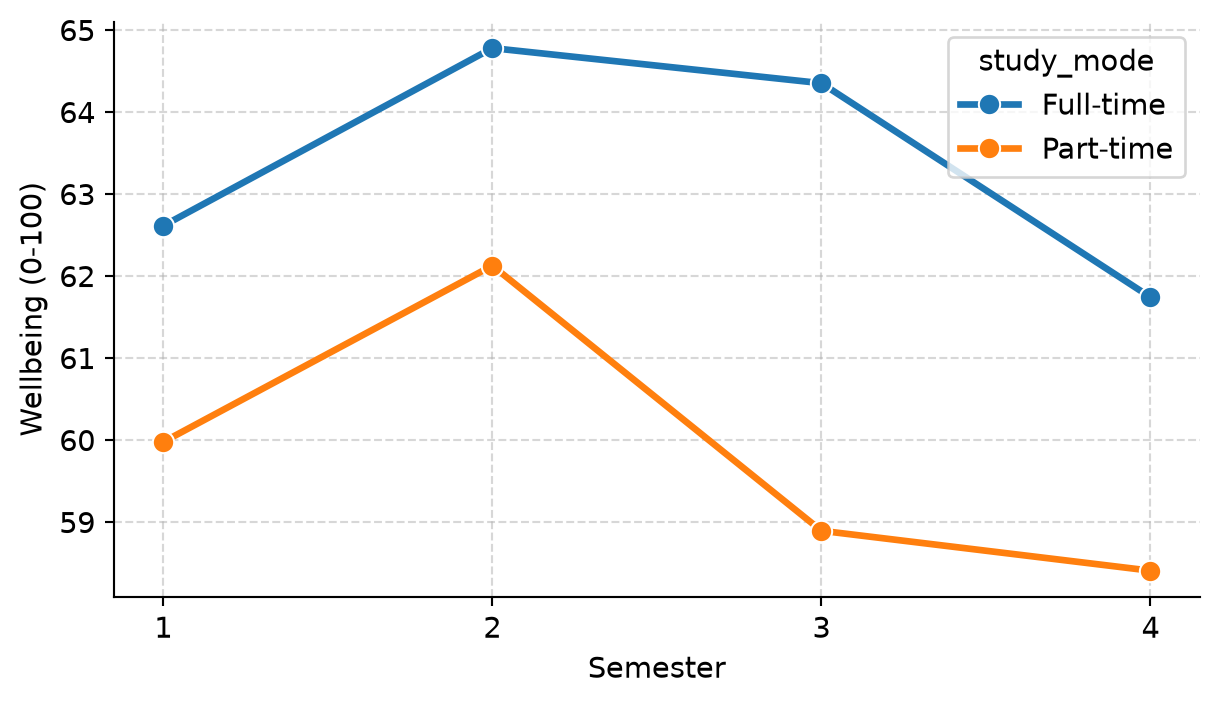
Running shiny run --reload app.py launches the dashboard locally. Figure 17.3 shows the plot generated when Education is selected.
17.6 Open science
Reproducibility within your own computer is the foundation. Open science broadens the horizon: ensuring research is accessible, inspectable, and reusable by the global scientific community.
17.6.2 Protecting participants and anonymisation
Human subject data must never be shared in a form that permits identification. Simply stripping student names and ID numbers is insufficient, because combinations of ordinary demographic variables can uniquely identify individuals:
small_cells = (
    students.groupby(["faculty", "study_mode", "gender", "has_children"], observed=False)
    .size()
    .reset_index(name="n")
    .sort_values("n")
)
small_cells.head(4)| faculty | study_mode | gender | has_children | n | |
|---|---|---|---|---|---|
| 7 | Education | Part-time | Male | Yes | 3 |
| 15 | Health Sciences | Part-time | Male | Yes | 3 |
| 21 | Humanities | Part-time | Female | Yes | 3 |
| 5 | Education | Part-time | Female | Yes | 4 |
In the output above, only 3 students are part-time male students with children in the Faculty of Education. In a small academic department, that combination easily identifies real individuals.
To protect participants before public data sharing:
- Group rare categories (e.g., binning ages or combining sparse faculties).
- Top-code or bottom-code extreme outliers.
- Omit unnecessary demographic identifiers.
- When raw data cannot be published due to privacy or ethics restrictions, generate and share a synthetic dataset with identical statistical distributions, allowing peers to verify code execution without exposing participant records.
17.6.3 Preregistration and the garden of forking paths
Every empirical study involves dozens of defensible analytical decisions: whether to exclude outliers beyond 2 or 3 standard deviations, whether to log-transform a skewed variable, which non-parametric test to substitute, or which covariates to include in regression models.
When these decisions are made after inspecting the data, researchers naturally (and often subconsciously) gravitate toward choices that yield statistically significant results (\(p < 0.05\)). This phenomenon is known as the garden of forking paths (Gelman and Loken 2014).
A Python simulation illustrates the magnitude of this problem. In the simulation below, we generate 60 observations from an exponential distribution with zero real group difference. We then analyze the data five defensible ways and record how often the first analysis, and how often any of the five analyses, produces a false positive (\(p < 0.05\)):
import numpy as np
import pandas as pd
import scipy.stats as stats
import statsmodels.api as sm

def forking_paths():
    group = np.array(["A"] * 30 + ["B"] * 30)
    score = np.random.exponential(scale=10, size=60)
    covariate = np.random.normal(size=60)

    score_a = score[group == "A"]
    score_b = score[group == "B"]

    # 1. Standard t-test
    p_ttest = stats.ttest_ind(score_a, score_b).pvalue

    # 2. Outlier-trimmed t-test (|z| < 2)
    z = np.abs((score - np.mean(score)) / np.std(score, ddof=1))
    p_no_outliers = stats.ttest_ind(
        score[(z < 2) & (group == "A")],
        score[(z < 2) & (group == "B")]
    ).pvalue

    # 3. Log-scale t-test
    p_log = stats.ttest_ind(np.log(score_a), np.log(score_b)).pvalue

    # 4. Rank test (Mann-Whitney U)
    p_rank = stats.mannwhitneyu(score_a, score_b).pvalue

    # 5. Linear model with covariate
    X = sm.add_constant(np.column_stack([(group == "B").astype(int), covariate]))
    p_cov = sm.OLS(score, X).fit().pvalues[1]

    p_vals = [p_ttest, p_no_outliers, p_log, p_rank, p_cov]
    return {
        "first_analysis": p_ttest < 0.05,
        "any_analysis": any(p < 0.05 for p in p_vals)
    }

np.random.seed(17)
sim_results = pd.DataFrame([forking_paths() for _ in range(1000)])
sim_results.mean()
first_analysis 0.054
any_analysis 0.109
dtype: float64The single pre-planned t-test produces a false positive in approximately 5% of runs, exactly as the nominal \(\alpha = 0.05\) level dictates. However, choosing opportunistically among five defensible analyses inflates the false positive rate to over 10%—even though the true effect is exactly zero!
Preregistration solves this dilemma. Researchers register their hypotheses, experimental design, and planned statistical model on an independent, time-stamped registry (such as OSF Registries or AsPredicted) before collecting or inspecting the data. Preregistration clearly separates confirmatory analyses from exploratory findings. In a Registered Report, a journal peer-reviews and accepts the study protocol before data collection commences, ensuring publication regardless of whether the eventual findings are statistically significant.
17.6.4 Citing software
Open-source scientific Python packages are developed by researchers and community volunteers whose academic careers depend on citations. Always cite the specific packages used in your thesis.
Official citation guidelines and BibTeX records are available on package documentation pages (e.g., McKinney, 2010 for pandas; Pedregosa et al., 2011 for scikit-learn; Virtanen et al., 2020 for SciPy; Seabold & Perktold, 2010 for statsmodels).
A methodology section should state:
“Analyses were conducted in Python (v3.13), utilizing pandas (v2.2) for data manipulation, SciPy (v1.14) and statsmodels (v0.14) for statistical modeling, and scikit-learn (v1.6) for machine learning.”
17.7 Keeping a history with git (optional)
As a thesis project evolves, files quickly proliferate: thesis_final.qmd, thesis_final_v2.qmd, thesis_final_supervisor_edits.qmd. Version control replaces file duplication with a clean, linear history of every modification made to the project.
Git is the industry-standard version control system, and GitHub is the premier platform for cloud backup, team collaboration, and scientific dissemination (Bryan 2018).
Key Git concepts:
- Repository: The project directory whose complete history Git tracks.
- Commit: A snapshot of tracked files at a specific moment in time, accompanied by a descriptive message (e.g.,
"Filter duplicate survey responses in ch3"). - Push / Pull: Synchronizing local commits with a remote repository on GitHub.
.gitignore: A text file specifying files Git must ignore (e.g., raw sensitive data, temporary cache directories,.venv/).
Modern code editors (VS Code, Positron, PyCharm) provide intuitive visual Git interfaces with buttons for staging changes, writing commit messages, and pushing to GitHub.
17.8 Common misconceptions
- “Reproducibility is just about sharing a code snippet.” Reproducibility encompasses the full pipeline from raw data to final published estimates, including documentation of every data exclusion, environment dependencies, and random seeds.
- “Copying and pasting a few numbers manually is harmless.” Manual transcriptions are the single most frequent source of discrepancies between analytical code and thesis prose.
- “If every analytical choice is reasonable, the resulting p-value is valid.” Evaluating multiple defensible choices after seeing the data severely inflates false positive rates (the garden of forking paths).
- “Deleting names makes data anonymous.” High-dimensional demographic combinations readily re-identify participants; demographic cell sizes must be scrutinized prior to public release.
17.9 Chapter review
17.9.1 Summary
- Reproducibility is a pillar of scientific integrity. An analysis is reproducible when independent researchers can run the same code on the same data and obtain identical results.
- Quarto documents (
.qmd) integrate narrative Markdown, Python code chunks, dynamic tables, plots, LaTeX equations, and BibTeX citations into a unified, reproducible source that compiles to HTML, Word, PDF, or presentations. - Virtual environments (
venv,uv) andrequirements.txtcapture library dependencies so that environments can be recreated reliably on any machine. - Shiny for Python creates reactive dashboards that empower readers to interactively explore findings without modifying code.
- Open science practices include depositing code and data in DOI-assigning archives (OSF, Zenodo), protecting demographic privacy, preregistering confirmatory analyses, and citing open-source tools.
- Git provides robust version control, recording every revision and preventing accidental data or code loss.
17.9.2 Key terms
Reproducibility, replicability, Quarto, Jupyter engine, YAML header, Markdown, code chunk, inline code, chunk options, cross-reference, BibTeX, CSL style, LaTeX, parameterised reports, virtual environment, requirements.txt, lockfile, Shiny for Python, UI, server, reactivity, reactive calculation, open science, DOI, Zenodo, OSF, anonymisation, small cells, synthetic data, garden of forking paths, preregistration, confirmatory analysis, exploratory analysis, Registered Report, Git, repository, commit, push, pull, GitHub, .gitignore.
17.10 Exercises
The interactive Playground provides browser-based exercises and complete solutions:
- Create a minimal Quarto document (
.qmd) using Python, compute the mean and standard deviation of three numbers, display them with inline code, and render the document to HTML. - Build a parameterised Quarto report that accepts a
facultystring parameter and filters thestudentsdataset to display the count and average wellbeing for that faculty. - Inspect demographic combinations in the
studentsdataset acrossfaculty,study_mode, andgender. Identify any cell with fewer than 5 respondents and propose an aggregation strategy to preserve privacy. - Modify the
forking_paths()simulation to add a sixth analytical path (e.g., a trimmed t-test excluding the 5 highest scores). Observe how the overall false positive rate increases. - Build a Shiny for Python dashboard with a slider that selects the semester range (1 to 4) and displays a line plot of wellbeing over the chosen semesters.
17.11 Further reading
- The official Quarto documentation at quarto.org provides exhaustive guides and examples for Python data science.
- The Shiny for Python guide at shiny.posit.co/py covers reactive UI development and dashboard deployment.
- Wilson et al. (2017), “Good enough practices in scientific computing”, provides practical guidelines for reproducible academic workflows.
- Bryan (2018), “Excuse me, do you have a moment to talk about version control?”, offers a friendly introduction to Git and GitHub for researchers.
References
Bryan, Jennifer. 2018. “Excuse Me, Do You Have a Moment to Talk about Version Control?” The American Statistician 72 (1): 20–27. https://doi.org/10.1080/00031305.2017.1399928.
Gelman, Andrew, and Eric Loken. 2014. “The Statistical Crisis in Science: Data-Dependent Analysis–a ’Garden of Forking Paths’–Explains Why Many Statistically Significant Comparisons Don’t Hold Up.” American Scientist 102 (6): 460–65.
Open Science Collaboration. 2015. “Estimating the Reproducibility of Psychological Science.” Science 349 (6251): aac4716. https://doi.org/10.1126/science.aac4716.
Peng, Roger D. 2011. “Reproducible Research in Computational Science.” Science 334 (6060): 1226–27. https://doi.org/10.1126/science.1213847.
Wilson, Greg, Jennifer Bryan, Karen Cranston, Justin Kitzes, Lex Nederbragt, and Tracy K. Teal. 2017. “Good Enough Practices in Scientific Computing.” PLOS Computational Biology 13 (6): e1005510. https://doi.org/10.1371/journal.pcbi.1005510.