A spreadsheet containing 600 rows of numbers conveys virtually nothing at a glance. A well-designed statistical visualization of that same data reveals in seconds where observations cluster, which values are anomalous, how experimental groups diverge, and how constructs covary. Graphics are not cosmetic embellishments appended to an empirical report at the conclusion; they are primary instruments of scientific discovery. The first task of an investigator encountering new data is to inspect it visually, and many data-entry anomalies and invalid assumptions are detected solely through graphical exploration.
A figure is also a scientific argument. Visual design choices—the selected geometry, axis scaling, aspect ratio, color palette, and data aggregation—determine what a reader notices first and what conclusions they infer. Thoughtful choices clarify subtle empirical patterns; careless choices distort differences, exaggerating trivial variations or masking substantial heterogeneity. This chapter begins with graphical perception theory: what scientific figures are for, how human vision decodes visual encodings, and what constitutes an honest, truthful display. It then introduces Seaborn and Matplotlib, Python’s standard libraries for statistical visualization, applying them to explore graduate student life (RQ1).
TipBy the end of this chapter you will be able to
Explain why visualization is indispensable alongside summary statistics, and contrast exploratory vs. explanatory graphics.
Apply graphical perception theory, recognizing why position and length are decoded more accurately than angles, areas, or color saturation.
Select the appropriate visualization based on the research question and variable measurement levels.
Construct statistical graphics using Seaborn and Matplotlib (histograms, KDE density curves, bar charts, box plots, scatter plots, and line charts).
Build small multiples (facets) and correlation heatmaps to investigate multi-variable interactions.
Detect and rectify misleading visual representations (such as truncated bar-chart baselines and visual clutter).
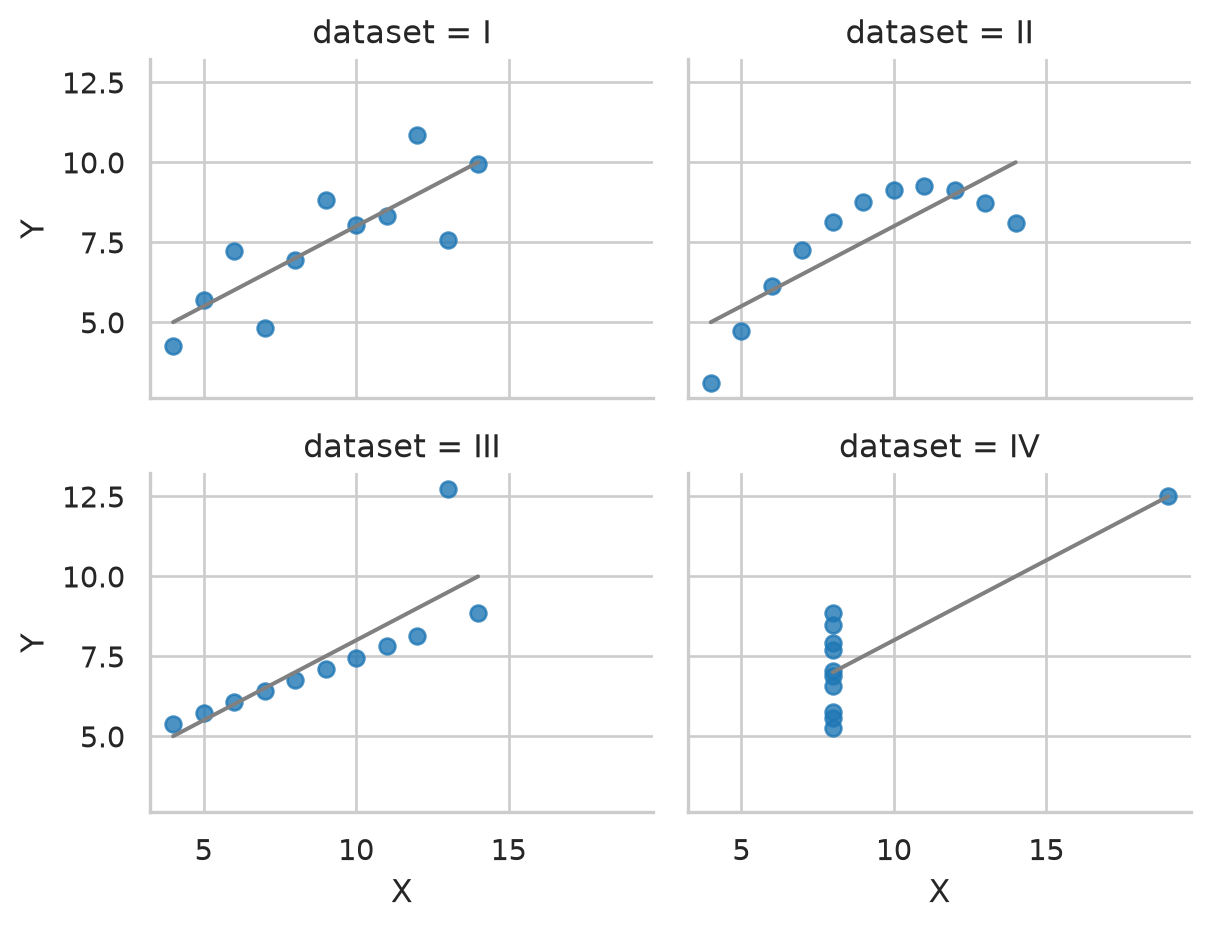
Summary statistics compress empirical distributions into a handful of numerical parameters (means, standard deviations, correlations). That compression can conceal radically different data distributions. The statistician Francis Anscombe demonstrated this vulnerability with four synthetic datasets constructed in 1973 (Anscombe 1973), bundled in Seaborn as anscombe:
Across all four datasets, the summary statistics are practically identical: \(\bar{x} = 9.0\), \(s_x = 3.32\), \(\bar{y} = 7.50\), and \(s_y = 2.03\). Bivariate regression yields identical linear fits (\(y = 3.0 + 0.5x\)) with identical correlation coefficients (\(r = 0.82\)). Judged solely by numerical summaries, the four datasets appear indistinguishable.
Yet Figure 4.1 demonstrates that their underlying relationships are entirely dissimilar.
Figure 4.1: Anscombe’s quartet: identical means, standard deviations, and regression lines, but four completely different empirical patterns.
Only Dataset I represents the bivariate linear association assumed by Pearson’s \(r\). Dataset II is a non-linear quadratic curve, Dataset III is a perfect linear relationship corrupted by one outlier, and Dataset IV is an unassociated vertical cluster whose correlation is produced entirely by a single high-leverage point. An analyst relying strictly on summary statistics would draw identical—and incorrect—conclusions across all four. Visual inspection prior to modeling is not optional; it is a prerequisite for valid inference.
4.1.1 Exploratory versus explanatory graphs
Scientific graphics serve two distinct functions:
Exploratory graphs: Created rapidly by the researcher to interrogate the data—checking skewness, detecting outliers, and screening for interaction effects. They require minimal aesthetic polish.
Explanatory graphs: Curated for external readers and thesis examiners to communicate a validated empirical finding. They require meticulous care: informative axis labels, accessible color palettes, annotations, and the elimination of extraneous chartjunk.
4.2 Graphical perception: How vision decodes data
Graphs function by translating numbers into visual encodings: position, length, angle, area, slope, and color. Human perception does not decode these attributes with equal precision. In pioneering experiments, William Cleveland and Robert McGill (Cleveland and McGill 1984) evaluated how accurately observers judge quantitative differences across visual channels, establishing an empirical hierarchy:
Position along a common aligned scale (most accurate)
Length
Slope and Angle
Area
Color saturation and hue (least accurate)
Effective scientific graphics map primary research comparisons to position or length, reserving color and area for secondary grouping.
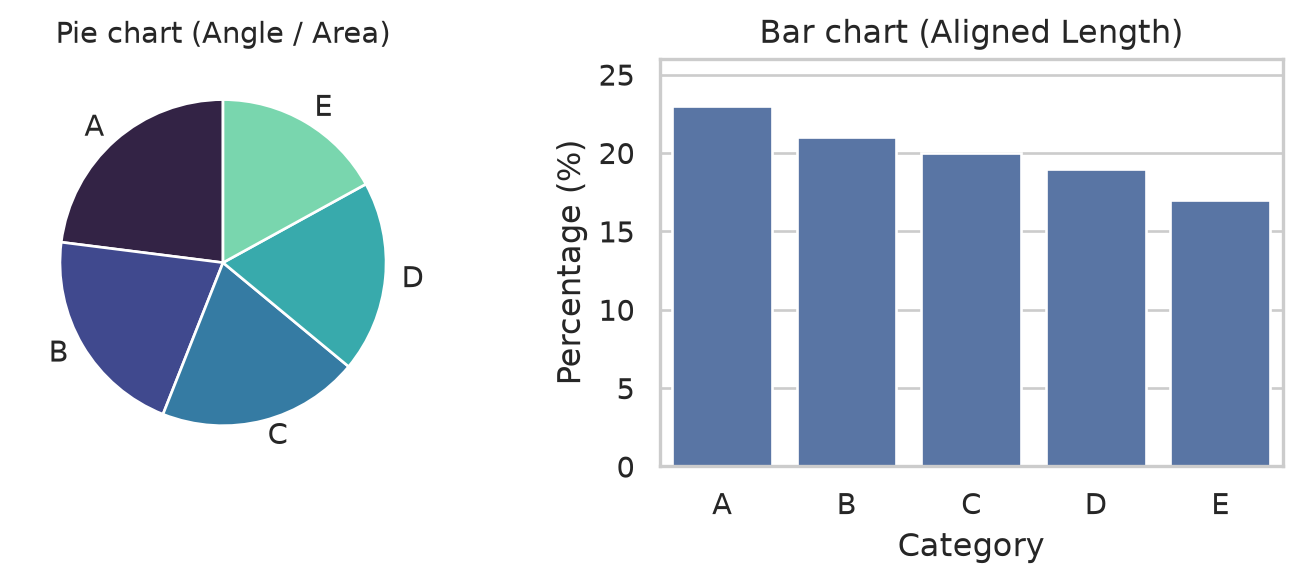
The perceptual difference is readily apparent when comparing identical proportions displayed as a pie chart versus a bar chart (Figure 4.2).
Figure 4.2: The same five percentages displayed as a pie chart (angle and area) versus a bar chart (length along an aligned scale). Identifying the ranking is immediate in the bar chart.
In the pie chart, the five slices appear virtually identical; determining the rank order requires scrutinizing legends and mentally comparing angles. In the bar chart, the monotonic decline from category A (23%) to E (17%) is evident immediately because comparisons occur along a common baseline. Consequently, scientific reporting favors bar charts and dot plots over pie charts.
4.3 Selecting the right visualization
The choice of graph is governed by the research question and the levels of measurement of the variables under study (Table 4.1).
Table 4.1: Selecting the appropriate visualization based on analytical questions and variable types
Analytical Question
Variable Types
Recommended Graph
Python Seaborn / Matplotlib Function
Distribution of a single continuous metric
One numeric
Histogram / KDE plot
sns.histplot(), sns.kdeplot()
Frequency counts of categorical groups
One categorical
Bar chart
sns.countplot(), sns.barplot()
Comparison of continuous metric across groups
One numeric by categorical
Box plot / Strip plot
sns.boxplot(), sns.stripplot()
Association between two continuous variables
Two numeric
Scatter plot with trend line
sns.scatterplot(), sns.regplot()
Trajectory of a metric over time
Numeric over time
Longitudinal line plot
sns.lineplot()
Multilateral correlation structure
Several numeric
Correlation heatmap
sns.heatmap()
4.4 Core statistical visualizations with Seaborn
To explore Elaf’s wellbeing cohort, we merge Semester 1 measurements with baseline student background demographics:
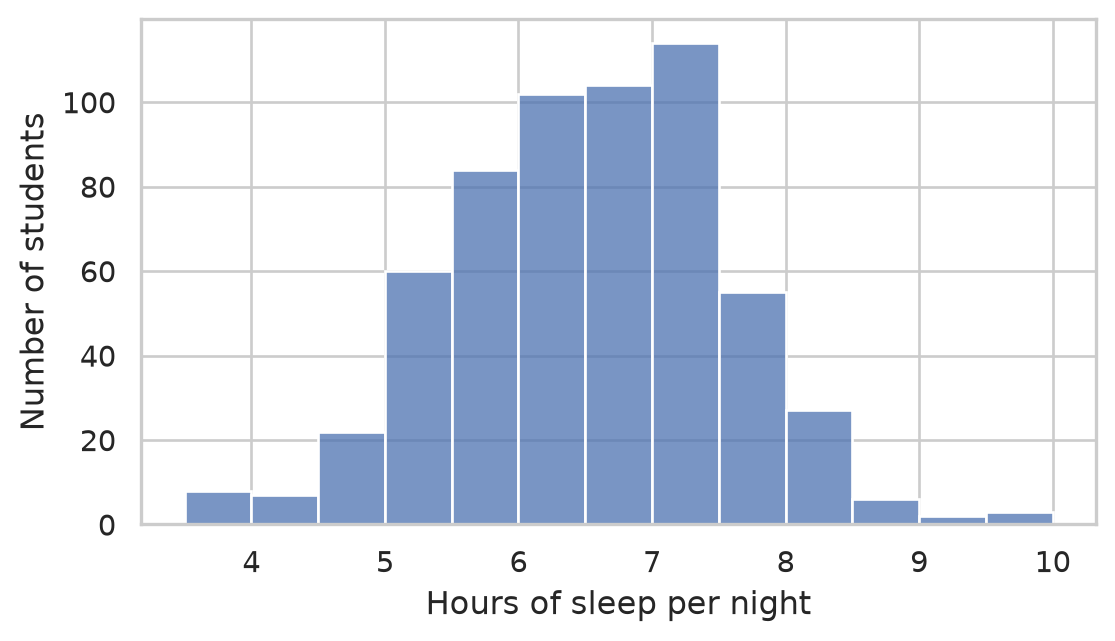
The initial question concerning any continuous variable addresses its empirical distribution: central tendency, spread, skewness, and the presence of extreme outliers. A histogram partitions the continuous range into discrete bins, displaying the count of observations falling within each interval:
fig, ax = plt.subplots(figsize=(6, 3.5))sns.histplot( data=first_sem, x="sleep_hours", binwidth=0.5, color="#4c72b0", edgecolor="white", ax=ax)ax.set(xlabel="Hours of sleep per night", ylabel="Number of students")plt.tight_layout()plt.show()
Figure 4.3: Distribution of sleep hours per night in Semester 1.
Figure 4.3 displays a roughly symmetrical, unimodal distribution centered near 6.5 hours. Exactly r round(100 * share_short, 1)% of graduate students sleep less than the clinically recommended 7 hours during their first semester.
4.4.2 Bar charts for categorical counts
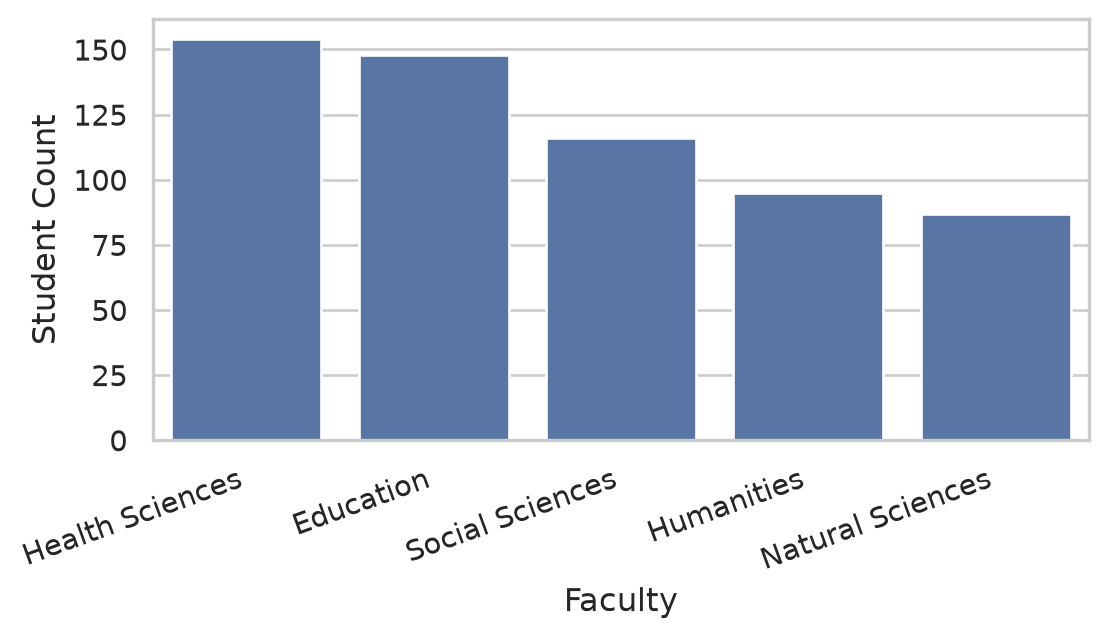
A bar chart plots frequency distributions across categorical factor levels:
Figure 4.4: Enrollment frequency across academic faculties.
Because bar lengths represent quantities proportionally, the numerical baseline must always start at zero.
4.4.3 Box plots for group comparisons
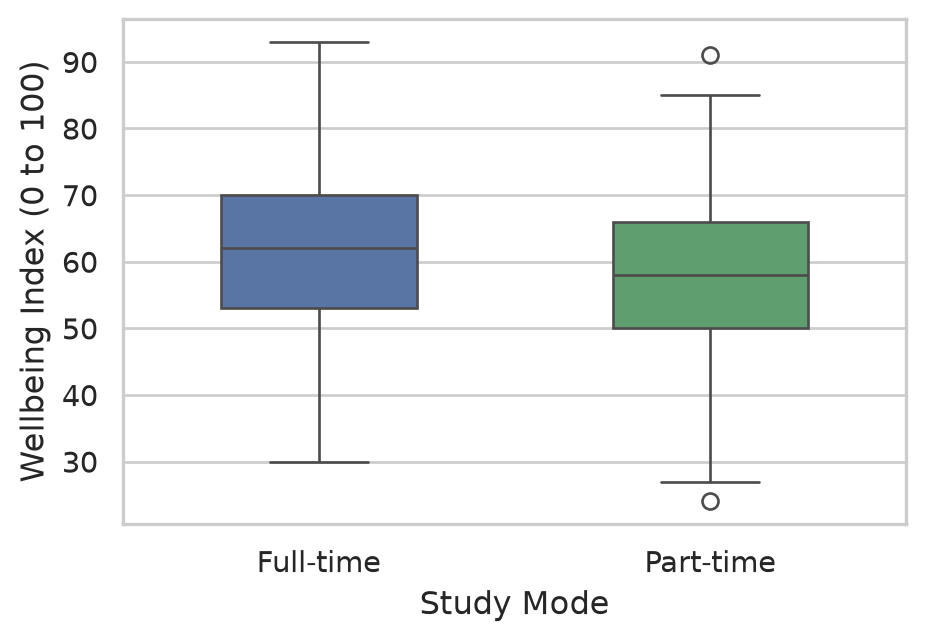
A box plot summarizes five key distribution parameters: the median (center line), interquartile range (IQR, box edges covering the 25th to 75th percentiles), whiskers (extending to \(1.5 \times \text{IQR}\)), and individual points for potential outliers. It is the gold standard for comparing continuous metrics across qualitative groups:
fig, ax = plt.subplots(figsize=(5, 3.5))sns.boxplot( data=first_sem, x="study_mode", y="wellbeing", palette=["#4c72b0", "#55a868"], ax=ax, width=0.5)ax.set(xlabel="Study Mode", ylabel="Wellbeing Index (0 to 100)")plt.tight_layout()plt.show()
Figure 4.5: Wellbeing in Semester 1 by study mode (Full-time vs. Part-time).
Part-time students report a slightly lower median wellbeing score than full-time students, but the distributions overlap substantially. In ?@sec-ch08, we use inferential ANOVA to test whether this group discrepancy is statistically significant.
4.4.4 Scatter plots with regression trend lines
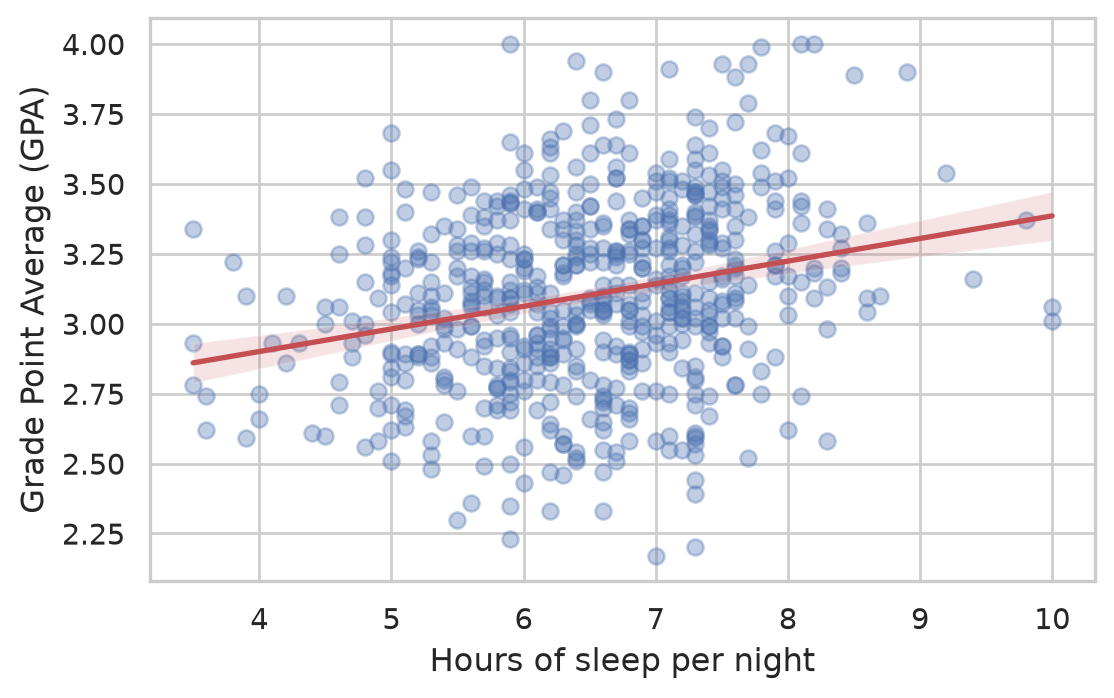
The relationship between two continuous variables—such as sleep hours and academic performance—is evaluated via a scatter plot. When plotting 600 participants, individual markers often overlap (overplotting). We mitigate this by setting transparency (alpha=0.4) and overlaying a linear regression trend line with sns.regplot():
fig, ax = plt.subplots(figsize=(6, 3.8))sns.regplot( data=first_sem, x="sleep_hours", y="gpa", scatter_kws={"alpha": 0.35, "color": "#4c72b0"}, line_kws={"color": "#c44e52", "linewidth": 2}, ax=ax)ax.set(xlabel="Hours of sleep per night", ylabel="Grade Point Average (GPA)")plt.tight_layout()plt.show()
Figure 4.6: Association between sleep hours and GPA in Semester 1, with ordinary least squares trend line.
The regression line slopes upward: students sleeping more hours tend to achieve modestly higher GPAs. However, observations scatter broadly around the line (\(r \approx 0.30\)), indicating that sleep explains only a fraction of total academic variance.
4.4.5 Longitudinal trajectory line plots
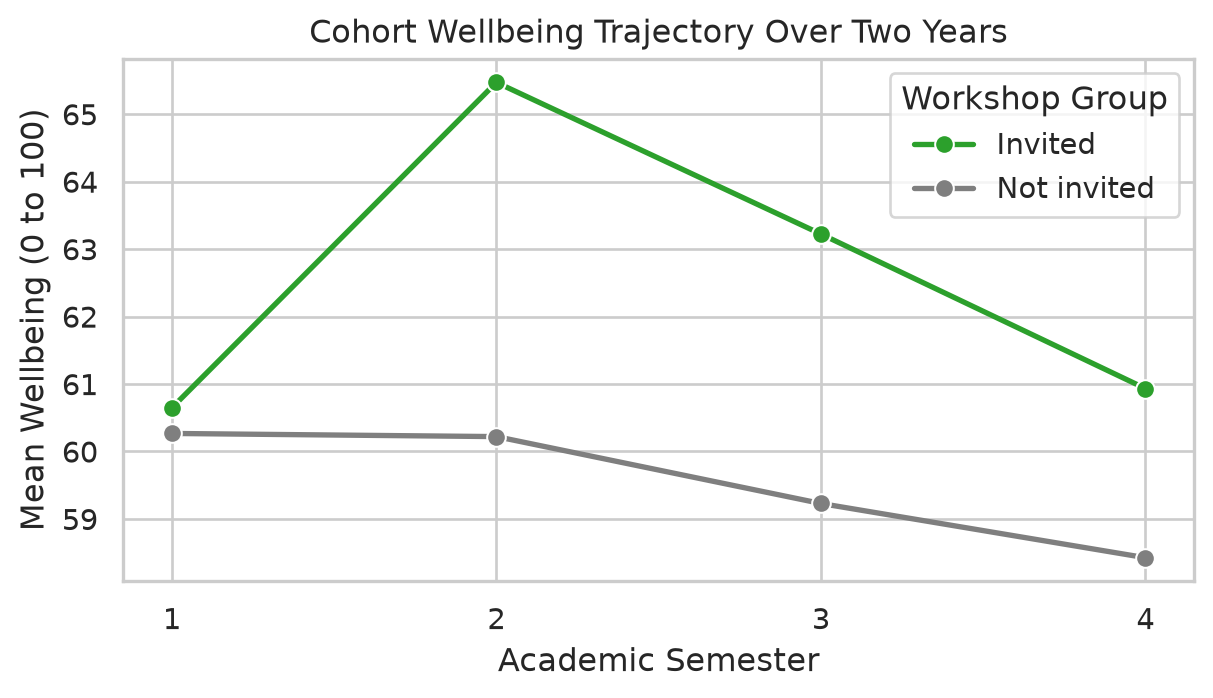
Elaf’s research design tracked cohorts across four consecutive semesters. A line plot illustrates how group means evolve over time:
Figure 4.7: Longitudinal wellbeing trajectories across four semesters by workshop participation.
Figure 4.7 captures the core narrative of Elaf’s intervention study: groups start at identical baselines in Semester 1, invited students pull ahead following the intervention in Semester 2, and the gap stabilizes over subsequent terms.
4.5 Preparing publication-quality figures
Exploratory graphics suffice during initial data exploration, but explanatory figures destined for a thesis or journal article require publication-standard polish.
4.5.1 Annotations and reference lines
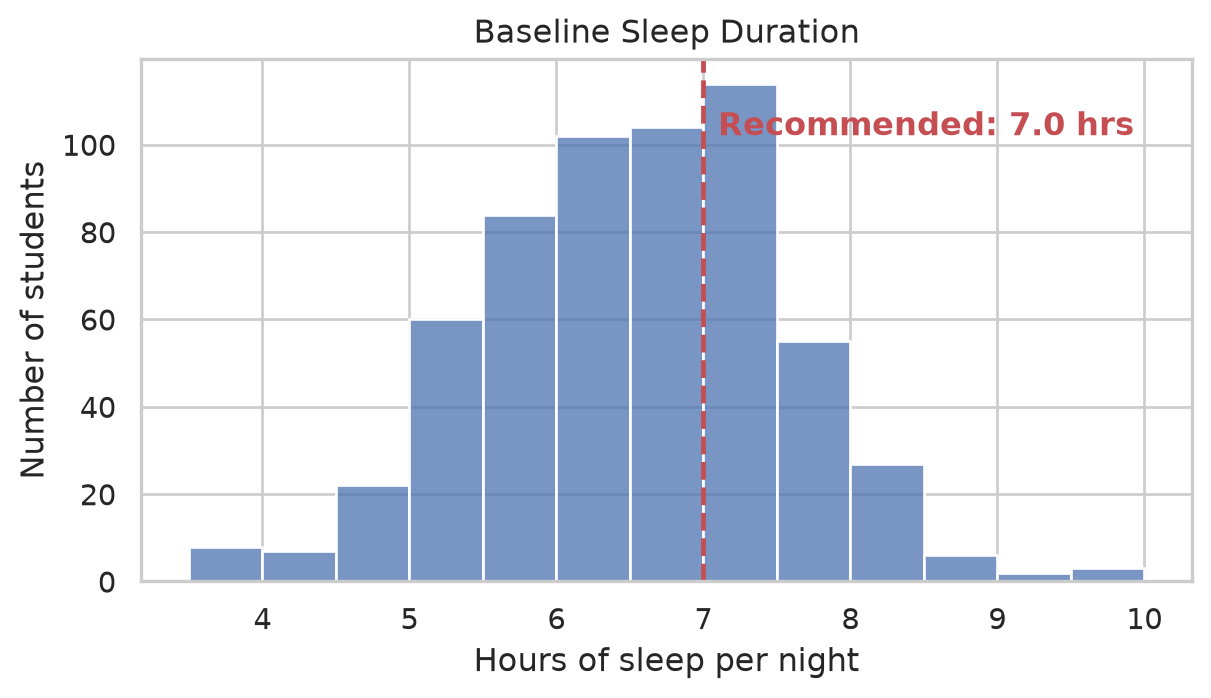
Adding explicit reference lines and annotations directs reader attention to clinically meaningful thresholds:
Figure 4.8: Distribution of sleep hours with clinical 7-hour reference benchmark.
4.5.2 Color accessibility
Approximately 8% of men and 0.5% of women experience congenital color vision deficiency (red-green color blindness). A scientific graphic must remain interpretable to all readers and reproduce legibly when printed in black and white:
Avoid rainbow (jet) palettes, which introduce artificial visual boundaries.
Utilize perceptually uniform, colorblind-safe palettes such as viridis, plasma, cividis, or colorblind.
Combine color with redundant visual encodings (distinct marker shapes, line styles, or direct text labels).
4.6 Honest graphs and visual ethics
A visualization can be mathematically accurate while remaining visually misleading. Distortion frequently stems from unexamined software defaults:
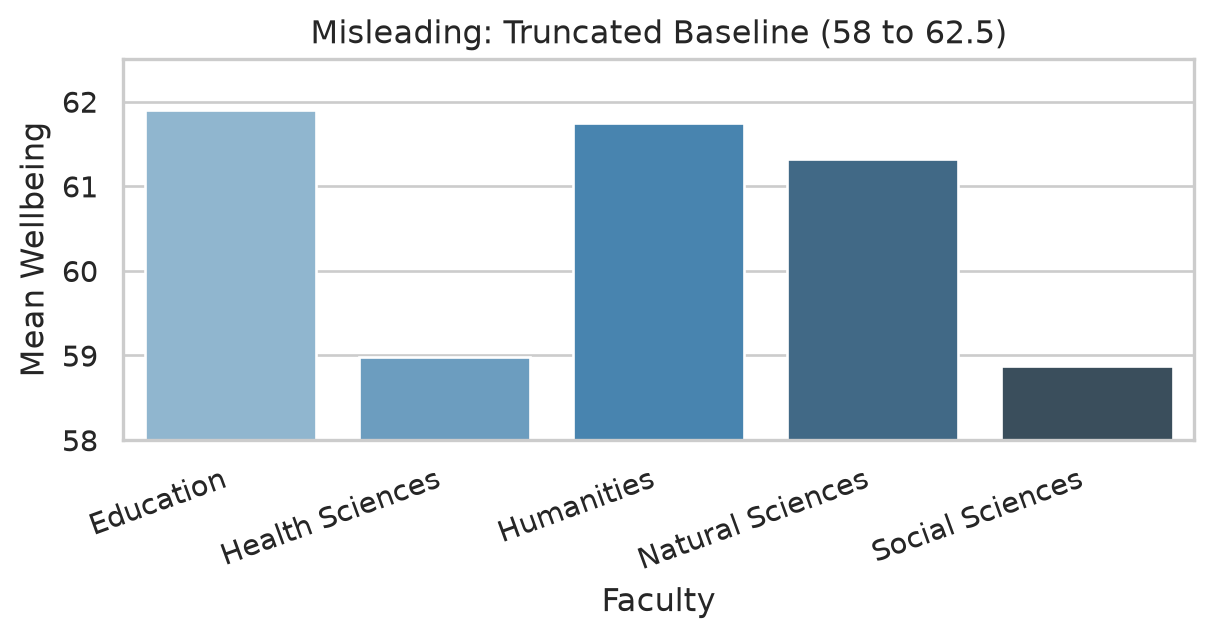
Truncated vertical baselines on bar charts: Because a bar encodes magnitude through length, truncating the baseline exaggerates differences.
Chartjunk and 3D effects: Pseudo-3D perspectives distort angular perception and distance.
Hiding underlying distribution variance: Reporting only summary bar heights masks critical within-group heterogeneity.
4.6.1 Redesigning a misleading figure
Suppose an investigator evaluates whether mean wellbeing differs across faculties. A careless chart with an artificially truncated axis appears in Figure 4.9:
Figure 4.9: A misleading graphic: the vertical axis is truncated at 58, exaggerating modest differences and concealing student-level variance.
In Figure 4.9, the Education faculty bar appears triple the height of Social Sciences. Yet the actual group means differ by barely 2.5 points on a 100-point scale. Furthermore, the bar chart completely conceals individual variation.
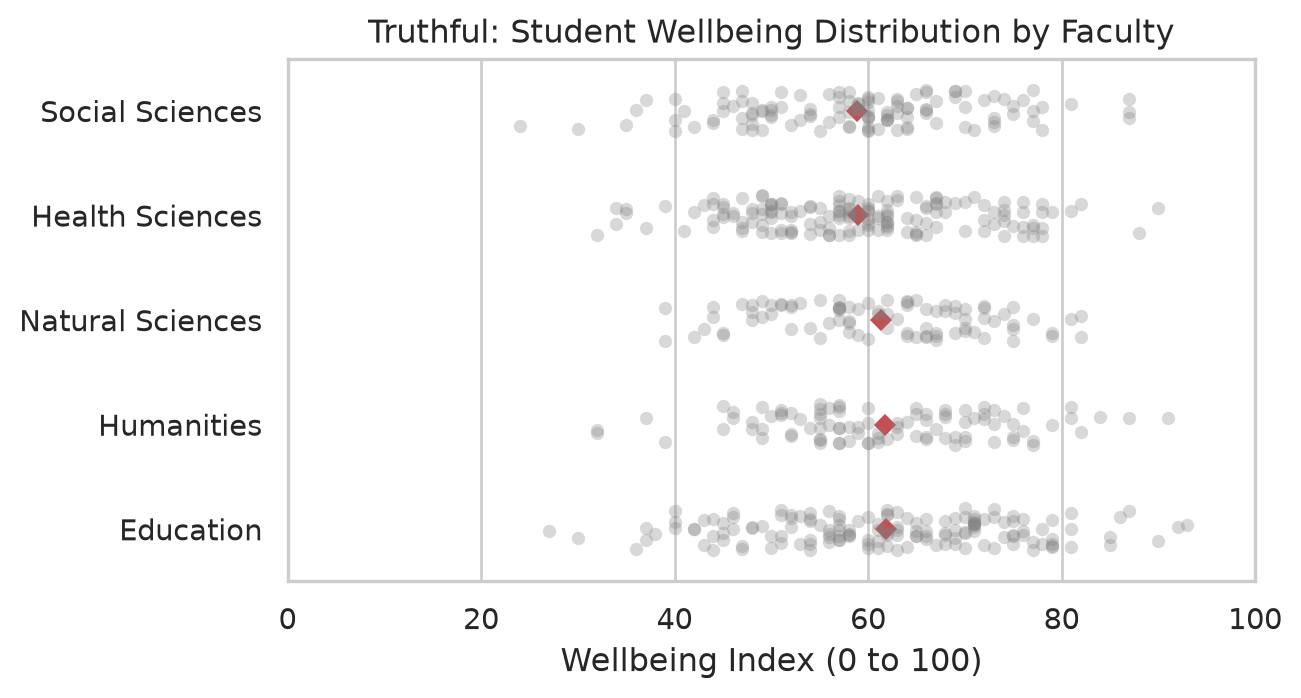
In Figure 4.10, the display is redesigned into an honest, informative jittered strip plot with overlaid group means:
order = faculty_means.sort_values("wellbeing")["faculty"]fig, ax = plt.subplots(figsize=(7, 3.8))# Jittered individual student scoressns.stripplot( data=first_sem, y="faculty", x="wellbeing", order=order, color="grey", alpha=0.3, jitter=0.2, size=5, ax=ax)# Overlay group means as prominent diamondssns.pointplot( data=first_sem, y="faculty", x="wellbeing", order=order, color="#c44e52", markers="D", scale=0.8, errorbar=None, join=False, ax=ax)ax.set( title="Truthful: Student Wellbeing Distribution by Faculty", xlabel="Wellbeing Index (0 to 100)", ylabel=None, xlim=(0, 100) # Full theoretical scale!)plt.tight_layout()plt.show()
Figure 4.10: The redesigned truthful display: individual observations shown as faint points, with faculty means marked in red. Within-faculty spread vastly exceeds between-faculty differences.
Figure 4.10 communicates the true scientific story: individual student scores vary widely between 25 and 95 across all departments, and average differences between faculties are trivial by comparison.
4.7 Advanced scientific visualizations
4.7.1 Small multiples (Faceting)
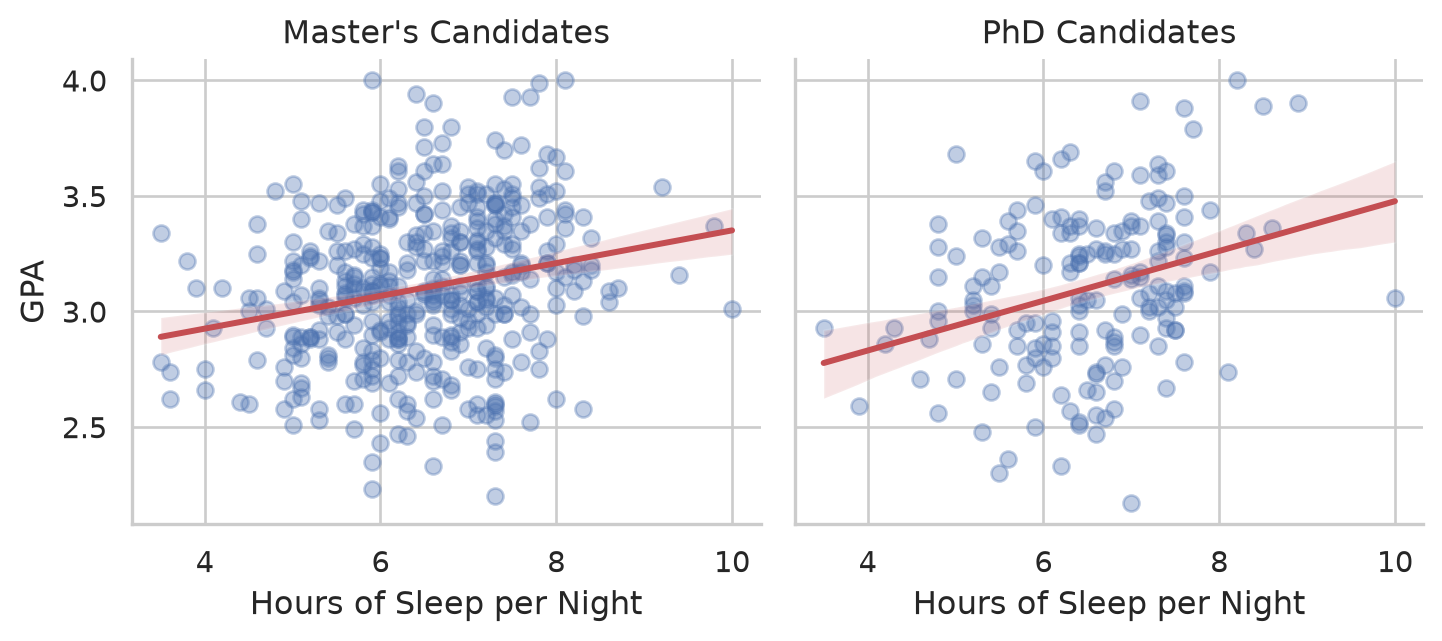
Small multiples partition a complex visualization into separate subpanels sharing identical axes, enabling direct visual comparisons:
g = sns.lmplot( data=first_sem, x="sleep_hours", y="gpa", col="programme", scatter_kws={"alpha": 0.35, "color": "#4c72b0"}, line_kws={"color": "#c44e52"}, height=3.5, aspect=1.1)g.set_axis_labels("Hours of Sleep per Night", "GPA")g.set_titles(col_template="{col_name} Candidates")plt.tight_layout()plt.show()
Figure 4.11: Association between sleep hours and GPA, faceted by degree programme.
The regression slope between sleep and academic performance is virtually identical across both Master’s and PhD cohorts.
4.7.2 Kernel density estimation (KDE) plots
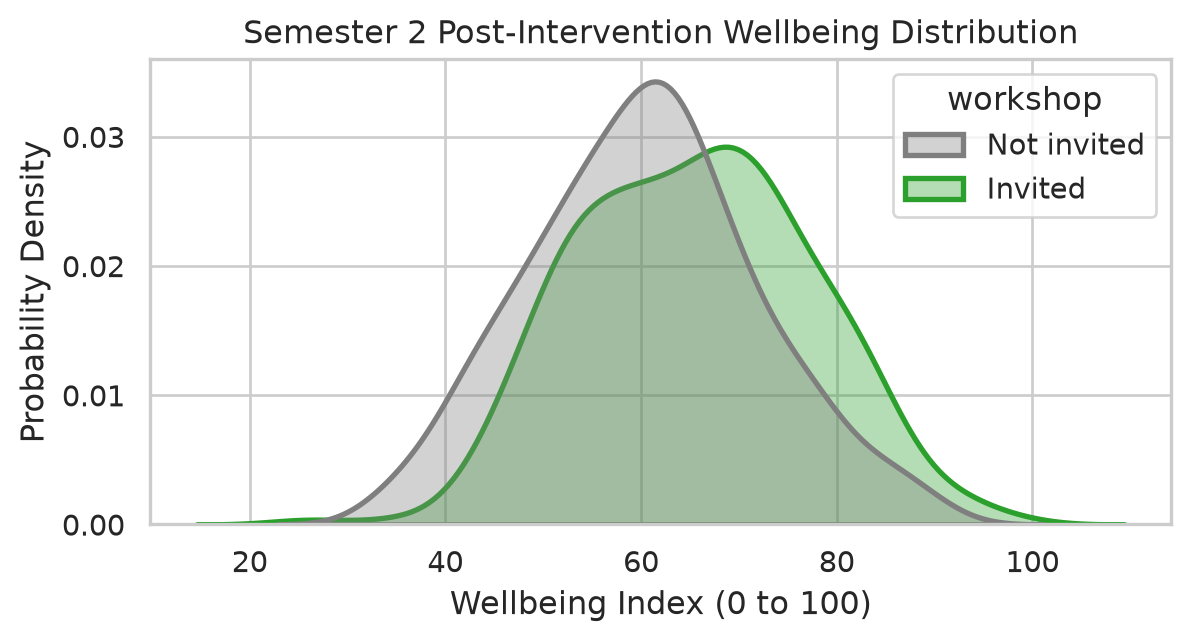
A density plot provides a smoothed continuous estimate of the probability density function, facilitating clean comparisons of overlapping distributions:
Figure 4.12: Comparative probability density of Semester 2 wellbeing by workshop group.
Notice that the entire distribution for invited students is shifted rightward, demonstrating a cohort-wide positive effect rather than an isolated outlier reaction.
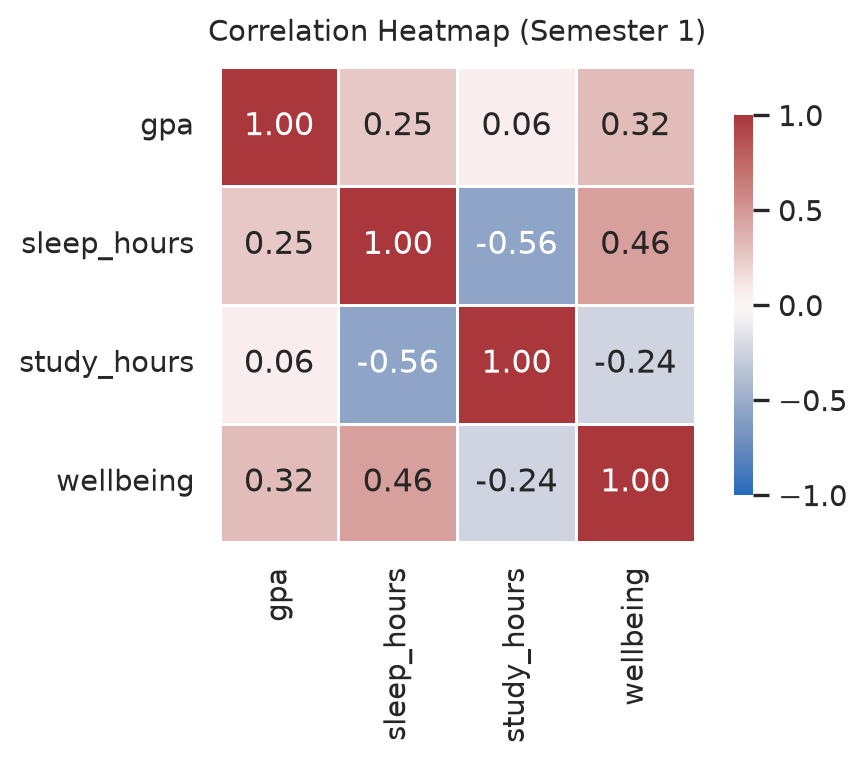
4.7.3 Correlation heatmaps
When examining relationships among numerous continuous constructs, a correlation heatmap visualizes the bivariate correlation matrix via a diverging color gradient:
Figure 4.13: Bivariate correlation matrix across Semester 1 quantitative metrics.
The diverging vlag palette centers white at zero correlation, mapping negative associations to blue and positive associations to red. Values printed within each cell ensure readers are not forced to decode coefficients solely through color saturation.
4.8 Exporting publication-ready figures
Scientific figures must be exported at explicit target physical dimensions and print resolutions:
# Save as 300 DPI PNG raster image (suitable for Word documents and presentations):fig.savefig("figures/wellbeing_trajectory.png", dpi=300, bbox_inches="tight")# Save as vector graphic (ideal for LaTeX and journal publication):fig.savefig("figures/wellbeing_trajectory.pdf", bbox_inches="tight")
Setting bbox_inches="tight" prevents axis labels from being clipped. Standard journal column widths typically measure 8.5 cm (single column) or 17.5 cm (full width). Defining figure sizes in code preserves font proportions when rendered on the printed page.
4.9 Chapter review
4.9.1 Summary
Summary statistics can mask fundamentally divergent distributions (Anscombe’s quartet); visualizing data prior to modeling is essential.
Graphical perception theory demonstrates that position and length are decoded with greatest precision; key scientific comparisons must be mapped to aligned coordinates.
Continuous distributions are inspected using histograms and KDE density plots; group comparisons rely on box plots and strip plots; bivariate relationships are evaluated via scatter plots and regression trend lines.
Tidy longitudinal trajectories are plotted using sns.lineplot(), small multiples using sns.lmplot(col=...), and correlation matrices using sns.heatmap().
Ethical visual design requires zero-aligned baselines for bar charts, colorblind-accessible palettes (viridis, vlag), and transparent representation of within-group variance.
Publication-quality figures are saved using fig.savefig() at 300+ DPI or vector formats (.pdf, .svg).
4.9.2 Key terms
Anscombe’s quartet, exploratory vs. explanatory graphics, graphical perception, aligned scale, histogram, KDE density plot, box plot, strip plot, overplotting, regression trend line, longitudinal line plot, small multiples, facet, correlation heatmap, color accessibility, chartjunk, DPI, vector graphics.
4.10 Exercises
Work through these exercises in your browser using the Chapter 4 Playground or download the starter project for VS Code.
Using first_sem, generate a histogram of study_hours. Experiment with binwidths of 2, 5, and 10 hours, and evaluate which binning best reveals distribution shape.
Construct a bar chart showing student counts across employment categories, ordered from "None" to "Full-time job", using a colorblind-safe single color.
Draw a scatter plot of caffeine consumption (caffeine_mg) against sleep hours (sleep_hours) in Semester 1 with an overlaid linear regression line, and describe the observed association.
Save any figure created in this chapter to figures/exercise_plot.png at 300 DPI with tight bounding boxes.
Redesign the faculty wellbeing bar chart into a horizontal strip plot showing both individual scores and group medians. Explain why this display is scientifically superior.
4.11 Further reading
Fundamentals of Data Visualization by Claus O. Wilke (Wilke 2019): an exceptional, language-agnostic text on the principles of honest, effective visual communication.
Cleveland, William S., and Robert McGill. 1984. “Graphical Perception: Theory, Experimentation, and Application to the Development of Graphical Methods.”Journal of the American Statistical Association 79 (387): 531–54. https://doi.org/10.1080/01621459.1984.10478080.
Wilke, Claus O. 2019. Fundamentals of Data Visualization: A Primer on Making Informative and Compelling Figures. O’Reilly Media. https://clauswilke.com/dataviz/.