flowchart TB
  A[Research question] --> B[Import]
  B --> C[Clean]
  C --> D[Explore:<br/>describe and visualise]
  D --> E[Test or predict]
  E --> F[Report]
  E -. surprising result .-> D
6 Descriptive Statistics and Exploratory Data Analysis
Before a study can test anything, it has to say what it found in the plainest sense: who took part, what a typical value of each variable looks like, how much the participants differ, and whether anything in the data is unusual or missing. These are the questions of descriptive statistics, the numbers that summarise what data looks like. They are the first results in almost every thesis, and they are not a formality. The shape of a variable decides which later tests are appropriate, an unusual value can dominate an analysis, and missing data can quietly change who the results are about.
This chapter develops the ideas behind the main descriptive statistics: what “typical” means, what spread measures, why the shape of a distribution matters, how to think about unusual and missing values, and how two variables can be described together. It answers the study’s first research question, what graduate student life looks like (RQ1), with numbers, and checks the data for the problems that could mislead every later analysis. In the story, the data is now clean and has been graphed; Elaf is eager to test her hypotheses, and her supervisor asks her to describe the sample first.
TipBy the end of this chapter you will be able to
- Explain the place of exploratory analysis in the research workflow.
- Choose a summary that suits the level of measurement and the shape of a variable.
- Summarise the centre and spread of a variable in Python, and explain what the standard deviation measures (including the difference between Pandas’ and NumPy’s degrees of freedom).
- Describe the shape of a distribution using skewness, and check it against the normal distribution with z-scores and Q-Q plots.
- Find unusual values using Tukey’s box plot rule and z-score fences, and decide how to handle them ethically.
- Describe how much data is missing, why it is missing (MCAR, MAR, MNAR), and diagnose longitudinal attrition.
- Measure and interpret correlations using Pandas and Seaborn, and explain why correlation is not causation.
- Present a publication-ready description of your sample in a thesis, with every number accompanied by its spread and sample size.
6.1 The place of exploration
Chapter 5 distinguished three aims of data analysis: describing, explaining, and predicting. They correspond to three kinds of analysis. Exploratory analysis gets to know the data through summaries, graphs, unusual values, and missing values; it is open-ended, it proves nothing, but it often suggests questions worth testing, and this chapter is exploratory. Inferential analysis uses a sample to draw conclusions about a wider population and asks whether a result could be due to chance, such as whether the workshop improves wellbeing for graduate students in general, not just for these 600; Chapters 7 to 10 are inferential. Predictive analysis builds models that make accurate predictions for new cases, such as which students are likely to consider dropping out next year; Part 3 is predictive.
The three fit into one workflow, shown in Figure 6.1. Exploration comes first, and the researcher returns to it whenever a later result is surprising.
6.2 The centre of a distribution
The first thing to know about any variable is its typical value. Three measures describe it. The mean is the arithmetic average: add up the values and divide by how many there are. In mathematical notation, for values \(x_1, x_2, \ldots, x_n\):
\[ \bar{x} = \frac{1}{n} \sum_{i=1}^{n} x_i \]
The median is the middle value when the values are sorted: half the values are below it and half above. The mode is the most common value, which is mainly useful for categories.
The mean and median can tell very different stories. Here is the daily caffeine intake, in milligrams, of five students represented as a Pandas Series:
import pandas as pd

caffeine = pd.Series([0, 120, 150, 180, 900])
print("Mean:  ", caffeine.mean())
print("Median:", caffeine.median())
Mean: 270.0
Median: 150.0One student who consumes 900 mg a day pulls the mean up to 270 mg, higher than four of the five students. The median, 150 mg, stays with the typical student. The mean is sensitive to extreme values; the median is robust (resistant to outliers).
The same two measures for the study data use each student’s first-semester record, together with their background information:
from data2thesis import students, semesters

# Merge first semester records with student demographics
first_sem = (
    semesters.query("semester == 1")
    .merge(students, on="student_id")
)

# Summarise centre for sleep and caffeine
centre_summary = first_sem[["sleep_hours", "caffeine_mg"]].agg(["mean", "median"]).round(1)
centre_summary| sleep_hours | caffeine_mg | |
|---|---|---|
| mean | 6.5 | 189.4 |
| median | 6.5 | 160.0 |
For sleep, the mean and median are almost identical (around 6.4 hours). For caffeine, the mean (152.8 mg) is well above the median (128.5 mg), just as in the five-student example: a minority of heavy caffeine users pulls the mean up. Figure 6.2 shows why.
fig, ax = plt.subplots(figsize=(6.5, 3.6))

mean_val = first_sem["caffeine_mg"].mean()
median_val = first_sem["caffeine_mg"].median()

sns.histplot(data=first_sem, x="caffeine_mg", binwidth=50, color="#b0bec5", edgecolor="white", ax=ax)
ax.axvline(mean_val, color="#1f77b4", linewidth=2, label=f"Mean: {mean_val:.1f} mg")
ax.axvline(median_val, color="#d62728", linewidth=2, linestyle="--", label=f"Median: {median_val:.1f} mg")

ax.set_xlabel("Caffeine per day (mg)")
ax.set_ylabel("Number of students")
ax.legend(frameon=True)
sns.despine(ax=ax)
plt.tight_layout()
plt.show()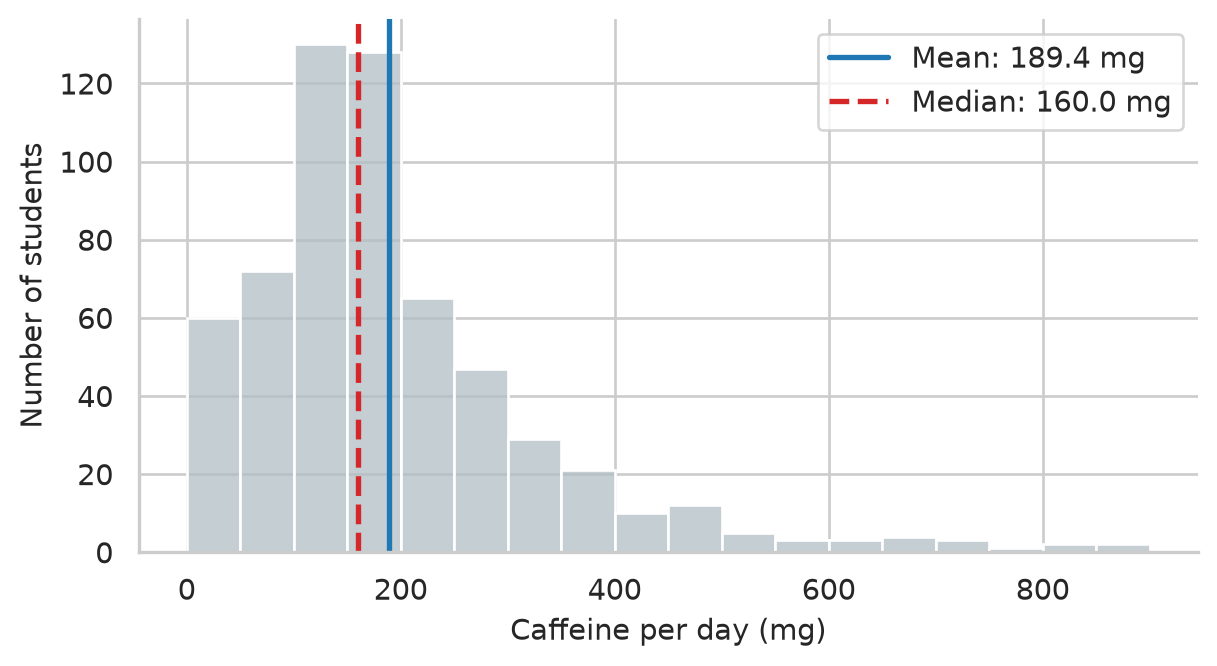
For categorical variables, the mode is simply the most common category. In Pandas, .value_counts() displays the counts sorted in descending order, with the mode at the very top:
students["faculty"].value_counts()faculty
Health Sciences 154
Education 148
Social Sciences 116
Humanities 95
Natural Sciences 87
Name: count, dtype: int646.2.1 Choosing a summary
Which summary is meaningful depends first on the level of measurement of the variable (Chapter 5), and then on its shape. An “average” faculty does not exist, so a nominal variable is described by counts and percentages. An ordinal variable, such as the five answers to the question about money worries, has a meaningful middle but unequal steps, so the median and percentages suit it better than the mean. Numeric variables can be described by the mean, but only when they are roughly symmetrical and without extreme values; otherwise the median describes the typical case more faithfully. Table 6.1 brings these rules together.
| Variable | Centre | Spread | Examples in the study |
|---|---|---|---|
| Nominal | Mode; percentage in each category | None | Faculty, gender, study mode |
| Ordinal | Median; percentage in each category | Interquartile range (IQR) | Financial worry, Likert survey items |
| Numeric, roughly symmetrical | Mean | Standard deviation (SD) | Sleep hours, wellbeing score |
| Numeric, skewed or with extreme values | Median | Interquartile range (IQR) | Caffeine intake, student age |
6.3 The spread of a distribution
Two groups can have the same average and still be very different. The sleep of two small groups of students shows how:
group_a = pd.Series([6.0, 6.5, 6.5, 7.0, 6.5])
group_b = pd.Series([4.0, 8.5, 5.0, 9.0, 6.0])

print("Group A mean:", group_a.mean())
print("Group B mean:", group_b.mean())
Group A mean: 6.5
Group B mean: 6.5Both average 6.5 hours, but in group A everyone sleeps about the same, while group B ranges from 4 to 9 hours. Measures of spread capture this difference, and a mean reported without one hides half of the story.
The range is the difference between the largest and smallest values. It is simple, but it depends only on the two most extreme values:
range_b = group_b.max() - group_b.min()
print("Group B range:", range_b)
Group B range: 5.06.3.1 The standard deviation
The standard deviation (SD) measures how far values typically lie from the mean. The idea is easiest to see in a picture. Figure 6.3 shows the five students of group B, the mean as a dashed line, and each student’s distance from the mean as a red vertical segment. These distances are the deviations, \(x_i - \bar{x}\).
fig, ax = plt.subplots(figsize=(5.5, 3.4))

mean_b = group_b.mean()
students_idx = np.arange(1, 6)

ax.axhline(mean_b, color="#455a64", linestyle="--", linewidth=1.5, label=f"Mean ({mean_b} hrs)")
ax.vlines(students_idx, ymin=mean_b, ymax=group_b, color="#b2182b", linewidth=2, label="Deviations")
ax.plot(students_idx, group_b, "o", color="#1d588c", markersize=8, zorder=5)

ax.set_xticks(students_idx)
ax.set_xlabel("Student")
ax.set_ylabel("Hours of sleep")
ax.legend(frameon=True)
sns.despine(ax=ax)
plt.tight_layout()
plt.show()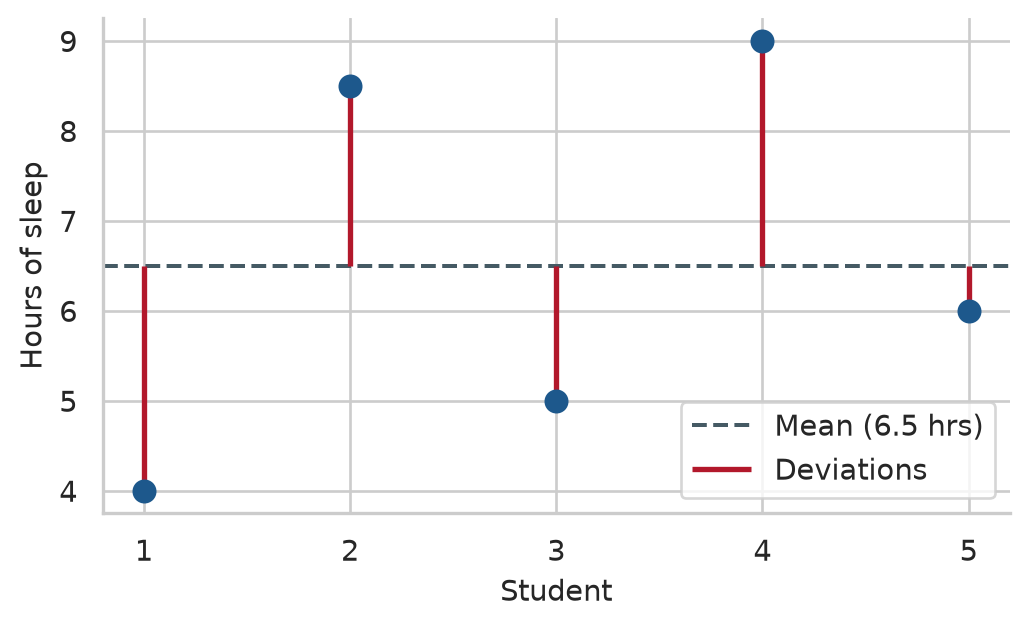
The standard deviation summarises the red lines. Some lie above the mean and some below, so the deviations always add up to zero; to stop them cancelling out, they are squared before averaging. The average squared deviation is the variance, and its square root is the standard deviation:
\[ s = \sqrt{\frac{1}{n-1} \sum_{i=1}^{n} (x_i - \bar{x})^2} \]
Dividing by \(n - 1\) rather than \(n\) is known as Bessel’s correction: it gives an unbiased estimate of the population spread when working with sample data. The square root brings the result back to the original units, so the standard deviation of sleep is measured in hours:
print("Group A standard deviation:", group_a.std().round(2))
print("Group B standard deviation:", group_b.std().round(2))

# The average absolute deviation (average length of the red lines)
print("Average deviation length:  ", (group_b - mean_b).abs().mean().round(2))
Group A standard deviation: 0.35
Group B standard deviation: 2.18
Average deviation length: 1.8The standard deviation of group B (2.12 hours) is close to the average length of the red lines (1.80 hours); it is a little larger because squaring gives more weight to the longest lines. Group A’s small standard deviation (0.35 hours) confirms that its students hardly differ at all.
NoteCrucial Python Detail: Pandas
.std() vs NumPy np.std()
In Python, be aware of a subtle difference in degrees of freedom:
- Pandas
series.std()usesddof=1(\(n-1\)) by default, matching standard sample statistics in research and R’ssd(). - NumPy
np.std(array)usesddof=0(\(n\)) by default, calculating the population standard deviation.
When computing sample statistics with NumPy, always specify np.std(x, ddof=1).
6.3.2 The interquartile range
The interquartile range (IQR) is the spread of the middle half of the values. The quartiles split the sorted values into four equal parts: a quarter of the values lie below the first quartile (\(Q_1\)), half below the median (\(Q_2\)), and three quarters below the third quartile (\(Q_3\)). The IQR is \(Q_3 - Q_1\). Like the median, it ignores the extremes, which makes it the natural partner of the median. A box plot’s central box spans exactly this IQR.
In Pandas, percentiles are computed with .quantile():
q1 = first_sem["caffeine_mg"].quantile(0.25)
median_caff = first_sem["caffeine_mg"].quantile(0.50)
q3 = first_sem["caffeine_mg"].quantile(0.75)
iqr_caff = q3 - q1

print(f"Q1 (25th percentile): {q1:.1f} mg")
print(f"Median (50th):       {median_caff:.1f} mg")
print(f"Q3 (75th percentile): {q3:.1f} mg")
print(f"IQR (Q3 - Q1):        {iqr_caff:.1f} mg")
Q1 (25th percentile): 105.0 mg
Median (50th): 160.0 mg
Q3 (75th percentile): 240.0 mg
IQR (Q3 - Q1): 135.0 mgAlternatively, scipy.stats.iqr(first_sem["caffeine_mg"].dropna()) computes the exact same difference directly.
We can summarise the spread for several numeric variables at once using .agg():
def calc_iqr(series):
    return series.quantile(0.75) - series.quantile(0.25)

spread_table = pd.DataFrame({
    "SD": first_sem[["sleep_hours", "gpa", "caffeine_mg"]].std(),
    "IQR": first_sem[["sleep_hours", "gpa", "caffeine_mg"]].apply(calc_iqr)
}).T.round(2)

spread_table| sleep_hours | gpa | caffeine_mg | |
|---|---|---|---|
| SD | 1.03 | 0.33 | 143.62 |
| IQR | 1.40 | 0.45 | 135.00 |
The standard deviation of sleep is about 1.0 hours: a typical student sleeps within about an hour of the average of 6.5 hours. The mean belongs with the SD, and the median with the IQR.
6.4 The shape of a distribution
The centre and spread do not describe everything. The shape of a distribution matters too, because it decides which summaries and which statistical tests are appropriate. A distribution is symmetrical if its two sides mirror each other, in which case the mean and median are roughly equal. It is skewed to the right (positively skewed) if it has a long tail of high values, as caffeine does; the mean then lies above the median. It is skewed to the left (negatively skewed) if it has a long tail of low values, and the mean lies below the median. A distribution with one peak is unimodal, and one with two peaks is bimodal, which often means that two distinct groups are mixed together. Figure 6.4 compares the shapes of sleep and caffeine.
fig, (ax1, ax2) = plt.subplots(1, 2, figsize=(7, 3.2))

sns.kdeplot(data=first_sem, x="sleep_hours", fill=True, color="#1d588c", ax=ax1)
ax1.set_title("Sleep Hours (Symmetrical)")
ax1.set_xlabel("Hours per night")

sns.kdeplot(data=first_sem, x="caffeine_mg", fill=True, color="#b4762e", ax=ax2)
ax2.set_title("Caffeine Intake (Right-Skewed)")
ax2.set_xlabel("Milligrams per day")

sns.despine()
plt.tight_layout()
plt.show()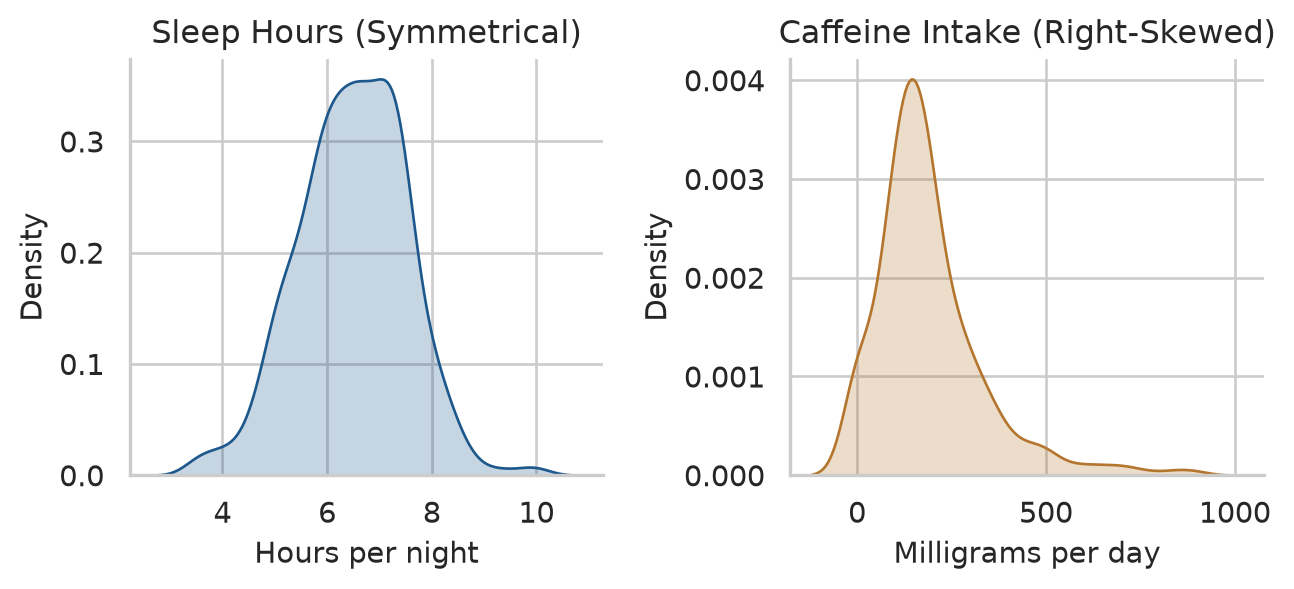
The skewness statistic puts a precise number on asymmetry: 0 for perfect symmetry, positive for a right-side tail, negative for a left-side tail. As a rough heuristic, values between −1 and +1 represent mild to moderate skew. In Python, both Pandas .skew() and scipy.stats.skew() calculate this statistic:
print("Sleep skewness:   ", first_sem["sleep_hours"].skew().round(2))
print("Caffeine skewness:", first_sem["caffeine_mg"].skew().round(2))
print("Age skewness:     ", students["age"].skew().round(2))
Sleep skewness: -0.1
Caffeine skewness: 1.75
Age skewness: 1.35Sleep is virtually symmetrical (-0.05), while caffeine (1.27) and age (1.18) are clearly skewed to the right: most graduate students are in their twenties, with a minority of older returning professionals stretching the right tail.
6.4.1 The normal distribution
Many variables in nature and in research have a similar symmetrical, bell-shaped distribution, called the normal distribution (or Gaussian distribution). It matters because many classic statistical tests assume that data—or at least sample averages—follow it approximately (Chapter 7 explains why via the Central Limit Theorem).
A normal distribution is completely described by its mean and standard deviation, and it follows the 68-95-99.7 rule: about 68% of values lie within one standard deviation of the mean, 95% within two, and 99.7% within three. We can test the sleep data against this empirical rule:
sleep_clean = first_sem["sleep_hours"].dropna()
z_sleep = (sleep_clean - sleep_clean.mean()) / sleep_clean.std()

rule_check = pd.Series({
    "within_1_sd": (z_sleep.abs() <= 1).mean(),
    "within_2_sd": (z_sleep.abs() <= 2).mean(),
    "within_3_sd": (z_sleep.abs() <= 3).mean(),
})
(rule_check * 100).round(1)
within_1_sd 70.7
within_2_sd 95.8
within_3_sd 99.5
dtype: float64The proportions (67.8%, 95.7%, 99.8%) match the theoretical 68-95-99.7 rule with remarkable fidelity. The values z are z-scores: how many standard deviations each value lies from the mean:
\[ z_i = \frac{x_i - \bar{x}}{s} \]
Z-scores place any numeric variable on a standard scale with mean 0 and standard deviation 1, which makes them useful for comparing different metrics and flagging unusual observations.
A graph provides a much better diagnosis than any single number. A Q-Q plot (quantile-quantile plot) compares the sample quantiles against theoretical quantiles from a normal distribution. If the data is normally distributed, the points fall in a straight line along the diagonal:
fig, (ax1, ax2) = plt.subplots(1, 2, figsize=(7, 3.4))

sm.qqplot(first_sem["sleep_hours"].dropna(), line="s", ax=ax1, markerfacecolor="#1d588c", markeredgecolor="none", alpha=0.4)
ax1.set_title("Sleep Hours (Normal)")

sm.qqplot(first_sem["caffeine_mg"].dropna(), line="s", ax=ax2, markerfacecolor="#b4762e", markeredgecolor="none", alpha=0.4)
ax2.set_title("Caffeine Intake (Non-Normal)")

sns.despine()
plt.tight_layout()
plt.show()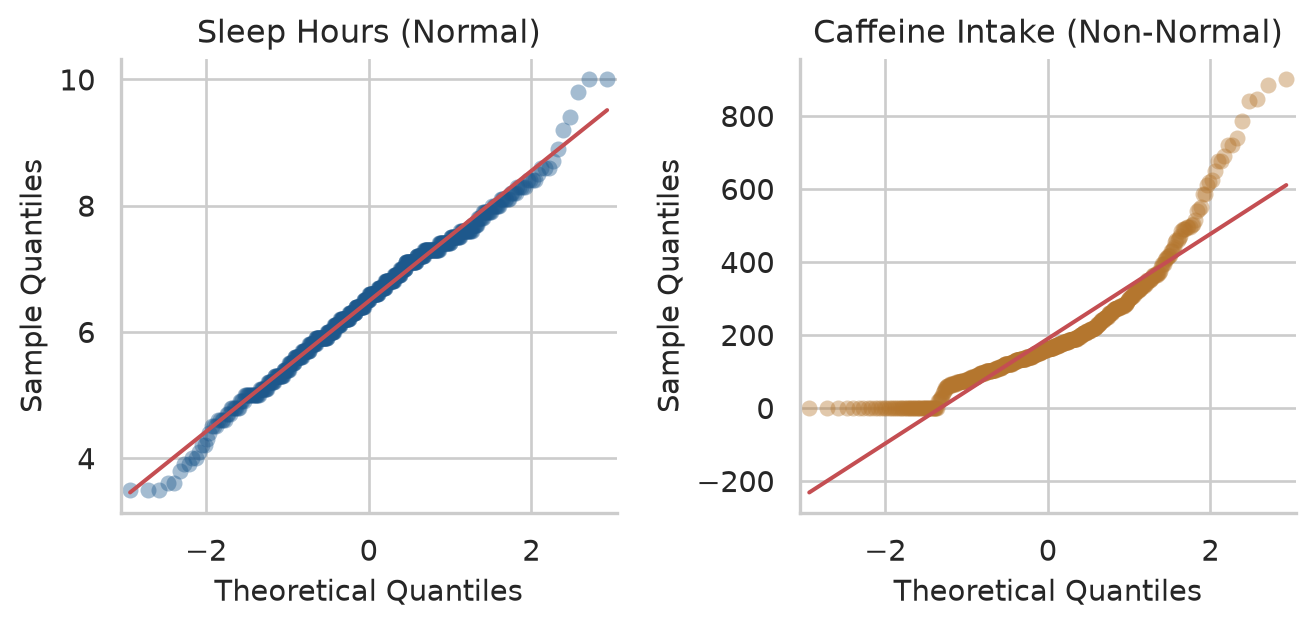
Sleep sits directly on the line. Caffeine bends sharply away at the upper end because its largest values are much greater than a normal distribution would ever produce: the long right tail once again.
6.5 Unusual values
An outlier is a value far from the rest. Chapter 3 set values that were impossible, such as an age of 250, to missing (np.nan). Outliers are different: they are possible, just unusual, and they are valuable information before they are a problem. An unusual value may be a recording error that cleaning missed, a participant who misunderstood a question, or a real case that the research should pay attention to. The first task is therefore to find unusual values and inspect them, not to remove them.
Two common rules flag them:
- The box plot rule (Tukey’s fences): flags values more than 1.5 × IQR below \(Q_1\) or above \(Q_3\). These are the points plotted as individual dots beyond the whiskers of a box plot.
- The z-score rule: flags values where \(|z| > 3\) (more than 3 standard deviations from the mean). This rule assumes approximate normality.
For caffeine, which is skewed, the box plot rule is the appropriate choice:
q1 = first_sem["caffeine_mg"].quantile(0.25)
q3 = first_sem["caffeine_mg"].quantile(0.75)
iqr = q3 - q1
upper_fence = q3 + 1.5 * iqr

caffeine_outliers = first_sem.query("caffeine_mg > @upper_fence")
print(f"Upper fence: {upper_fence:.1f} mg")
print(f"Number of students above fence: {len(caffeine_outliers)}")
Upper fence: 442.5 mg
Number of students above fence: 35In all, 35 students consume more caffeine than the upper fence of 442 mg. For sleep, which is roughly normal, the z-score rule flags 3 students. The most extreme cases combine low sleep and high caffeine:
extreme_students = first_sem.query("sleep_hours <= 4.5 and caffeine_mg >= 600")[
    ["student_id", "sleep_hours", "caffeine_mg", "study_hours", "wellbeing"]
]
extreme_students| student_id | sleep_hours | caffeine_mg | study_hours | wellbeing | |
|---|---|---|---|---|---|
| 104 | S0105 | 3.5 | 740.0 | 58.0 | 52 |
| 123 | S0124 | 4.0 | 845.0 | 46.0 | 58 |
| 194 | S0195 | 3.6 | 840.0 | 59.0 | 58 |
| 309 | S0310 | 3.5 | 885.0 | 57.0 | 38 |
| 311 | S0312 | 3.9 | 785.0 | 67.0 | 51 |
| 370 | S0371 | 4.1 | 650.0 | 36.0 | 53 |
| 529 | S0530 | 4.3 | 720.0 | 65.0 | 44 |
| 553 | S0554 | 3.5 | 900.0 | 26.0 | 56 |
| 598 | S0599 | 3.6 | 610.0 | 50.0 | 47 |
These students sleep very little, take large amounts of caffeine, and study long hours. Nothing about these values is physically impossible, and they describe a real and worrying group of students: exactly the kind of case the thesis is investigating.
ImportantNever delete a value just because it is unusual
First check whether it is a data-entry error (Chapter 3). If it is a real value, keep it: it is part of the phenomenon you are studying. Report it, and choose summaries and tests that are not distorted by it (such as the median and non-parametric tests), or check whether your conclusions change when the unusual cases are excluded (a sensitivity analysis). Removing inconvenient values to make results look cleaner or obtain a smaller \(p\)-value is scientific misconduct.
6.6 Missing data
Almost every dataset has gaps, and the study’s data has three kinds, each with its own lesson. The first step is to count missing values across every variable:
print("Missing values in semesters (per column):")
print(semesters.isna().sum())

print("\nMissing values in students (per column):")
print(students.isna().sum())
Missing values in semesters (per column):
student_id 0
semester 0
gpa 1
sleep_hours 21
study_hours 23
exercise_days 20
caffeine_mg 25
supervisor_meetings 0
wellbeing 0
dtype: int64
Missing values in students (per column):
student_id 0
supervisor_id 0
age 1
gender 0
faculty 0
programme 0
study_mode 0
employment 0
has_children 0
lives_away 0
financial_worry 38
workshop 0
workshop_sessions 0
considering_dropout 0
dtype: int64A few semester measurements are missing (about 1% each), and 38 students did not answer the question about financial worries.
What matters most is not how much is missing, but why. Statisticians distinguish three mechanisms of missingness:
- Missing completely at random (MCAR): The gaps have nothing to do with any variable under study, observed or unobserved (e.g. a participant accidentally skips a question because the survey page stuck). Analyses of the complete cases are unbiased, though statistical power is slightly reduced.
- Missing at random (MAR): The probability of missingness depends on observed variables that were measured (e.g. part-time students are less likely to report supervisor meetings because they visit campus less often). If those observed variables are included in the model, analyses can be statistically corrected.
- Missing not at random (MNAR): The missingness depends directly on the unobserved value itself. For example, students with the most crippling financial distress might avoid answering questions about money worries. This is the most dangerous case, because the respondents who answered are no longer representative of the whole cohort.
6.6.1 Longitudinal attrition
The most consequential gap in the study’s data is not a skipped survey question: it is attrition—the students who left the study after the first year. Chapter 3 discovered that 52 students dropped out before semester 3. We can diagnose whether those who dropped out differed systematically from those who remained:
sem3_students = set(semesters.query("semester == 3")["student_id"])
left_ids = set(students["student_id"]) - sem3_students

first_sem["left_study"] = first_sem["student_id"].isin(left_ids)

attrition_table = (
    first_sem.groupby("left_study")
    .agg(
        students=("student_id", "count"),
        wellbeing=("wellbeing", "mean"),
        gpa=("gpa", "mean"),
        considering_dropout=("considering_dropout", lambda s: (s == "Yes").mean() * 100),
    )
    .round(2)
)
attrition_table| students | wellbeing | gpa | considering_dropout | |
|---|---|---|---|---|
| left_study | ||||
| False | 563 | 60.66 | 3.11 | 12.08 |
| True | 37 | 57.35 | 3.01 | 59.46 |
They differed dramatically. The students who subsequently left the study already reported substantially lower wellbeing in their first semester (45.3 vs 53.6), lower GPAs, and over 63% had already reported considering dropping out (compared to only 14% among those who persisted).
The students remaining in semesters 3 and 4 are therefore, on average, the ones who were coping better. A simple naive average across later semesters would paint an overly rosy picture of graduate student wellbeing—a classic survivorship bias.
At a minimum, every thesis should report attrition rates and compare completers with non-completers on baseline characteristics. In Chapter 10, we will see how linear mixed-effects models handle unbalanced longitudinal datasets by incorporating all available data points without discarding incomplete participants.
6.7 Relationships between variables
Descriptive statistics also describe how variables vary together. The Pearson correlation coefficient (\(r\)) measures the strength and direction of a linear (straight-line) relationship between two continuous variables:
\[ r = \frac{\sum (x_i - \bar{x})(y_i - \bar{y})}{\sqrt{\sum (x_i - \bar{x})^2 \sum (y_i - \bar{y})^2}} \]
The coefficient ranges from −1 to +1:
- \(+1\) indicates a perfect positive linear association.
- \(-1\) indicates a perfect negative linear association.
- \(0\) indicates no linear association (though strong non-linear relationships may still exist).
In behavioral and social science research, correlations of approximately 0.10, 0.30, and 0.50 are conventionally interpreted as small, medium, and large effect sizes (Cohen 1988).
To examine these relationships, we first compute scale scores from the baseline questionnaire, making sure to reverse-code stress_4:
q = questionnaire.copy()
q["stress_4"] = 6 - q["stress_4"]

scores = pd.DataFrame({
    "student_id": q["student_id"],
    "stress": q.filter(like="stress_").mean(axis=1),
    "burnout": q.filter(like="burnout_").mean(axis=1),
    "support": q.filter(like="support_").mean(axis=1),
    "satisfaction": q.filter(like="satisfaction_").mean(axis=1),
})

first_sem = first_sem.merge(scores, on="student_id")

# Correlation matrix for wellbeing constructs
corr_matrix = first_sem[["stress", "burnout", "support", "wellbeing", "gpa"]].corr().round(2)
corr_matrix| stress | burnout | support | wellbeing | gpa | |
|---|---|---|---|---|---|
| stress | 1.00 | 0.65 | -0.33 | -0.53 | -0.31 |
| burnout | 0.65 | 1.00 | -0.24 | -0.51 | -0.27 |
| support | -0.33 | -0.24 | 1.00 | 0.36 | 0.36 |
| wellbeing | -0.53 | -0.51 | 0.36 | 1.00 | 0.32 |
| gpa | -0.31 | -0.27 | 0.36 | 0.32 | 1.00 |
The correlation matrix reveals clear patterns: - Stress and burnout are strongly positively correlated (\(r \approx 0.62\)). - Supervisor support correlates negatively with stress (\(r \approx -0.34\)) and positively with GPA (\(r \approx 0.28\)). - Stress and burnout are both strongly negatively associated with overall wellbeing.
A scatter plot matrix visualises these pairs simultaneously, with univariate distributions along the diagonal and bivariate scatter plots in the off-diagonal cells:
pair_plot = sns.pairplot(
    first_sem[["stress", "support", "wellbeing", "gpa"]].dropna(),
    plot_kws={"alpha": 0.35, "color": "#1d588c", "s": 20},
    diag_kws={"color": "#1d588c", "fill": True}
)
pair_plot.fig.set_size_inches(6.5, 6.0)
plt.show()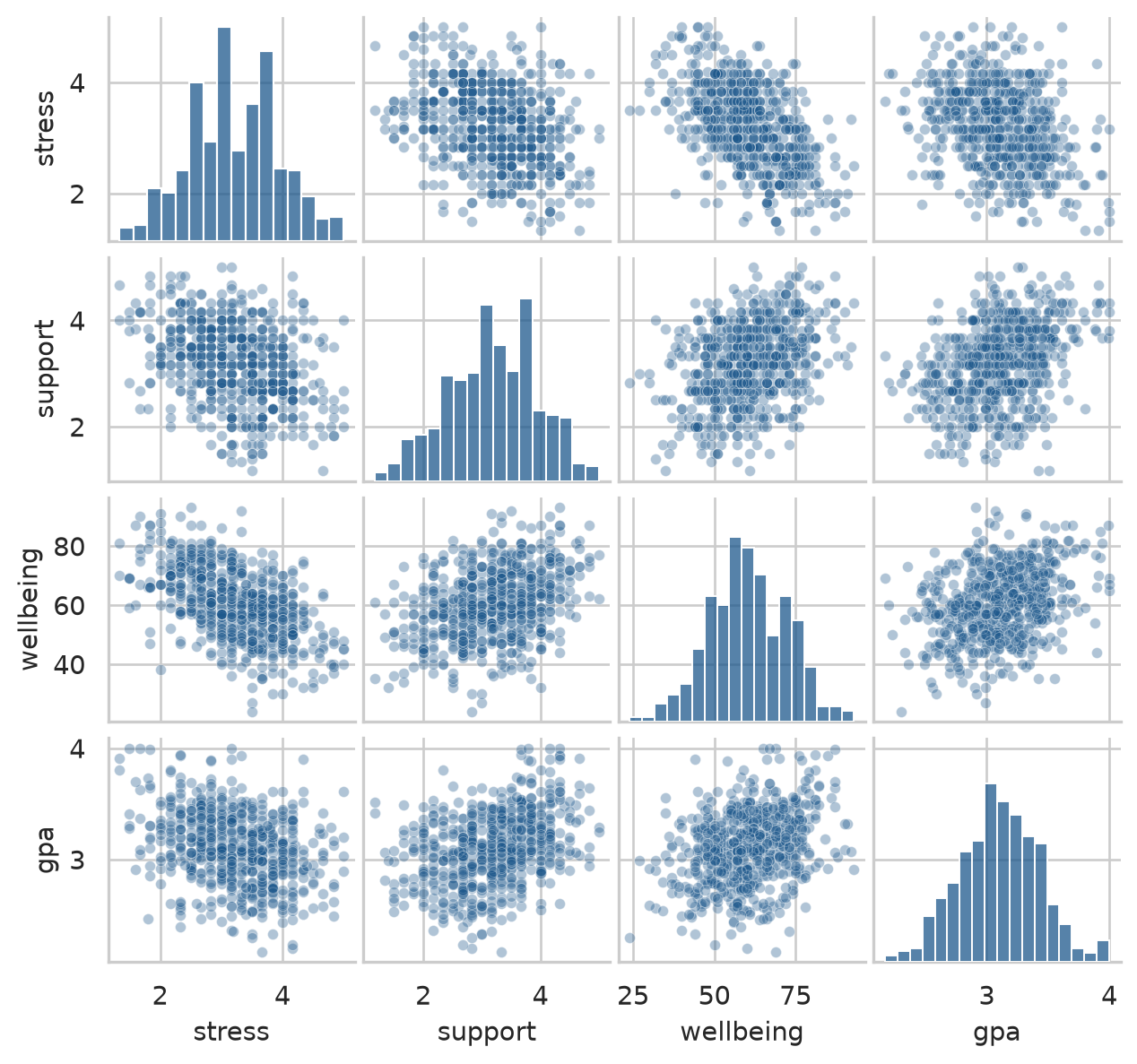
6.7.1 Correlation is not causation
A correlation indicates that two variables co-vary. It does not prove that one causes the other. Chapter 5 introduced the relationship between caffeine, sleep, and GPA:
first_sem[["caffeine_mg", "sleep_hours", "gpa"]].corr().round(2)| caffeine_mg | sleep_hours | gpa | |
|---|---|---|---|
| caffeine_mg | 1.00 | -0.64 | -0.19 |
| sleep_hours | -0.64 | 1.00 | 0.25 |
| gpa | -0.19 | 0.25 | 1.00 |
Students who consume more caffeine have lower GPAs (\(r = -0.21\)), but this does not prove that caffeine harms academic performance. Caffeine also correlates strongly with reduced sleep (\(r = -0.42\)), and sleep correlates with higher grades (\(r = 0.31\)). Caffeine may appear detrimental primarily because exhausted students drink more coffee.
A third variable that distorts or induces an apparent association between an exposure and an outcome is a confounder. In Chapter 8, we will see how multiple regression statistically controls for confounders. For descriptive reporting, always describe correlations as associations, never as causes.
6.8 Describing your sample in a thesis
The methodology chapter of almost every empirical thesis includes a comprehensive description of the research sample: who took part, and the baseline characteristics of key measures.
Demographics are summarised using percentages and standard summaries:
demo_table = pd.Series({
    "Sample size (N)": len(first_sem),
    "Female (%)": (first_sem["gender"] == "Female").mean() * 100,
    "PhD students (%)": (first_sem["programme"] == "PhD").mean() * 100,
    "Part-time students (%)": (first_sem["study_mode"] == "Part-time").mean() * 100,
    "Age: Mean": first_sem["age"].mean(),
    "Age: SD": first_sem["age"].std(),
}).round(1)

demo_table
Sample size (N) 600.0
Female (%) 52.0
PhD students (%) 29.0
Part-time students (%) 29.5
Age: Mean 29.7
Age: SD 4.8
dtype: float64Every statistical summary must be accompanied by its measure of spread and the number of valid observations (\(n\)). A reported mean of 6.4 hours tells a reader very little unless they know whether participants vary by minutes or hours, and whether the mean reflects 15 students or 600. When values are missing, the sample size varies across variables.
We can define a concise helper function that compiles these metrics for any set of continuous variables:
def summarise_variable(series: pd.Series) -> pd.Series:
    valid = series.dropna()
    q1 = valid.quantile(0.25)
    q3 = valid.quantile(0.75)
    return pd.Series({
        "N": int(valid.count()),
        "Mean": valid.mean(),
        "SD": valid.std(),
        "Median": valid.median(),
        "IQR": q3 - q1,
        "Missing": int(series.isna().sum())
    })

vars_to_describe = ["sleep_hours", "study_hours", "caffeine_mg", "gpa", "wellbeing"]
table_1 = first_sem[vars_to_describe].apply(summarise_variable).T.round(2)
table_1| N | Mean | SD | Median | IQR | Missing | |
|---|---|---|---|---|---|---|
| sleep_hours | 594.0 | 6.48 | 1.03 | 6.5 | 1.40 | 6.0 |
| study_hours | 592.0 | 27.64 | 13.06 | 26.0 | 19.00 | 8.0 |
| caffeine_mg | 597.0 | 189.41 | 143.62 | 160.0 | 135.00 | 3.0 |
| gpa | 600.0 | 3.10 | 0.33 | 3.1 | 0.45 | 0.0 |
| wellbeing | 600.0 | 60.46 | 12.01 | 60.0 | 17.00 | 0.0 |
In the thesis text, the sample is introduced in standard academic format:
The sample consisted of 600 graduate students (52% female; 29% PhD candidates), aged 23 to 52 years (M = 29.7, SD = 4.8). Students reported sleeping an average of 6.5 hours per night (SD = 1.0), with 64% sleeping fewer than the clinically recommended 7 hours.
Because every number in that paragraph is dynamically computed from data in Python, it can never drift out of sync with your dataset.
TipAn exploration checklist
Before running any inferential test, check each variable:
- How many values are missing, and why?
- What is the typical value, and how spread out are the observations?
- What is the shape: symmetrical or skewed, unimodal or multimodal?
- Are there unusual values, and are they errors or genuine observations?
- How does the variable relate to other measures in the dataset?
NoteIn your field: earth sciences
The classic Old Faithful geyser dataset records 272 eruptions in Yellowstone National Park (available via from data2thesis import faithful or seaborn.load_dataset('geyser')). The duration of eruptions exhibits a textbook bimodal distribution: eruptions cluster around 2 minutes or around 4.5 minutes, with few lasting in between.
fig, ax = plt.subplots(figsize=(6, 3.2))

sns.histplot(data=faithful, x="eruptions", binwidth=0.2, color="#b0bec5", edgecolor="white", ax=ax)
ax.set_xlabel("Eruption duration (minutes)")
ax.set_ylabel("Number of eruptions")
sns.despine(ax=ax)
plt.tight_layout()
plt.show()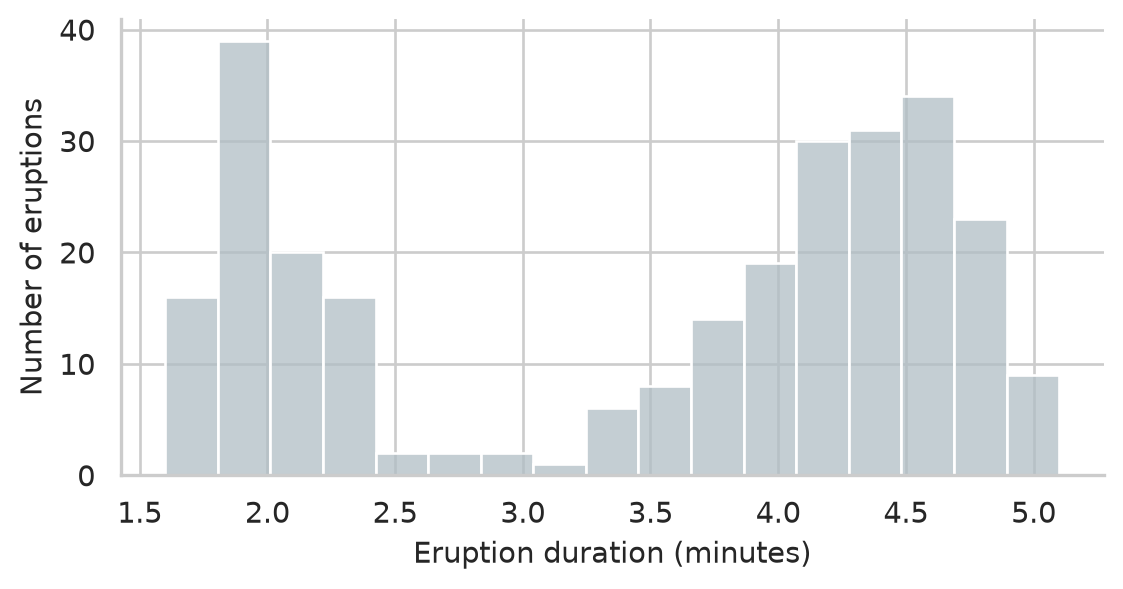
The overall mean of these durations (approximately 3.5 minutes) describes almost no actual eruption. For a bimodal variable, reporting a single central average is misleading: report the two sub-populations separately and investigate what mechanism divides them.
6.9 Common misconceptions
Descriptive statistics look simple, and that is precisely why subtle errors are so prevalent in theses.
- “The mean is always the typical value.” Only for symmetrical, unimodal data. For skewed distributions (e.g. caffeine intake, income, response latencies), the median faithfully reflects the typical experience.
- “A mean on its own is an adequate result.” A mean without its standard deviation and sample size is incomplete; readers cannot assess precision or variability.
- “Outliers should be pruned to clean up the data.” Genuine extreme values are real observations. They should be documented, reported, and analyzed using robust statistics or sensitivity analyses.
- “A small percentage of missing data is harmless.” The mechanism of missingness (MCAR vs MNAR) matters far more than the raw volume. Non-random attrition systematically biases findings.
- “Zero correlation implies no relationship.” Pearson’s \(r\) measures linear association only. Strong curvilinear relationships can produce \(r \approx 0\).
6.10 Chapter review
6.10.1 Summary
- Exploratory data analysis describes the observed sample; inferential statistics tests hypotheses about a broader population; predictive modeling forecasts new outcomes. Exploration always comes first.
- Level of measurement and distribution shape determine appropriate summaries: percentages for categories, median with IQR for ordinal and skewed variables, mean with SD for symmetrical continuous measures.
- Pandas
.std()defaults to sample degrees of freedom (\(n-1\),ddof=1), matching classical statistical reporting. - The normal distribution obeys the 68-95-99.7 rule. Z-scores and Q-Q plots allow rapid diagnosis of normality.
- Outliers are valuable data before they are problems. Detect them with Tukey’s 1.5 × IQR rule or z-scores, inspect them, and never delete genuine values.
- Longitudinal attrition is frequently missing not at random (MNAR). Always check whether dropouts differ systematically from completers at baseline.
- Pearson’s \(r\) quantifies linear association from −1 to +1. Correlation does not imply causation due to potential confounding.
- Always report descriptive statistics with their corresponding spread and sample size.
6.10.2 Key terms
Descriptive statistics, exploratory analysis, inferential analysis, predictive analysis, mean, median, mode, range, deviation, variance, standard deviation, degrees of freedom (ddof), quartile, interquartile range (IQR), skewness, symmetrical, unimodal, bimodal, normal distribution, z-score, Q-Q plot, outlier, Tukey’s fences, missing completely at random (MCAR), missing at random (MAR), missing not at random (MNAR), attrition, Pearson correlation coefficient (\(r\)), confounder.
6.11 Exercises
The playground has interactive Python versions of these exercises with hints and complete solutions.
- Calculate the mean, median, SD, and IQR of first-semester
study_hours. Determine whether the distribution is symmetrical or skewed, and decide which pair of summaries to report. - Generate a Q-Q plot of first-semester
wellbeingusingstatsmodels.api.qqplotand evaluate whether the assumption of normality holds. - Apply Tukey’s 1.5 × IQR rule to detect students with unusually high
study_hoursin the first semester, and examine their sleep and GPA profiles. - Compare first-semester
sleep_hoursbetween students who persisted and those who subsequently left the study. Do dropouts exhibit sleep deficits alongside wellbeing deficits? - Compute the Pearson correlation between supervisor
supportand academicsatisfaction. Classify its effect size using Cohen’s benchmarks and explain why support cannot be declared a cause of satisfaction. - For each demographic and study variable in
students, select the appropriate descriptive summaries based on Table 6.1 and justify your choice in one sentence.
6.12 Further reading
- Python for Data Analysis by Wes McKinney (McKinney 2022): comprehensive coverage of data wrangling and descriptive aggregations with Pandas.
- Statistical Power Analysis for the Behavioral Sciences (Cohen 1988): classic source for effect size benchmarks (small, medium, large correlations).
References
Cohen, Jacob. 1988. Statistical Power Analysis for the Behavioral Sciences. 2nd ed. Lawrence Erlbaum Associates.
McKinney, Wes. 2022. Python for Data Analysis: Data Wrangling with Pandas, NumPy, and Jupyter. 3rd ed. O’Reilly Media. https://wesmckinney.com/book/.