import data2thesis as dt
import pandas as pd
import numpy as np
from sklearn.model_selection import train_test_split, StratifiedKFold
from sklearn.compose import ColumnTransformer
from sklearn.impute import SimpleImputer
from sklearn.preprocessing import StandardScaler, OneHotEncoder
from sklearn.pipeline import Pipeline

students = dt.load_students()
questionnaire = dt.load_questionnaire()
semesters = dt.load_semesters()

questionnaire['stress_4'] = 6 - questionnaire['stress_4']
scores = pd.DataFrame({
    'student_id': questionnaire['student_id'],
    'stress': questionnaire[['stress_1', 'stress_2', 'stress_3', 'stress_4', 'stress_5', 'stress_6']].mean(axis=1),
    'burnout': questionnaire[[f'burnout_{i}' for i in range(1, 7)]].mean(axis=1),
    'support': questionnaire[[f'support_{i}' for i in range(1, 7)]].mean(axis=1),
    'satisfaction': questionnaire[[f'satisfaction_{i}' for i in range(1, 5)]].mean(axis=1),
})

sem1 = semesters[semesters['semester'] == 1].drop(columns=['semester'])

dropout_data = (
    students.merge(scores, on='student_id')
    .merge(sem1, on='student_id')
    .drop(columns=['student_id', 'supervisor_id', 'workshop', 'workshop_sessions'])
)

dropout_data['considering_dropout'] = (dropout_data['considering_dropout'] == 'Yes').astype(int)

X = dropout_data.drop(columns=['considering_dropout'])
y = dropout_data['considering_dropout']

X_train, X_test, y_train, y_test = train_test_split(
    X, y, test_size=0.25, stratify=y, random_state=2026
)

num_cols = X.select_dtypes(include=['int64', 'float64']).columns.tolist()
cat_cols = X.select_dtypes(include=['object', 'category']).columns.tolist()

dropout_recipe = ColumnTransformer([
    ('num', Pipeline([('imp', SimpleImputer(strategy='median')), ('scaler', StandardScaler())]), num_cols),
    ('cat', OneHotEncoder(drop='first', sparse_output=False, handle_unknown='ignore'), cat_cols)
])

tree_recipe = ColumnTransformer([
    ('num', SimpleImputer(strategy='median'), num_cols),
    ('cat', OneHotEncoder(drop='first', sparse_output=False, handle_unknown='ignore'), cat_cols)
])

dropout_folds = StratifiedKFold(n_splits=10, shuffle=True, random_state=2026)12 Classification Models
A classification model is built to support decisions: which patients to screen further, which applications to review, which students to contact. Two questions follow. The first is technical: whether more flexible methods than logistic regression would rank the cases better. The second matters more, and is often forgotten: what happens when the model’s predictions are turned into decisions. Every decision rule flags some cases wrongly and misses others, and the balance between those two errors is not a statistical matter alone. It depends on what each error costs, and on whom.
This chapter addresses both questions. It introduces four widely used families of classification models, decision trees, random forests, k-nearest neighbours, and support vector machines, each through the idea behind it and the way it separates the classes, and compares them fairly on the wellbeing data. It then looks beyond the AUC at how a model is used: the confusion matrix, precision and recall, the choice of the threshold at which a student is flagged, and what to do when one outcome is rare. In the story, Elaf shows her logistic regression to the student counselling service, which asks whether more powerful methods exist, and how many of the students it would contact are really at risk.
TipBy the end of this chapter you will be able to
- Explain how decision trees, random forests, k-nearest neighbours, and support vector machines classify.
- Fit each of them with scikit-learn, and compare several models fairly with cross-validation.
- Read a confusion matrix, and calculate sensitivity (recall), specificity, precision, and the F1 score.
- Choose a classification threshold from the costs of the two kinds of error and the purpose of the model.
- Explain the options for an imbalanced outcome, and what resampling does and does not change.
12.1 Data and resampling
The data, split, preprocessing pipeline, and cross-validation folds are exactly those of Chapter 11, so every model in this chapter is trained and tested on the same students:
12.2 Decision trees
A decision tree classifies by asking a series of yes-or-no questions, like a flowchart. To see how a tree chooses its questions, take twelve imaginary students:
tiny = pd.DataFrame({
    'stress':  [1.5, 2.0, 2.2, 2.8, 3.0, 3.1, 3.4, 3.6, 3.8, 4.0, 4.2, 4.5],
    'support': [4.5, 3.0, 4.0, 2.0, 4.2, 3.8, 2.1, 4.4, 1.8, 2.5, 3.9, 1.5],
    'dropout': ['No', 'No', 'No', 'No', 'No', 'No', 'Yes', 'No', 'Yes', 'Yes', 'No', 'Yes']
})
Four of the twelve consider dropping out. The tree looks for the single question that best separates the “Yes” students from the “No” students. “Is support below 2.75?” puts seven students, all “No”, on one side, and five students, four “Yes” and one “No”, on the other. The one “No” student among the low-support group has the lowest stress, so a second question, “Is stress 3.1 or more?”, separates the rest perfectly:
from sklearn.tree import DecisionTreeClassifier, export_text

tiny_tree = DecisionTreeClassifier(min_samples_split=2, criterion='gini', random_state=2026)
tiny_tree.fit(tiny[['stress', 'support']], (tiny['dropout'] == 'Yes').astype(int))
print(export_text(tiny_tree, feature_names=['stress', 'support']))
|--- support <= 2.75
| |--- stress <= 3.10
| | |--- class: 0
| |--- stress > 3.10
| | |--- class: 1
|--- support > 2.75
| |--- class: 0
Each line is a node: the question that led to it, and the predicted class (class: 0 for No, class: 1 for Yes). The final lines are the leaves. To classify a new student, you follow the questions from the top until you reach a leaf. To choose each question, the tree tries every predictor and every possible cut-off and picks the one that makes the two groups most “pure”, usually measured by the Gini impurity (0 when a group contains only one class).
Decision trees have attractive properties: they are easy to explain, they need no dummy variables or normalisation (a question such as “is stress 3.1 or more?” works the same on any scale), and they capture interactions automatically (stress matters here only for low-support students). For the wellbeing data, a preprocessor that fills in missing values without scaling is enough:
tree_pipe = Pipeline([
    ('prep', tree_recipe),
    ('model', DecisionTreeClassifier(max_depth=3, min_samples_leaf=10, random_state=2026))
])

tree_fit = tree_pipe.fit(X_train, y_train)
A depth of 3 keeps the tree small enough to read. Figure 12.1 draws it using scikit-learn’s plot_tree().
from sklearn.tree import plot_tree

feature_names = [f.split('__')[-1] for f in tree_pipe.named_steps['prep'].get_feature_names_out()]

fig, ax = plt.subplots(figsize=(9, 5.5))
plot_tree(
    tree_pipe.named_steps['model'],
    feature_names=feature_names,
    class_names=['No', 'Yes'],
    filled=True,
    rounded=True,
    fontsize=8,
    ax=ax
)
plt.show()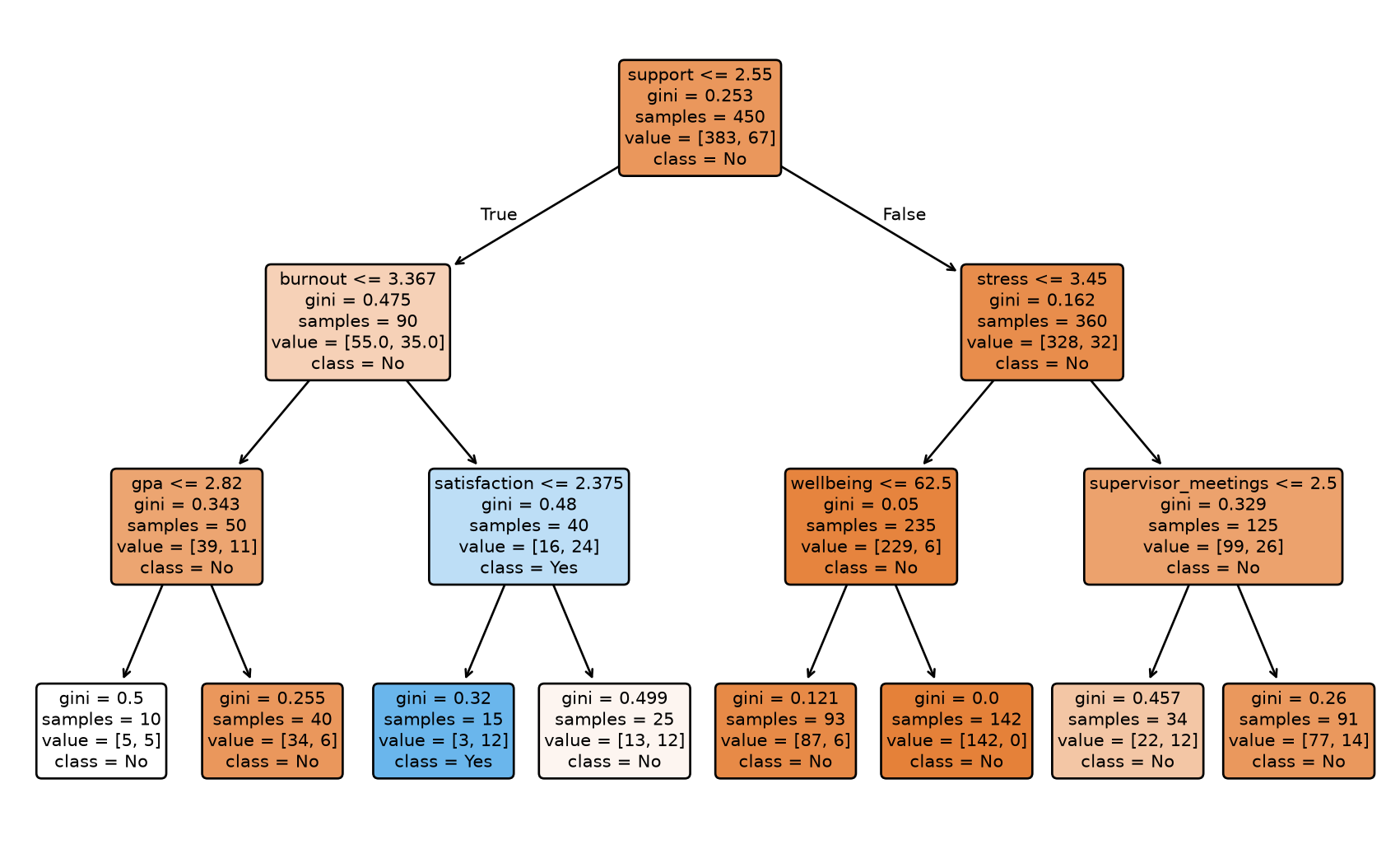
The first question is about support, the strongest single predictor. The tree is easy to read, but a single tree has a serious weakness: it is unstable. A slightly different sample of students can produce a completely different tree, and, as Chapter 11 showed, a deep tree overfits. The next method turns this weakness into a strength.
12.3 Random forests
A random forest grows hundreds of trees, each on a slightly different version of the data, and lets them vote. Two sources of randomness make the trees different. Each tree is grown on a bootstrap sample of the training data (Chapter 7), students drawn at random with replacement. And at each split, the tree may only choose from a random subset of the predictors; the size of this subset, max_features in scikit-learn, is a hyperparameter.
Each individual tree overfits in its own way, but because the trees differ, many of their errors cancel out when the trees vote. The predicted probability of “Yes” is the share of trees that vote “Yes”. Averaging many models in this way is called an ensemble; a random forest is an ensemble of trees (Breiman 2001).
Scikit-learn’s RandomForestClassifier fits random forests efficiently:
from sklearn.ensemble import RandomForestClassifier

forest_pipe = Pipeline([
    ('prep', tree_recipe),
    ('model', RandomForestClassifier(n_estimators=500, random_state=2026))
])

forest_fit = forest_pipe.fit(X_train, y_train)
A forest of 500 trees cannot be drawn, so it is a “black box”. Permutation importance opens it a little: for each predictor in turn, the values are shuffled randomly, and the drop in the model’s accuracy is recorded. Shuffling an important predictor hurts the predictions; shuffling an unimportant one does not. Figure 12.2 shows the result.
from sklearn.inspection import permutation_importance

imp = permutation_importance(forest_fit, X_train, y_train, n_repeats=10, random_state=2026)
importance_df = pd.DataFrame({
    'predictor': X_train.columns,
    'importance': imp.importances_mean
}).sort_values('importance')

fig, ax = plt.subplots(figsize=(6.5, 4.5))
ax.barh(importance_df['predictor'], importance_df['importance'], color='#2f6793')
ax.set_xlabel('Permutation importance (drop in accuracy)')
ax.grid(axis='x', linestyle='--', alpha=0.5)
plt.show()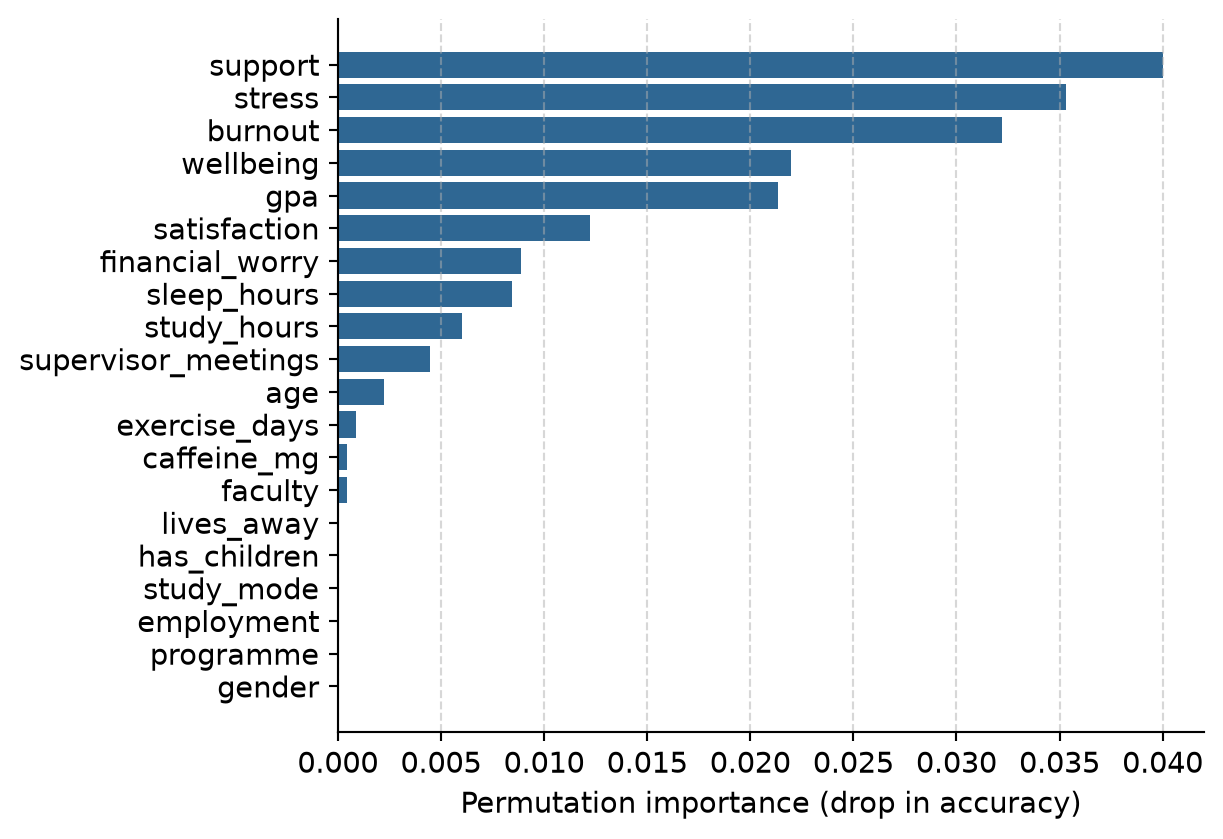
The forest relies most on support, stress, and burnout, and hardly at all on the students’ background, which agrees with the logistic regression of Chapter 8. Importance says which predictors the model uses, not what causes dropout; everything Chapter 8 said about confounding still applies.
12.4 k-nearest neighbours
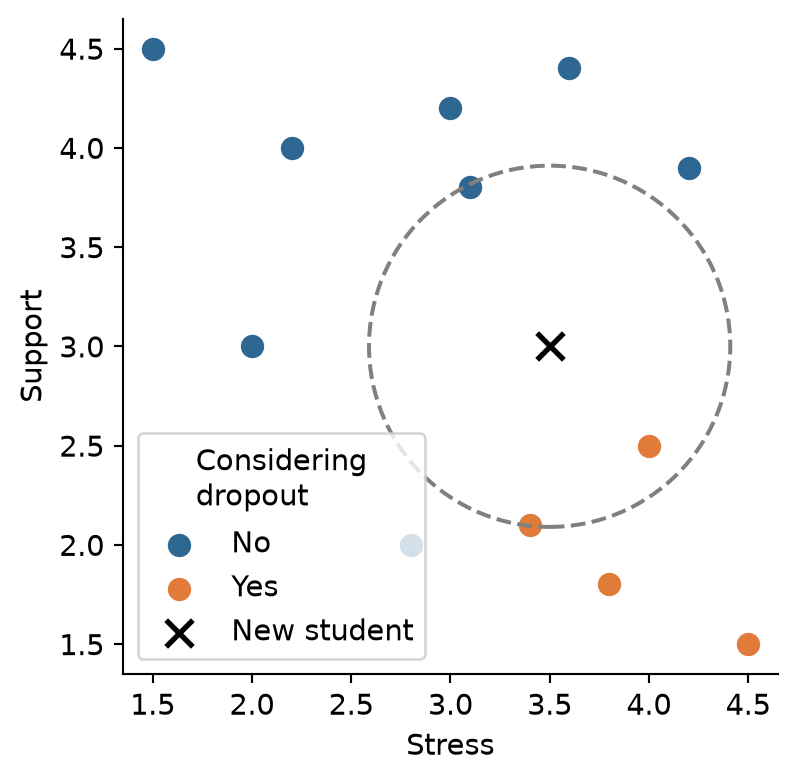
k-nearest neighbours (k-NN), met briefly in Chapter 11, classifies a new student by finding the \(k\) most similar students in the training data and letting them vote. “Similar” means close together when the predictors are drawn as a map. Suppose a new student in the tiny example has a stress score of 3.5 and a support score of 3.0. The distance to each training student is the straight-line distance on the stress-support map:
tiny_dist = tiny.copy()
tiny_dist['distance'] = np.sqrt((tiny_dist['stress'] - 3.5)**2 + (tiny_dist['support'] - 3.0)**2)
tiny_dist.sort_values('distance').head(3)| stress | support | dropout | distance | |
|---|---|---|---|---|
| 9 | 4.0 | 2.5 | Yes | 0.707107 |
| 5 | 3.1 | 3.8 | No | 0.894427 |
| 6 | 3.4 | 2.1 | Yes | 0.905539 |
With \(k = 3\), two of the three nearest students considered dropping out, so the predicted probability of “Yes” is 2/3. Figure 12.3 shows the picture.
Because k-NN is based on distances, the predictors must be on the same scale. Otherwise a variable measured in large numbers, such as caffeine in milligrams, would dominate the distance, and a variable measured on a 1-5 scale would hardly count. That is why the recipe normalises every predictor.
The number of neighbours, \(k\), is a hyperparameter. With \(k = 1\), the model copies the nearest student and overfits badly (Chapter 11); with a large \(k\), it averages over many students and becomes smoother. Tuning shows which works best for the wellbeing data:
from sklearn.model_selection import GridSearchCV
from sklearn.neighbors import KNeighborsClassifier

knn_pipe = Pipeline([
    ('prep', dropout_recipe),
    ('knn', KNeighborsClassifier())
])

param_grid = {'knn__n_neighbors': [1, 5, 11, 21, 41, 81]}
knn_grid = GridSearchCV(knn_pipe, param_grid=param_grid, cv=dropout_folds, scoring='roc_auc')
knn_grid.fit(X_train, y_train)

knn_results = pd.DataFrame({
    'neighbors': [1, 5, 11, 21, 41, 81],
    'mean': knn_grid.cv_results_['mean_test_score'],
    'std_err': knn_grid.cv_results_['std_test_score'] / np.sqrt(10)
})
knn_results| neighbors | mean | std_err | |
|---|---|---|---|
| 0 | 1 | 0.583237 | 0.022934 |
| 1 | 5 | 0.704131 | 0.031217 |
| 2 | 11 | 0.734453 | 0.033532 |
| 3 | 21 | 0.754412 | 0.021761 |
| 4 | 41 | 0.796486 | 0.016813 |
| 5 | 81 | 0.824661 | 0.024688 |
The AUC keeps rising up to the largest \(k\) tried. When the best value lies at the edge of the grid, the usual advice is to extend the grid, but here the result is informative in itself: the more neighbours k-NN averages over, the smoother its predictions become, and the better it does. The wellbeing data has a smooth pattern (risk rises steadily with stress and falls steadily with support), which a smooth model such as logistic regression captures directly. k-NN is at its best when the pattern is irregular and there is a lot of data.
12.5 Support vector machines
A support vector machine (SVM) separates the two classes with a boundary that is as far as possible from the students on either side. Imagine drawing a line between the “Yes” and “No” points on the stress-support map: of all the lines that separate them, the SVM picks the one with the widest empty “street” around it, the margin. Only the students closest to the boundary, the support vectors, determine where it goes. When the classes overlap, as they always do in real data, some students are allowed inside the margin or on the wrong side, at a cost set by a hyperparameter.
A straight boundary is a linear SVM. With a kernel, the SVM can draw curved boundaries: the popular radial basis function (RBF) kernel lets the boundary bend around groups of points. Both are available in scikit-learn via SVC:
from sklearn.svm import SVC

svm_linear = SVC(kernel='linear', probability=True, random_state=2026)
svm_rbf    = SVC(kernel='rbf', probability=True, random_state=2026)
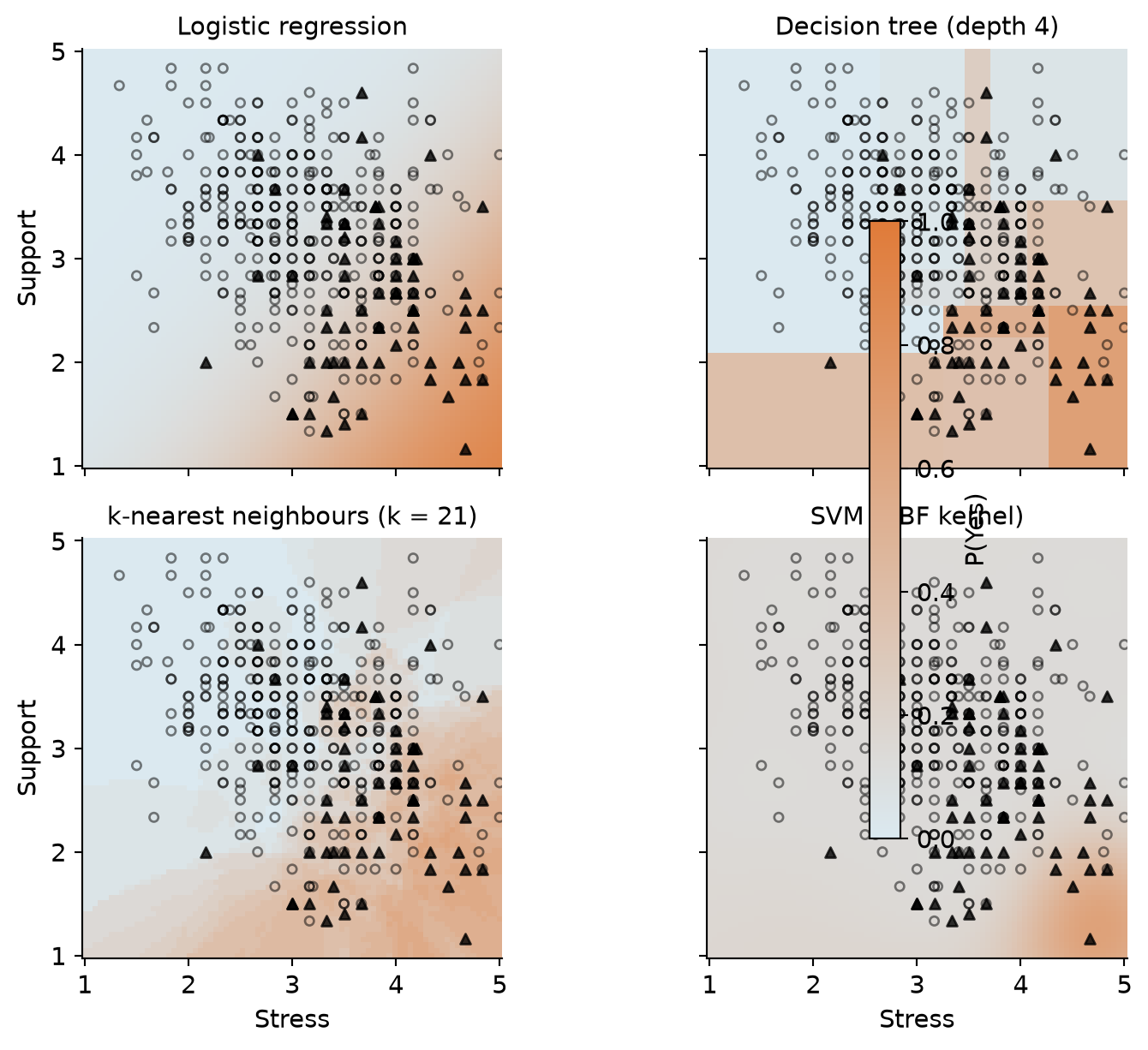
Like k-NN, SVMs are based on distances, so they need normalised predictors. Figure 12.4 shows how differently the four families draw their boundaries, using just stress and support so the result can be drawn as a map.
12.6 Comparing models fairly
The fair way to compare the models is cross-validation on the same folds. In Python, we define our pipelines and evaluate each over the identical 10 folds with cross_validate:
from sklearn.model_selection import cross_validate
from sklearn.linear_model import LogisticRegression

candidate_models = {
    'normalised_logistic': Pipeline([('prep', dropout_recipe), ('model', LogisticRegression(random_state=2026))]),
    'normalised_svm_linear': Pipeline([('prep', dropout_recipe), ('model', SVC(kernel='linear', probability=True, random_state=2026))]),
    'tree_data_forest': Pipeline([('prep', tree_recipe), ('model', RandomForestClassifier(n_estimators=500, random_state=2026))]),
    'normalised_knn': Pipeline([('prep', dropout_recipe), ('model', KNeighborsClassifier(n_neighbors=41))]),
    'tree_data_tree': Pipeline([('prep', tree_recipe), ('model', DecisionTreeClassifier(max_depth=4, min_samples_leaf=10, random_state=2026))]),
    'normalised_svm_rbf': Pipeline([('prep', dropout_recipe), ('model', SVC(kernel='rbf', probability=True, random_state=2026))]),
}

comparison_results = []
for name, pipe in candidate_models.items():
    cv_res = cross_validate(pipe, X_train, y_train, cv=dropout_folds, scoring='roc_auc')
    comparison_results.append({
        'wflow_id': name,
        'mean': cv_res['test_score'].mean(),
        'std_err': cv_res['test_score'].std(ddof=1) / np.sqrt(10)
    })

comparison_df = pd.DataFrame(comparison_results).sort_values('mean', ascending=False).reset_index(drop=True)
comparison_df| wflow_id | mean | std_err | |
|---|---|---|---|
| 0 | normalised_logistic | 0.805710 | 0.021498 |
| 1 | tree_data_forest | 0.800863 | 0.020319 |
| 2 | normalised_knn | 0.796486 | 0.017722 |
| 3 | normalised_svm_linear | 0.791321 | 0.024877 |
| 4 | tree_data_tree | 0.739196 | 0.021488 |
| 5 | normalised_svm_rbf | 0.709154 | 0.029474 |
The trees and forest use the unscaled imputation recipe, and the distance-based models use the normalised one.
The winner, with a cross-validated AUC of 0.81, is plain logistic regression. The linear SVM (0.79), which also draws a straight boundary, comes close, followed by the random forest (0.80). The standard errors, around 0.02, show that the smaller differences at the top could be due to chance, but none of the flexible models beats the simple one. This is not a failure of the methods: it says something about the data. The risk of considering dropout rises smoothly with stress and falls smoothly with support, with no sharp thresholds or complicated interactions for a tree or a forest to find. On data with such structure, and with larger samples, forests and SVMs often do win. The lesson is the one from Chapter 11: compare, and let the simpler model stand unless a complex one clearly does better.
Logistic regression is therefore kept. It predicts as well as any model here, and it can be explained to the counselling service in one sentence.
12.7 The confusion matrix
The AUC measures how well a model ranks students. But the counselling service needs a decision: contact this student or not. A model makes a decision by comparing each predicted probability with a threshold; by default, a student is classified “Yes” when the probability of “Yes” is above 0.5. The confusion matrix counts how those decisions turn out.
Take a tiny example first. A screening questionnaire is given to 100 students, 10 of whom are truly at risk. It flags 12 students, 8 of whom are among the 10 at risk:
| Truly at risk | Not at risk | Total | |
|---|---|---|---|
| Flagged | 8 (true positives) | 4 (false positives) | 12 |
| Not flagged | 2 (false negatives) | 86 (true negatives) | 88 |
| Total | 10 | 90 | 100 |
Every classification ends in one of four cells. A true positive is a student at risk who is flagged; a false negative is a student at risk who is missed; a false positive is a student flagged by mistake; a true negative is a student correctly left alone.
The key measures come from these four counts, and each answers a different practical question. Sensitivity, also called recall, is the share of students at risk who are flagged, here 8/10 = 80%: it measures how many of the students who need help are found. Specificity is the share of students not at risk who are left alone, 86/90 = 96%. Precision is the share of flagged students who are truly at risk, 8/12 = 67%: it measures how often a contact is justified. The F1 score balances precision and recall in a single number (their harmonic mean), here 0.73, and it is high only when both are high. Accuracy, the share classified correctly, is (8 + 86)/100 = 94%, but, as Chapter 11 showed, it is dominated by the large “No” group.
For the study’s logistic regression, confusion_matrix() produces the confusion matrix for the test students:
from sklearn.metrics import confusion_matrix, accuracy_score, recall_score, precision_score, f1_score

logistic_pipe = Pipeline([
    ('prep', dropout_recipe),
    ('model', LogisticRegression(random_state=2026))
])
logistic_fit = logistic_pipe.fit(X_train, y_train)

y_pred = logistic_fit.predict(X_test)
y_prob = logistic_fit.predict_proba(X_test)[:, 1]

# Confusion matrix with Yes (1) in row 0, No (0) in row 1
cm = confusion_matrix(y_test, y_pred, labels=[1, 0])
cm_df = pd.DataFrame(
    cm,
    index=['Truly Yes', 'Truly No'],
    columns=['Pred Yes', 'Pred No']
)
cm_df| Pred Yes | Pred No | |
|---|---|---|
| Truly Yes | 8 | 15 |
| Truly No | 3 | 124 |
Scikit-learn calculates the summary metrics. Notice how they treat 1 (“Yes”) as the event of interest:
tn, fp, fn, tp = confusion_matrix(y_test, y_pred, labels=[0, 1]).ravel()

class_metrics = pd.DataFrame({
    '.metric': ['accuracy', 'sensitivity', 'specificity', 'precision', 'f_meas'],
    '.estimate': [
        accuracy_score(y_test, y_pred),
        recall_score(y_test, y_pred),
        tn / (tn + fp),
        precision_score(y_test, y_pred),
        f1_score(y_test, y_pred)
    ]
})
class_metrics| .metric | .estimate | |
|---|---|---|
| 0 | accuracy | 0.880000 |
| 1 | sensitivity | 0.347826 |
| 2 | specificity | 0.976378 |
| 3 | precision | 0.727273 |
| 4 | f_meas | 0.470588 |
This is sobering. Of the 23 test students who considered dropping out, the model flags only 8: a sensitivity of 35%. The high accuracy and high specificity come almost entirely from correctly leaving alone the large majority who were never at risk. The AUC showed the model ranks students well, so the problem is not the model but the threshold: with only 15% of students at risk, few students ever get a predicted probability above 0.5.
12.8 Choosing the threshold
The threshold of 0.5 is a default, not a law. Lowering it flags more students: more of those at risk are found (higher recall), at the price of more false alarms (lower precision). Which balance is right depends on what the decision costs. Here, a flagged student is offered a conversation with a counsellor: cheap, and harmless if unnecessary. Missing a student who then leaves is costly. So a threshold well below 0.5 makes sense. If the decision were costly or stigmatising, a high threshold would be needed.
The threshold is a choice made while building the model, so it must be chosen without the test set. Cross-validation can provide predictions for every training student from a model that did not see them; cross_val_predict() provides out-of-fold probability estimates:
from sklearn.model_selection import cross_val_predict

cv_predictions = cross_val_predict(
    logistic_pipe, X_train, y_train, cv=dropout_folds, method='predict_proba'
)[:, 1]
The ROC curve shows every possible threshold at once. For each threshold, it plots the sensitivity against the false-positive rate (1 − specificity). A useless model follows the diagonal; a good one bends towards the top-left corner, and the AUC is the area under the curve:
from sklearn.metrics import roc_curve

fpr, tpr, thresholds = roc_curve(y_train, cv_predictions)

# Find closest points to threshold 0.5 and 0.2
idx_05 = np.argmin(np.abs(thresholds - 0.5))
idx_02 = np.argmin(np.abs(thresholds - 0.2))

fig, ax = plt.subplots(figsize=(5, 5))
ax.plot(fpr, tpr, color='#2f6793', linewidth=2)
ax.plot([0, 1], [0, 1], linestyle='--', color='grey')

ax.scatter([fpr[idx_05], fpr[idx_02]], [tpr[idx_05], tpr[idx_02]], color='#e07b39', s=50, zorder=5)
ax.annotate('threshold 0.5', (fpr[idx_05], tpr[idx_05]), textcoords='offset points', xytext=(10, -5))
ax.annotate('threshold 0.2', (fpr[idx_02], tpr[idx_02]), textcoords='offset points', xytext=(10, -5))

ax.set_aspect('equal')
ax.set_xlabel('False positive rate (1 - specificity)')
ax.set_ylabel('Sensitivity (recall)')
plt.show()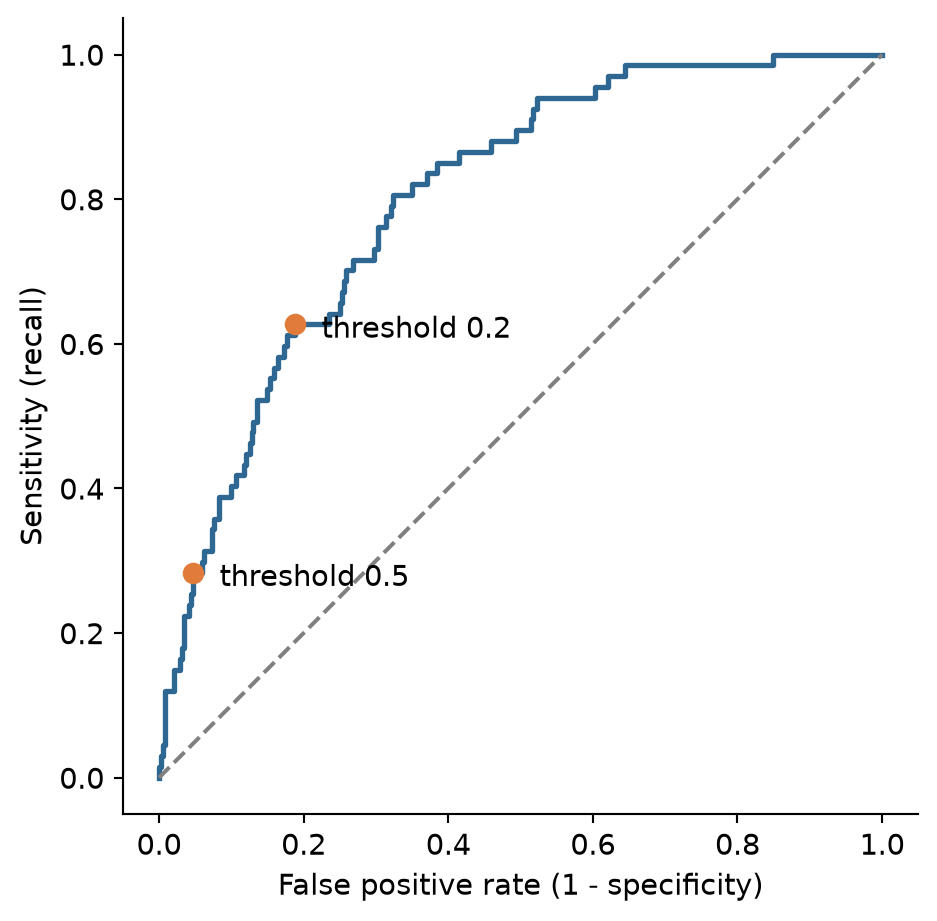
A table makes the trade-off concrete. For several thresholds, it shows the share of students flagged, and the resulting recall, precision, and specificity:
threshold_rows = []
for t in [0.5, 0.4, 0.3, 0.2, 0.15, 0.1]:
    flags = (cv_predictions >= t).astype(int)
    tn_c, fp_c, fn_c, tp_c = confusion_matrix(y_train, flags, labels=[0, 1]).ravel()
    threshold_rows.append({
        'threshold': t,
        'flagged': flags.mean(),
        'recall': tp_c / (tp_c + fn_c),
        'precision': tp_c / (tp_c + fp_c) if (tp_c + fp_c) > 0 else 0,
        'specificity': tn_c / (tn_c + fp_c)
    })

threshold_table = pd.DataFrame(threshold_rows)
threshold_table.round(3)| threshold | flagged | recall | precision | specificity | |
|---|---|---|---|---|---|
| 0 | 0.50 | 0.084 | 0.284 | 0.500 | 0.950 |
| 1 | 0.40 | 0.124 | 0.358 | 0.429 | 0.916 |
| 2 | 0.30 | 0.193 | 0.522 | 0.402 | 0.864 |
| 3 | 0.20 | 0.260 | 0.627 | 0.359 | 0.804 |
| 4 | 0.15 | 0.322 | 0.687 | 0.317 | 0.742 |
| 5 | 0.10 | 0.420 | 0.821 | 0.291 | 0.650 |
12.8.1 Costs of the two errors
Moving the threshold trades one error for the other, so the choice depends on how much each error costs. The costs are not statistical quantities; they are judgements about consequences, and they should be made explicitly. Suppose the counselling service judges that missing a student who is at risk is ten times as costly as an unnecessary conversation. The total cost of each threshold can then be calculated from the cross-validated predictions:
cost_miss        = 10   # a student at risk who is not contacted
cost_false_alarm = 1    # an unnecessary conversation

cost_rows = []
for t in np.arange(0.02, 0.62, 0.02):
    misses = np.sum((cv_predictions < t) & (y_train == 1))
    false_alarms = np.sum((cv_predictions >= t) & (y_train == 0))
    total_cost = cost_miss * misses + cost_false_alarm * false_alarms
    cost_rows.append({
        'threshold': round(t, 2),
        'misses': misses,
        'false_alarms': false_alarms,
        'flagged': np.mean(cv_predictions >= t),
        'total_cost': total_cost
    })

cost_curve = pd.DataFrame(cost_rows)
best_cost = cost_curve.loc[cost_curve['total_cost'].idxmin()]
best_cost
threshold 0.040000
misses 4.000000
false_alarms 209.000000
flagged 0.604444
total_cost 249.000000
Name: 1, dtype: float64fig, ax = plt.subplots(figsize=(6, 3.6))
ax.plot(cost_curve['threshold'], cost_curve['total_cost'], color='#2f6793', linewidth=2)
ax.scatter(best_cost['threshold'], best_cost['total_cost'], color='#e07b39', s=60, zorder=5)
ax.set_xlabel('Threshold')
ax.set_ylabel('Total cost (arbitrary units)')
plt.show()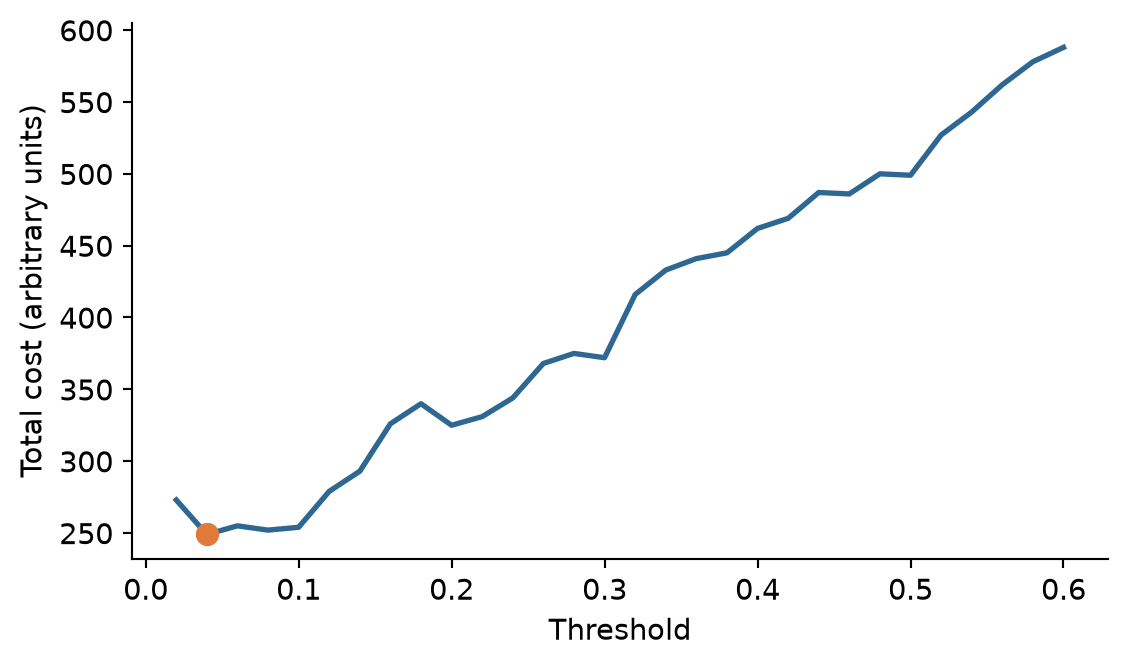
With these costs, the cheapest threshold is about 0.04 to 0.10. A simple rule from decision theory points in the same direction: when the predicted probabilities are accurate, the cost-minimising threshold is the cost of a false alarm divided by the sum of the two costs, here \(1 / (1 + 10) \approx 0.09\). The two do not match exactly. The rule assumes perfectly accurate probabilities, and the cost curve is estimated from limited at-risk students, so its minimum is a broad basin. Both approaches agree on what matters for the decision: with these costs, the threshold belongs far below 0.5. Different costs give different thresholds. If a false alarm carried a real cost, such as a letter that stigmatised the student, the threshold would rise; if missing a student carried a greater one, it would fall further.
The costs, and therefore the threshold, are a research decision with an ethical side. They should be set with the people who will use the model, stated in the thesis, and, where the consequences are serious, examined for their effects on different groups of students.
Practical limits matter as well. The counselling service cannot talk to every student the cost analysis would flag, and after discussing the table with Elaf it settles on a threshold of 0.2: the model then flags about 26% of students, finds about 63% of those at risk, and about 36% of the students it flags are truly at risk. Only now is the chosen threshold applied to the test students:
flags_test = (y_prob >= 0.2).astype(int)

cm_test_02 = pd.DataFrame(
    confusion_matrix(y_test, flags_test, labels=[1, 0]),
    index=['Truly Yes', 'Truly No'],
    columns=['Pred Yes', 'Pred No']
)
cm_test_02| Pred Yes | Pred No | |
|---|---|---|
| Truly Yes | 17 | 6 |
| Truly No | 29 | 98 |
tn_t, fp_t, fn_t, tp_t = confusion_matrix(y_test, flags_test, labels=[0, 1]).ravel()

test_metrics_02 = pd.DataFrame({
    '.metric': ['accuracy', 'sensitivity', 'specificity', 'precision', 'f_meas'],
    '.estimate': [
        accuracy_score(y_test, flags_test),
        recall_score(y_test, flags_test),
        tn_t / (tn_t + fp_t),
        precision_score(y_test, flags_test),
        f1_score(y_test, flags_test)
    ]
})
test_metrics_02.round(3)| .metric | .estimate | |
|---|---|---|
| 0 | accuracy | 0.767 |
| 1 | sensitivity | 0.739 |
| 2 | specificity | 0.772 |
| 3 | precision | 0.370 |
| 4 | f_meas | 0.493 |
On new students, the model now finds 17 of the 23 at risk instead of 8, while flagging 46 students in all. About one flagged student in three is truly at risk. The test numbers are in close agreement with the cross-validated estimates. Accuracy has fallen, and it does not matter: accuracy was never the goal.
ImportantReport the threshold
Sensitivity, specificity, precision, and F1 all depend on the threshold, so a paper that reports them must say which threshold was used, and why. The AUC does not depend on the threshold, which is why it is the standard measure for comparing models, and the threshold-dependent measures are the ones for describing how a model will be used.
12.9 Imbalanced outcomes
When one outcome is rare, as considering dropout is, models tend to predict the common one. Besides moving the threshold, there are two other common remedies. Resampling changes the training data so that the classes are balanced: upsampling repeats rare-class students, downsampling drops common-class students, and SMOTE creates new, artificial rare-class students between existing ones. Class weights instead make mistakes on the rare class count more when the model is fitted, and scikit-learn models support them directly via class_weight='balanced':
balanced_pipe = Pipeline([
    ('prep', dropout_recipe),
    ('model', LogisticRegression(class_weight='balanced', random_state=2026))
])

balanced_cv = cross_validate(
    balanced_pipe, X_train, y_train, cv=dropout_folds,
    scoring=['roc_auc', 'recall', 'precision']
)

pd.DataFrame({
    '.metric': ['roc_auc', 'sensitivity', 'precision'],
    'mean': [
        balanced_cv['test_roc_auc'].mean(),
        balanced_cv['test_recall'].mean(),
        balanced_cv['test_precision'].mean()
    ]
}).round(3)| .metric | mean | |
|---|---|---|
| 0 | roc_auc | 0.805 |
| 1 | sensitivity | 0.710 |
| 2 | precision | 0.324 |
With the usual 0.5 threshold, the balanced model has a sensitivity of about 71%, far higher than the unweighted default (28%). But its AUC, 0.81, has not improved. Weighting the classes did not make the model better at telling students apart; it pushed all the predicted probabilities upwards, which has much the same effect as lowering the threshold. That is often how it works out, and for a model that produces probabilities, choosing the threshold directly is simpler and keeps the probabilities meaningful (after reweighting or upsampling, an output score of 0.6 no longer corresponds to a 60% empirical rate). Class balancing is most useful for models that do not produce calibrated probabilities, and when the rare class is very rare.
WarningDoes the model work equally well for everyone?
Among the test students, the model with a threshold of 0.2 finds similar proportions of at-risk women and at-risk men; but with only 23 at-risk students in the test set, subtle subgroup differences can be hard to detect. Before a model like this is deployed, its sensitivity and precision should be checked for each demographic and academic group that matters (gender, faculty, full- and part-time study) on as much data as possible, as Chapter 11 recommended. A threshold that works well on average can still miss one group of students much more often than another.
12.10 Chapter review
12.10.1 Summary
- A decision tree classifies by a series of yes-or-no questions. Trees are easy to explain and need no normalisation, but a single tree is unstable and overfits easily.
- A random forest averages hundreds of trees grown on bootstrap samples with random subsets of predictors. Permutation importance shows which predictors it relies on.
- k-nearest neighbours classifies by the vote of the \(k\) most similar training cases; it needs normalised predictors, and \(k\) must be tuned.
- A support vector machine separates the classes with the widest possible margin; kernels allow curved boundaries.
- Compare models with cross-validation on the same folds. On the wellbeing data, with its smooth pattern, logistic regression predicts as well as any flexible model.
- The confusion matrix counts true and false positives and negatives. Sensitivity (recall) is the share of positives found; precision is the share of flagged cases that are positive; F1 balances the two.
- The threshold turns probabilities into decisions. Choose it from the costs of the two errors and the practical limits of its use, using cross-validated predictions, and report it.
- For imbalanced outcomes, moving the threshold, resampling, and class weights all shift the balance between recall and precision; resampling rarely improves the AUC.
12.10.2 Key terms
Decision tree, node, leaf, Gini impurity, random forest, bootstrap sample, ensemble, max_features, permutation importance, k-nearest neighbours, distance, support vector machine, margin, support vector, kernel, radial basis function, cross-validation comparison, threshold, confusion matrix, true positive, false positive, true negative, false negative, sensitivity, recall, specificity, precision, F1 score, ROC curve, misclassification cost, upsampling, downsampling, SMOTE, class weights.
12.11 Exercises
The playground has these and more, with hints and solutions.
- Draw the decision tree for the wellbeing data with
max_depth = 2. Name the predictors it uses, and explain the tree in plain words, as you would to a counsellor. - Tune the random forest’s
max_featuresover[2, 5, 10]with cross-validation, and compare the best value with the default. - Extend the k-NN grid to
n_neighbors = [81, 161, 301], describe what happens to the AUC, and explain what happens to a k-NN model as \(k\) approaches the number of training students. - Using the tiny example’s confusion matrix (Table 12.1), calculate the F1 score yourself from precision and recall (\(F_1 = 2 \times \text{precision} \times \text{recall} / (\text{precision} + \text{recall})\)).
- Suppose the counselling service can only contact 10% of new students. Using
threshold_table, recommend a threshold and report the recall and precision it would give. - Fit a logistic regression model with downsampling or compare
class_weight='balanced'with the unweighted baseline, and compare the sensitivity and AUC. - Repeat the cost analysis with a cost of 3 for a missed student instead of 10. Report the new cheapest threshold, and compare it with the decision-theory rule.
12.12 Further reading
- An Introduction to Statistical Learning: with Applications in Python (James et al. 2023) explains trees, random forests, and support vector machines, with clear illustrations of how each draws its boundaries.
- Python Data Science Handbook (VanderPlas 2016) provides clear tutorials on scikit-learn classifiers and hyperparameter tuning.
- Breiman’s original paper on random forests (Breiman 2001) is still readable and explains why averaging many trees works.
References
Breiman, Leo. 2001. “Random Forests.” Machine Learning 45 (1): 5–32. https://doi.org/10.1023/A:1010933404324.
Horst, Allison M., Alison Presmanes Hill, and Kristen B. Gorman. 2022. “Palmer Archipelago Penguins Data in the Palmerpenguins R Package: An Alternative to Anderson’s Irises.” The R Journal 14 (1): 244–54. https://doi.org/10.32614/RJ-2022-020.
James, Gareth, Daniela Witten, Trevor Hastie, Robert Tibshirani, and Jonathan Taylor. 2023. An Introduction to Statistical Learning: With Applications in Python. Springer. https://doi.org/10.1007/978-3-031-38747-0.
VanderPlas, Jake. 2016. Python Data Science Handbook: Essential Tools for Working with Data. O’Reilly Media. https://jakevdp.github.io/PythonDataScienceHandbook/.