# Prepare composite scores from the questionnaire
q = questionnaire.copy()
q["stress_4"] = 6 - q["stress_4"]  # reverse-scored item

scores = pd.DataFrame({
    "student_id": q["student_id"],
    "stress": q.filter(like="stress_").mean(axis=1),
    "support": q.filter(like="support_").mean(axis=1),
})

# Merge with student background and first-semester data
first_sem = semesters.query("semester == 1")
study = students.merge(scores, on="student_id").merge(first_sem, on="student_id")
study["employment"] = study["employment"].fillna("None")
students["employment"] = students["employment"].fillna("None")8 ANOVA and Regression
Most research questions involve more than two groups or more than one explanation. A researcher may want to compare five faculties rather than two, to know which of several factors go together with better grades, or to find what makes a student more likely to consider leaving a programme. Each of these questions asks, in one way or another, how much of the variation in an outcome can be traced to other variables. Students differ in stress, grades, and wellbeing; the task is to find which part of those differences is connected with faculty, sleep, or support, and which part remains unexplained.
This chapter introduces the two families of methods built on that idea, which together are probably the most widely used tools in quantitative research. Analysis of variance (ANOVA) compares the averages of three or more groups by splitting variation into the part between groups and the part within them. Regression models how an outcome depends on one or more predictors: linear regression for numeric outcomes such as GPA, and logistic regression for yes-or-no outcomes such as considering dropout. In the study, they answer three research questions: whether stress differs between faculties and study modes (RQ4), what explains students’ grades (RQ5), and who considers dropping out (RQ9).
TipBy the end of this chapter you will be able to
- Explain how ANOVA partitions variation into between-group and within-group parts, and what the F statistic compares.
- Compare three or more groups with one-way ANOVA, and find which groups differ with post-hoc tests.
- Analyse two grouping factors and their interaction with two-way ANOVA.
- Explain regression as a model of the average outcome at each value of the predictors, and fit and interpret simple and multiple linear regression models, including categorical predictors.
- Use regression to separate a real effect from a confounder, and model curves and interactions.
- Recognise violated assumptions in diagnostic plots.
- Fit and interpret a logistic regression model in terms of odds ratios and probabilities.
- Report ANOVA and regression results in a thesis.
The chapter uses each student’s first-semester records, their background information, and their questionnaire scores, calculated as in Chapter 3:
8.1 One-way ANOVA
The first question is whether stress differs between the five faculties. One approach would be a t-test for every pair of faculties, but that is 10 tests. Chapter 7 showed that each test has a 5% chance of a false alarm, and that the risks accumulate: across 10 independent tests, the chance of at least one false alarm is about 40%. Analysis of variance (ANOVA) avoids the problem by asking one question first: whether the faculty averages differ at all.
8.1.1 Partitioning variation
ANOVA compares two kinds of variation. Stress scores for three small groups show the idea:
group_scores = pd.DataFrame({
    "group": ["A"] * 4 + ["B"] * 4 + ["C"] * 4,
    "stress": [2.5, 3.0, 2.8, 3.1,   3.4, 3.8, 3.5, 3.9,   2.9, 3.3, 3.0, 3.4]
})
group_scores.groupby("group")["stress"].mean().reset_index()| group | stress | |
|---|---|---|
| 0 | A | 2.85 |
| 1 | B | 3.65 |
| 2 | C | 3.15 |
Figure 8.1 draws the twelve scores, the average of each group, and the overall average. The group averages differ from the overall average: that is variation between groups. The scores also differ from their own group’s average: that is variation within groups.
group_means = group_scores.groupby("group")["stress"].mean()
grand_mean = group_scores["stress"].mean()

fig, ax = plt.subplots(figsize=(5.5, 3.6))
ax.axhline(grand_mean, color="grey", linestyle="--", linewidth=1.2, label="Grand Mean")

x_map = {"A": 0, "B": 1, "C": 2}
offsets = [-0.09, -0.03, 0.03, 0.09] * 3

for i, row in group_scores.iterrows():
    ax.scatter(x_map[row["group"]] + offsets[i], row["stress"], color="#1d588c", s=45, zorder=3)

for g, mean_val in group_means.items():
    ax.hlines(mean_val, x_map[g] - 0.25, x_map[g] + 0.25, color="black", linewidth=2.5, zorder=4)

ax.set_xticks([0, 1, 2])
ax.set_xticklabels(["A", "B", "C"])
ax.set_xlabel("Group")
ax.set_ylabel("Stress score")
plt.tight_layout()
plt.show()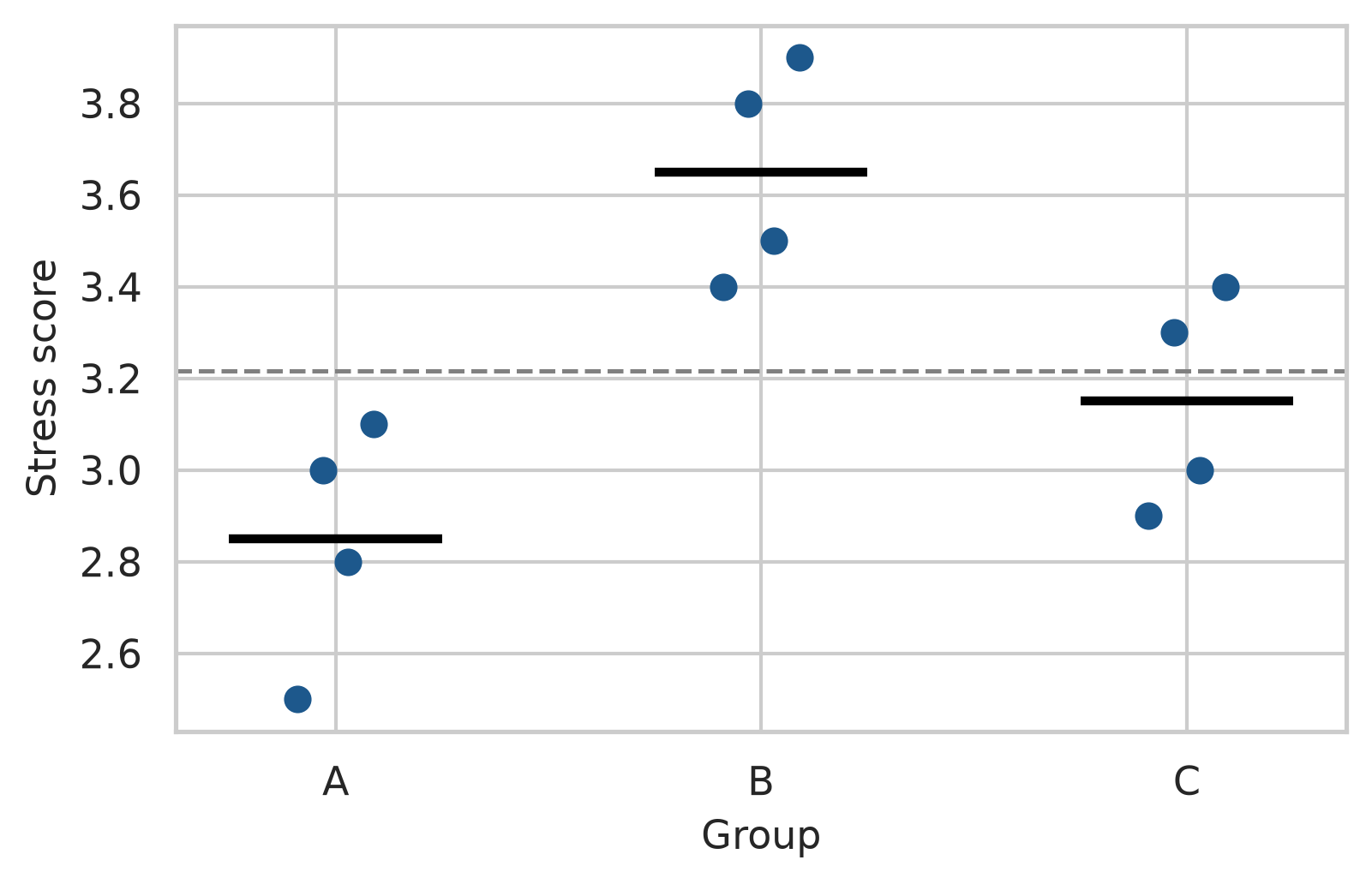
If the groups really come from populations with the same average, the between-group variation should be no larger than the within-group variation would lead one to expect: group averages always differ a little by chance. ANOVA’s F statistic is the ratio of the two:
\[ F = \frac{\text{variation between groups}}{\text{variation within groups}} \]
An F close to 1 means that the group averages differ no more than chance would produce; a large F means that they differ more. In Python, we can fit a linear model using statsmodels.formula.api.ols and compute the ANOVA table using anova_lm:
import statsmodels.api as sm
import statsmodels.formula.api as smf

model_group = smf.ols("stress ~ C(group)", data=group_scores).fit()
anova_table = sm.stats.anova_lm(model_group, typ=1)
print(anova_table)
df sum_sq mean_sq F PR(>F)
C(group) 2.0 1.306667 0.653333 10.690909 0.004191
Residual 9.0 0.550000 0.061111 NaN NaNThe p-value is small (\(p = 0.004\)): these three groups differ significantly.
The ratio matters more than the size of the differences between averages. The next code keeps the three group averages exactly as they are, but places the scores either close to their averages or far from them, and calculates F each time:
offsets = np.tile([-0.3, -0.1, 0.1, 0.3], 3)
group_avg = np.repeat(group_means.values, 4)

tight = group_scores.copy()
tight["stress"] = group_avg + 0.5 * offsets

wide = group_scores.copy()
wide["stress"] = group_avg + 4.0 * offsets

f_tight = sm.stats.anova_lm(smf.ols("stress ~ C(group)", data=tight).fit(), typ=1)["F"].iloc[0]
f_wide = sm.stats.anova_lm(smf.ols("stress ~ C(group)", data=wide).fit(), typ=1)["F"].iloc[0]

print(f"tight: {f_tight:.2f}, wide: {f_wide:.2f}")
tight: 39.20, wide: 0.61The group averages are identical in both versions, yet F is large when the scores cluster tightly around their averages and small when they spread widely. Differences of about half a point between groups are convincing when students within a group hardly differ, and unremarkable when they differ by more than two points. This is the whole logic of ANOVA, and it is why group averages should never be compared without looking at the spread within groups (Chapter 4).
8.1.2 The student wellbeing data
The data comes first. Figure 8.2 shows stress in each faculty.
fig, ax = plt.subplots(figsize=(7, 3.8))
sns.boxplot(
    data=study,
    x="faculty",
    y="stress",
    color="#eaf0f7",
    width=0.5,
    linewidth=1.0,
    ax=ax
)
ax.set_xlabel("")
ax.set_ylabel("Stress score (1 to 5)")
plt.xticks(rotation=15)
plt.tight_layout()
plt.show()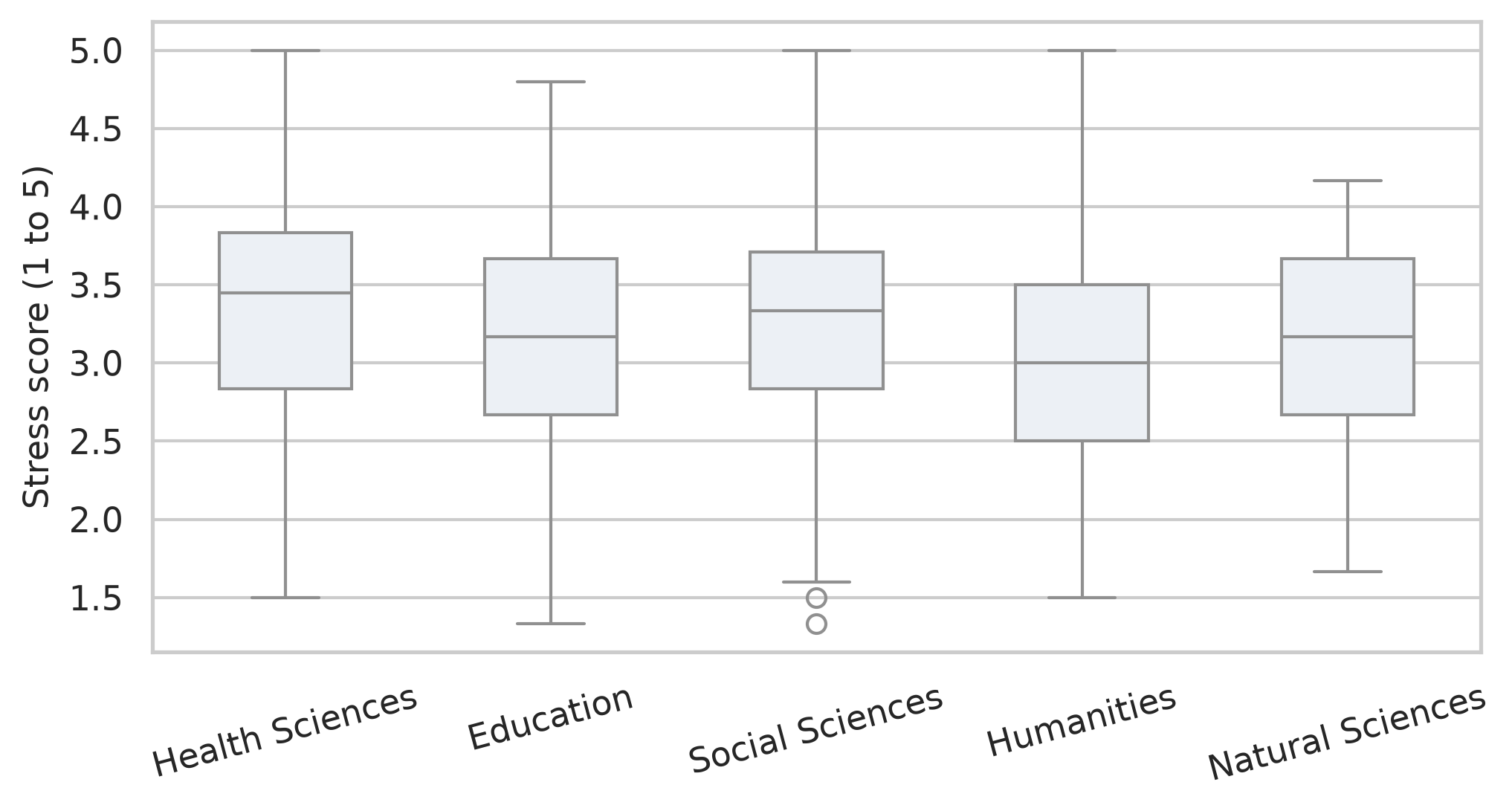
The faculties overlap a lot, but Health Sciences sits a little higher and Humanities a little lower. The ANOVA tests whether these differences exceed what chance would produce:
stress_anova = smf.ols("stress ~ C(faculty)", data=study).fit()
anova_summary = sm.stats.anova_lm(stress_anova, typ=1)
print(anova_summary)
df sum_sq mean_sq F PR(>F)
C(faculty) 4.0 8.715036 2.178759 4.152488 0.002516
Residual 595.0 312.189093 0.524688 NaN NaNThe p-value is \(0.003\), so the faculties do differ in stress. The size of the difference is measured by eta squared (\(\eta^2\)), the share of all the variation in stress that lies between faculties:
ss_between = anova_summary.loc["C(faculty)", "sum_sq"]
ss_total = anova_summary["sum_sq"].sum()
eta_sq = ss_between / ss_total
print(f"Eta squared: {eta_sq:.3f}")
Eta squared: 0.027Only about 3% (\(\eta^2 \approx 0.027\)) of the differences in stress between students have to do with their faculty; the rest is about individual student differences. By common guidelines, an \(\eta^2\) of 0.01 is small, 0.06 medium, and 0.14 large (Cohen 1988), so this is a real but small effect. For the research question, the answer is that faculty matters, but knowing a student’s faculty says very little about how stressed that student is.
8.1.3 Post-hoc tests
ANOVA says that the faculties differ, but not which ones. Post-hoc tests compare every pair while keeping the family-wise error rate at 5%. Tukey’s Honest Significant Difference (HSD) test is the standard choice, implemented in statsmodels:
from statsmodels.stats.multicomp import pairwise_tukeyhsd

tukey = pairwise_tukeyhsd(endog=study["stress"], groups=study["faculty"], alpha=0.05)
print(tukey)
Multiple Comparison of Means - Tukey HSD, FWER=0.05
========================================================================
group1 group2 meandiff p-adj lower upper reject
------------------------------------------------------------------------
Education Health Sciences 0.1943 0.1368 -0.0338 0.4224 False
Education Humanities -0.143 0.5615 -0.4036 0.1175 False
Education Natural Sciences -0.0588 0.975 -0.3265 0.209 False
Education Social Sciences 0.1222 0.6535 -0.1236 0.3679 False
Health Sciences Humanities -0.3373 0.0035 -0.5959 -0.0788 True
Health Sciences Natural Sciences -0.2531 0.0707 -0.5189 0.0127 False
Health Sciences Social Sciences -0.0721 0.9275 -0.3158 0.1715 False
Humanities Natural Sciences 0.0843 0.9352 -0.2098 0.3784 False
Humanities Social Sciences 0.2652 0.0636 -0.009 0.5395 False
Natural Sciences Social Sciences 0.1809 0.3974 -0.1002 0.462 False
------------------------------------------------------------------------Each row compares two faculties: the difference in average stress (meandiff), its 95% confidence interval, an adjusted p-value (p-adj), and whether to reject the null hypothesis (reject). Only one comparison is significant: Health Sciences students are more stressed than Humanities students, by about 0.34 points on the 1-to-5 scale (\(p = 0.004\)). All other pair comparisons have adjusted p-values well above 0.05.
8.1.4 Assumptions of ANOVA
ANOVA makes the same assumptions as the t-test: independent observations, roughly normal data within each group (or large groups), and similar spread in each group (homoscedasticity). The spread can be checked with Levene’s test in scipy.stats:
faculty_groups = [group["stress"].dropna() for _, group in study.groupby("faculty")]
stat_levene, p_levene = stats.levene(*faculty_groups)
print(f"Levene's test: F = {stat_levene:.3f}, p = {p_levene:.3f}")
Levene's test: F = 0.943, p = 0.439The p-value is large (\(p = 0.439\)), so there is no evidence that the spread differs between faculties. When the assumptions fail, the Kruskal-Wallis test is the non-parametric alternative, comparing ranks instead of averages:
stat_kw, p_kw = stats.kruskal(*faculty_groups)
print(f"Kruskal-Wallis test: H = {stat_kw:.3f}, p = {p_kw:.4f}")
Kruskal-Wallis test: H = 15.460, p = 0.0038It agrees with the ANOVA (\(p = 0.004\)).
8.2 Two-way ANOVA
Wellbeing might depend on the programme (Master’s or PhD), on study mode (full-time or part-time), or on a combination of both. A two-way ANOVA examines all three possibilities at once. The main effect of programme is the difference between Master’s and PhD students on average, and the main effect of study mode is the difference between full-time and part-time students. The interaction asks whether the effect of study mode depends on the programme: part-time study might, for example, be harder on PhD students than on Master’s students.
An interaction plot shows the group averages as lines. If the lines are parallel, there is no interaction: the effect of study mode is the same in both programmes.
wb_summary = study.groupby(["programme", "study_mode"])["wellbeing"].mean().reset_index()

fig, ax = plt.subplots(figsize=(6, 3.8))
sns.lineplot(
    data=wb_summary,
    x="programme",
    y="wellbeing",
    hue="study_mode",
    marker="o",
    markersize=8,
    linewidth=2,
    palette=["#1d588c", "#b4762e"],
    ax=ax
)
ax.set_xlabel("")
ax.set_ylabel("Average wellbeing")
ax.legend(title="Study mode")
plt.tight_layout()
plt.show()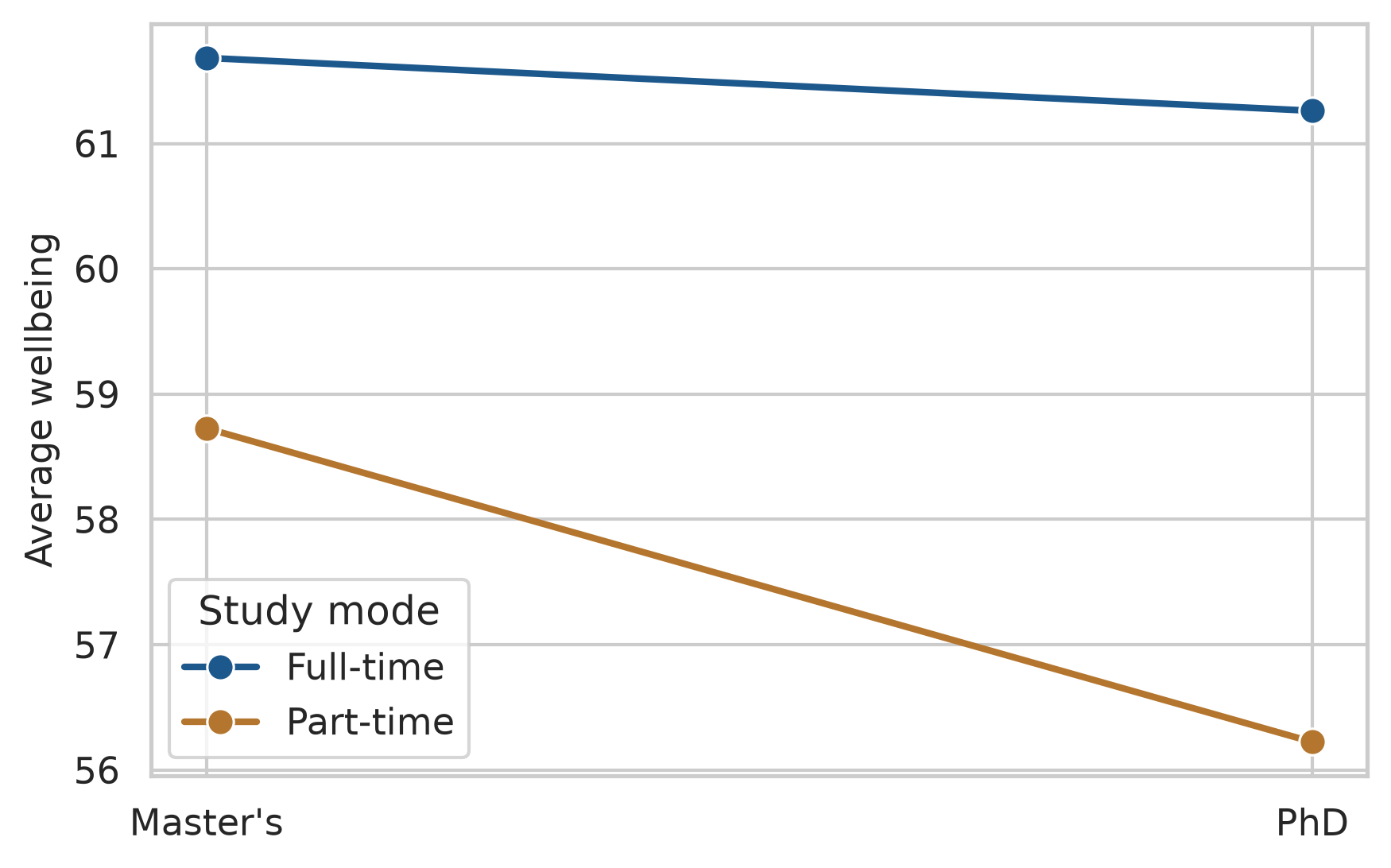
Part-time students have lower wellbeing in both programmes, and the lines are close to parallel. In the formula, C(programme) * C(study_mode) asks for both main effects and their interaction:
model_2way = smf.ols("wellbeing ~ C(programme) * C(study_mode)", data=study).fit()
aov_2way = sm.stats.anova_lm(model_2way, typ=2)
print(aov_2way)
sum_sq df F PR(>F)
C(programme) 156.553032 1.0 1.105982 0.293383
C(study_mode) 1640.156694 1.0 11.587025 0.000709
C(programme):C(study_mode) 118.619402 1.0 0.837997 0.360341
Residual 84364.487300 596.0 NaN NaNStudy mode has a clear effect (\(F \approx 11.6, p < .001\)). Programme does not (\(p = 0.29\)), and neither does the interaction (\(p = 0.36\)): part-time study lowers wellbeing by about the same amount whether a student is doing a Master’s or a PhD. When an interaction is significant, it should be interpreted before the main effects, because it means that no single “effect of study mode” describes everyone.
8.3 Linear regression
ANOVA compares groups. Regression goes further: it models how an outcome changes with one or more predictors, which can be numeric or categorical. It is the workhorse of quantitative research, and ANOVA is in fact a special case of it.
8.3.1 The regression line
At its heart, regression describes the average outcome for given values of the predictors. For sleep and GPA, the question is what the average GPA is among students who sleep 5 hours, among those who sleep 6 hours, and so on. These averages can be calculated directly, by grouping students into half-hour bands of sleep:
sleep_bands = (
    study.dropna(subset=["sleep_hours"])
    .assign(sleep_band=lambda d: (d["sleep_hours"] * 2).round() / 2)
    .groupby("sleep_band")
    .agg(mean_gpa=("gpa", "mean"), students=("student_id", "count"))
    .reset_index()
    .sort_values("sleep_band")
)
sleep_bands.head()| sleep_band | mean_gpa | students | |
|---|---|---|---|
| 0 | 3.5 | 2.882000 | 5 |
| 1 | 4.0 | 2.901250 | 8 |
| 2 | 4.5 | 2.939231 | 13 |
| 3 | 5.0 | 3.022340 | 47 |
| 4 | 5.5 | 3.021385 | 65 |
Figure 8.4 places these averages over the individual students, together with a straight regression line.
fig, ax = plt.subplots(figsize=(6.5, 4))
ax.scatter(study["sleep_hours"], study["gpa"], alpha=0.2, color="#666666", label="Students")
sns.regplot(
    data=study,
    x="sleep_hours",
    y="gpa",
    scatter=False,
    color="#1d588c",
    line_kws={"linewidth": 2},
    ax=ax
)
ax.scatter(
    sleep_bands["sleep_band"],
    sleep_bands["mean_gpa"],
    s=sleep_bands["students"] * 1.5,
    color="#b2182b",
    zorder=4,
    label="Band averages"
)
ax.set_xlabel("Hours of sleep per night")
ax.set_ylabel("GPA")
plt.tight_layout()
plt.show()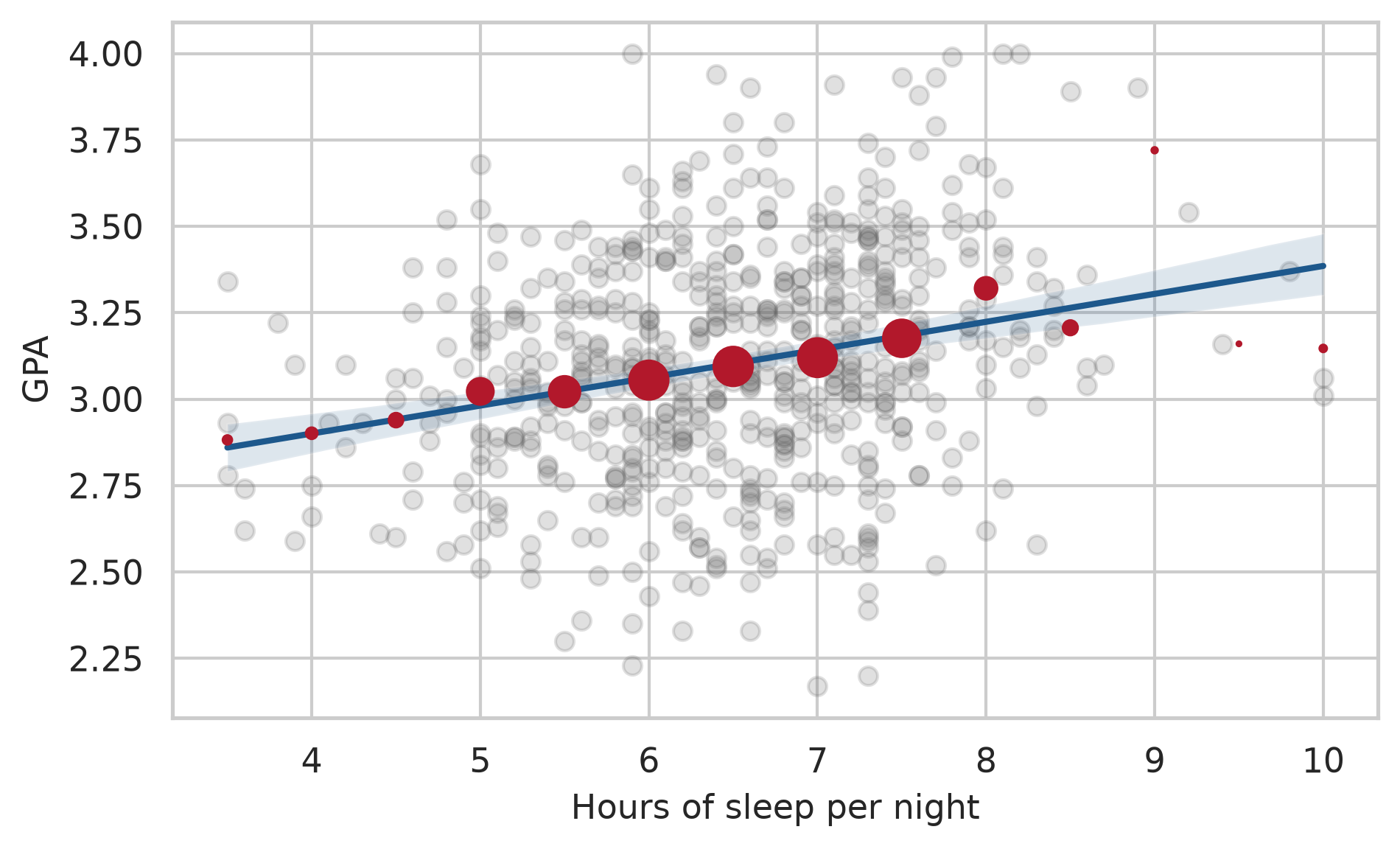
The band averages rise gently with sleep, and the line passes close to them, especially where there are many students. The regression line is a smooth summary of these conditional averages: it assumes that the average GPA changes by the same amount for each extra hour of sleep, and estimates that amount from all the students at once. The spread of the grey points around the line is what the model does not explain.
A small example shows the calculation. Here are five students’ sleep and GPA:
five = pd.DataFrame({
    "sleep": [5.0, 6.0, 6.5, 7.0, 8.0],
    "gpa":   [2.8, 3.0, 3.2, 3.1, 3.4]
})
Simple linear regression fits the straight line that best describes how GPA changes with sleep:
\[ \text{GPA} = b_0 + b_1 \times \text{sleep} + \text{error} \]
The coefficient \(b_0\) is the intercept, the predicted GPA for a student who sleeps zero hours, and \(b_1\) is the slope, the change in predicted GPA for each extra hour of sleep. “Best” means the line that makes the squared vertical distances between the points and the line, the residuals, as small as possible, a method called least squares. In Python, smf.ols() finds it:
fit_five = smf.ols("gpa ~ sleep", data=five).fit()
print(fit_five.params)
Intercept 1.865
sleep 0.190
dtype: float64Each extra hour of sleep goes with a GPA that is about 0.18 higher. The intercept is where the line would cross zero hours of sleep, which no one does; it is needed to place the line, but it rarely means anything on its own.
8.3.2 The student wellbeing data
For all 600 students, .summary() gives the full results:
gpa_simple = smf.ols("gpa ~ sleep_hours", data=study).fit()
print(gpa_simple.summary())
OLS Regression Results
==============================================================================
Dep. Variable: gpa R-squared: 0.064
Model: OLS Adj. R-squared: 0.063
Method: Least Squares F-statistic: 40.70
Date: Sat, 24 Oct 2026 Prob (F-statistic): 3.57e-10
Time: 00:43:49 Log-Likelihood: -162.94
No. Observations: 594 AIC: 329.9
Df Residuals: 592 BIC: 338.7
Df Model: 1
Covariance Type: nonrobust
===============================================================================
coef std err t P>|t| [0.025 0.975]
-------------------------------------------------------------------------------
Intercept 2.5771 0.083 30.990 0.000 2.414 2.740
sleep_hours 0.0808 0.013 6.380 0.000 0.056 0.106
==============================================================================
Omnibus: 0.368 Durbin-Watson: 2.045
Prob(Omnibus): 0.832 Jarque-Bera (JB): 0.388
Skew: -0.060 Prob(JB): 0.824
Kurtosis: 2.966 Cond. No. 42.7
==============================================================================
Notes:
[1] Standard Errors assume that the covariance matrix of the errors is correctly specified.The output contains three results that matter for the research question. The coefficients table gives the estimate of each coefficient, its standard error, a t statistic, and a p-value testing whether it is zero. The slope for sleep_hours is about 0.08: each extra hour of sleep goes with a GPA about 0.08 higher, and the p-value (\(p < .001\)) shows that this is not chance. R-squared (\(R^2 = 0.064\)) is the share of the variation in GPA that the model explains; here it is about 6%, so sleep explains about 6% of the differences in GPA. Sleep matters, but it is far from the whole story, as the scatter plot suggested. Finally, the scale estimate (square root of MSE) shows the typical residual distance is about 0.32 grade points.
8.3.3 Multiple regression
Many things affect grades at once. Multiple regression includes several predictors in one model:
gpa_model = smf.ols("gpa ~ sleep_hours + study_hours + stress + support", data=study).fit()
print(gpa_model.summary())
OLS Regression Results
==============================================================================
Dep. Variable: gpa R-squared: 0.252
Model: OLS Adj. R-squared: 0.247
Method: Least Squares F-statistic: 49.14
Date: Sat, 24 Oct 2026 Prob (F-statistic): 1.25e-35
Time: 00:43:49 Log-Likelihood: -95.042
No. Observations: 587 AIC: 200.1
Df Residuals: 582 BIC: 222.0
Df Model: 4
Covariance Type: nonrobust
===============================================================================
coef std err t P>|t| [0.025 0.975]
-------------------------------------------------------------------------------
Intercept 2.1374 0.145 14.712 0.000 1.852 2.423
sleep_hours 0.1060 0.014 7.487 0.000 0.078 0.134
study_hours 0.0069 0.001 6.270 0.000 0.005 0.009
stress -0.0835 0.018 -4.685 0.000 -0.119 -0.049
support 0.1107 0.017 6.632 0.000 0.078 0.144
==============================================================================
Omnibus: 1.577 Durbin-Watson: 2.062
Prob(Omnibus): 0.455 Jarque-Bera (JB): 1.661
Skew: -0.106 Prob(JB): 0.436
Kurtosis: 2.850 Cond. No. 389.
==============================================================================
Notes:
[1] Standard Errors assume that the covariance matrix of the errors is correctly specified.Each coefficient now means the change in predicted GPA for a one-unit increase in that predictor, holding the other predictors constant. Among students with the same study hours, stress, and support, each extra hour of sleep goes with a GPA about 0.11 higher. Each extra hour of study per week adds about 0.007 points, each point of stress lowers GPA by about 0.08 points, and each point of supervisor support raises it by about 0.11 points. All four are significant (\(p < .001\)).
Together, the four predictors explain about 25% (\(R^2 = 0.252\)) of the variation in GPA. That may sound modest, but grades depend on many things no survey measures, from ability to luck on exam day. In social and educational research, models that explain a quarter of the variation are common and useful. The adjusted R-squared (\(0.247\)) is slightly lower, because it corrects for the number of predictors: adding any predictor, even a useless one, raises R-squared a little, but only a useful one raises the adjusted version.
The output shows \(N = 587\) (from the 600 original students, 13 had missing values in at least one variable). statsmodels automatically drops missing observations from the regression. The number of students each model is based on should always be reported in your thesis.
8.3.4 Categorical predictors
Categorical variables can be predictors too. Gender, for example, can be added to the model to see whether it matters once the other predictors are taken into account:
gpa_gender = smf.ols("gpa ~ sleep_hours + study_hours + stress + support + C(gender)", data=study).fit()
print(gpa_gender.summary().tables[1])
=====================================================================================
coef std err t P>|t| [0.025 0.975]
-------------------------------------------------------------------------------------
Intercept 2.1237 0.147 14.422 0.000 1.835 2.413
C(gender)[T.Male] 0.0138 0.024 0.580 0.562 -0.033 0.061
sleep_hours 0.1066 0.014 7.505 0.000 0.079 0.134
study_hours 0.0070 0.001 6.292 0.000 0.005 0.009
stress -0.0828 0.018 -4.633 0.000 -0.118 -0.048
support 0.1105 0.017 6.614 0.000 0.078 0.143
=====================================================================================Python turns a categorical predictor into a comparison with a reference category, by default the first in alphabetical order: here Female. The coefficient C(gender)[T.Male] is the difference between men and women, holding everything else constant. It is tiny (\(0.014\)) and far from significant (\(p = 0.56\)): there is no evidence that gender affects GPA. That is a finding too, and worth reporting.
For a variable with more categories, such as faculty, C(faculty) compares each category with the reference. A different reference category can be chosen explicitly using Treatment:
from patsy.contrasts import Treatment

gpa_fac = smf.ols("gpa ~ C(faculty, Treatment(reference='Humanities'))", data=study).fit()
print(gpa_fac.summary().tables[1])
=====================================================================================================================================
coef std err t P>|t| [0.025 0.975]
-------------------------------------------------------------------------------------------------------------------------------------
Intercept 3.1435 0.034 93.120 0.000 3.077 3.210
C(faculty, Treatment(reference='Humanities'))[T.Education] -0.0294 0.043 -0.680 0.497 -0.114 0.056
C(faculty, Treatment(reference='Humanities'))[T.Health Sciences] -0.0234 0.043 -0.545 0.586 -0.108 0.061
C(faculty, Treatment(reference='Humanities'))[T.Natural Sciences] -0.0872 0.049 -1.785 0.075 -0.183 0.009
C(faculty, Treatment(reference='Humanities'))[T.Social Sciences] -0.0817 0.046 -1.794 0.073 -0.171 0.008
=====================================================================================================================================8.3.5 Separating an effect from a confounder
Chapters 5 and 6 found that students who take more caffeine have lower GPAs, but also sleep less. Two explanations are possible, and Figure 8.5 draws them. In the first, caffeine itself harms grades. In the second, sleep is a common cause: students who sleep less both drink more coffee and get lower grades, and caffeine has no effect of its own.
flowchart LR
  subgraph "Caffeine as a cause"
    C1[Caffeine] --> G1[GPA]
  end
  subgraph "Sleep as a confounder"
    S2[Sleep] --> C2[Caffeine]
    S2 --> G2[GPA]
    C2 -. "apparent link" .- G2
  end
Regression can tell the two apart, by comparing students who sleep the same amount. Caffeine alone comes first:
fit_caf1 = smf.ols("gpa ~ caffeine_mg", data=study).fit()
print(fit_caf1.summary().tables[1])
===============================================================================
coef std err t P>|t| [0.025 0.975]
-------------------------------------------------------------------------------
Intercept 3.1849 0.022 145.063 0.000 3.142 3.228
caffeine_mg -0.0004 9.24e-05 -4.688 0.000 -0.001 -0.000
===============================================================================Caffeine has a significant negative association with GPA (\(p < .001\)). Sleep is then added to the model:
fit_caf2 = smf.ols("gpa ~ caffeine_mg + sleep_hours", data=study).fit()
print(fit_caf2.summary().tables[1])
===============================================================================
coef std err t P>|t| [0.025 0.975]
-------------------------------------------------------------------------------
Intercept 2.6381 0.124 21.304 0.000 2.395 2.881
caffeine_mg -7.807e-05 0.000 -0.654 0.514 -0.000 0.000
sleep_hours 0.0739 0.017 4.458 0.000 0.041 0.106
===============================================================================Once sleep is held constant, caffeine’s coefficient shrinks from \(-0.0004\) to almost zero (\(-0.00008\)) and is no longer significant (\(p = 0.51\)), while sleep stays strongly significant (\(p < .001\)). Among students who sleep the same amount, caffeine makes no difference to grades. Caffeine looked harmful only because heavy caffeine users sleep less: sleep was a confounder, and the data supports the second explanation.
The general rule is that a confounder is a common cause of the predictor and the outcome. Adjusting for it in a regression compares like with like, students who are the same on the confounder, and removes the misleading part of the association.
ImportantRegression adjusts only for what you include
Regression can remove the effect of a confounder only if you measured it and put it in the model. It cannot adjust for anything you did not measure. That is why, outside a randomised experiment like the workshop, regression shows associations adjusted for the variables in the model, not proof of cause.
8.3.6 Curved relationships
A straight line assumes that every extra hour of study adds the same amount to GPA, which is hard to believe: the difference between 5 and 15 hours a week is probably larger than the difference between 45 and 55. Adding a squared term lets the line curve:
gpa_curve = smf.ols("gpa ~ study_hours + np.power(study_hours, 2)", data=study).fit()
print(gpa_curve.summary().tables[1])
============================================================================================
coef std err t P>|t| [0.025 0.975]
--------------------------------------------------------------------------------------------
Intercept 2.8630 0.054 53.211 0.000 2.757 2.969
study_hours 0.0183 0.004 4.687 0.000 0.011 0.026
np.power(study_hours, 2) -0.0003 6.49e-05 -4.430 0.000 -0.000 -0.000
============================================================================================In the formula, np.power(study_hours, 2) calculates the squared term. The squared term is negative and significant: the line bends downwards. Figure 8.6 shows the shape.
fig, ax = plt.subplots(figsize=(6.5, 4))
sns.regplot(
    data=study,
    x="study_hours",
    y="gpa",
    order=2,
    scatter_kws={"alpha": 0.25, "color": "#666666"},
    line_kws={"color": "#1d588c", "linewidth": 2},
    ax=ax
)
ax.set_xlabel("Study hours per week")
ax.set_ylabel("GPA")
plt.tight_layout()
plt.show()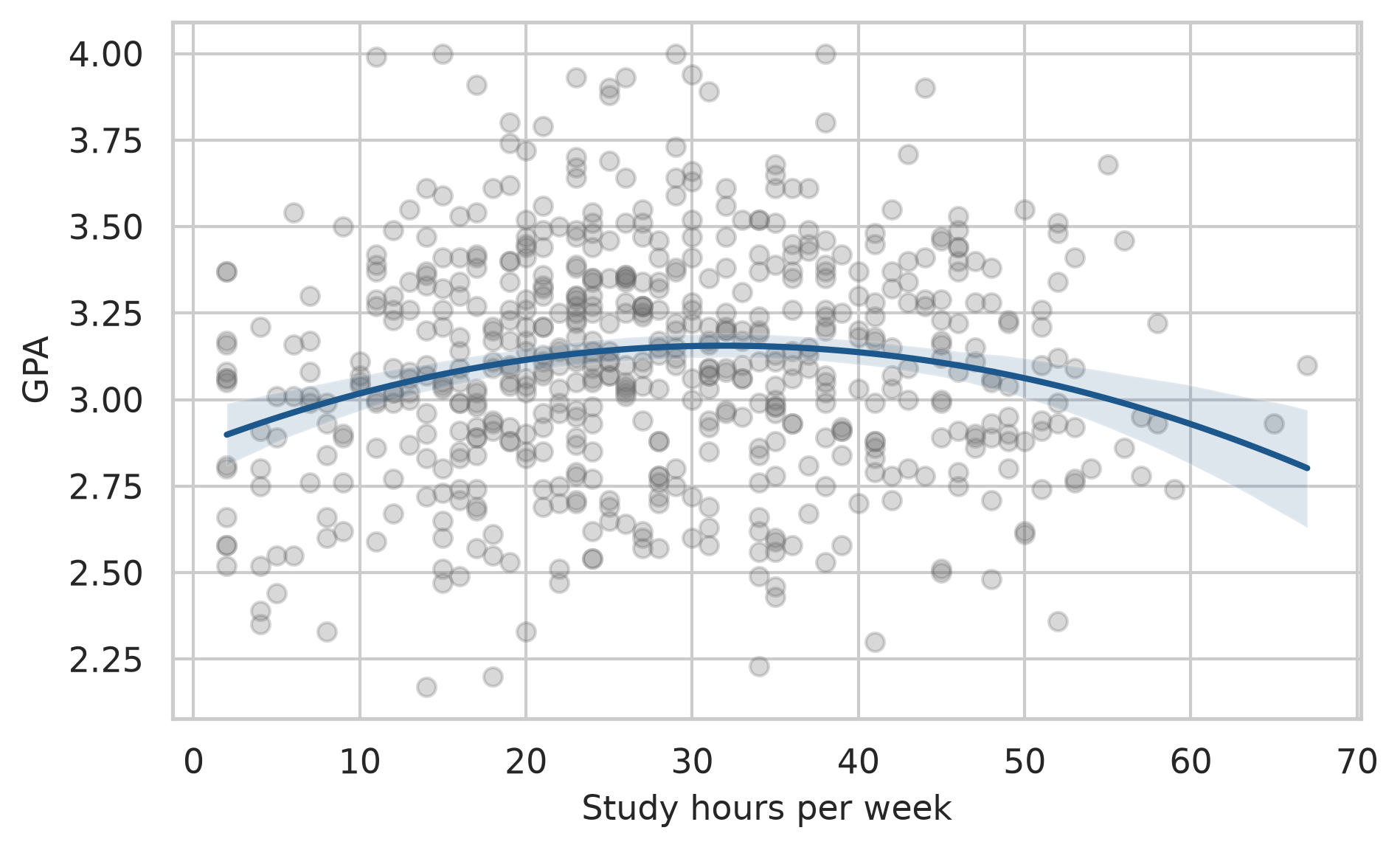
The first hours of study make a real difference; the curve then flattens, and reaches its highest point at about 32 hours a week, beyond which more study brings nothing extra. Economists call this diminishing returns, and it is worth knowing for any student tempted to study all night instead of sleeping.
8.3.7 Interactions
The effect of supervisor support need not be the same for every student. An interaction term lets the effect of one predictor depend on another. In the formula, support_c * C(programme) gives the effect of support, the effect of programme, and how the effect of support differs between programmes. To make the coefficients easier to read, support is first centred: the average is subtracted, so that zero means “average support”:
study["support_c"] = study["support"] - study["support"].mean()
gpa_interaction = smf.ols("gpa ~ support_c * C(programme) + sleep_hours + study_hours", data=study).fit()
print(gpa_interaction.summary().tables[1])
=================================================================================================
coef std err t P>|t| [0.025 0.975]
-------------------------------------------------------------------------------------------------
Intercept 2.1546 0.112 19.207 0.000 1.934 2.375
C(programme)[T.PhD] 0.0117 0.026 0.449 0.654 -0.040 0.063
support_c 0.1021 0.018 5.552 0.000 0.066 0.138
support_c:C(programme)[T.PhD] 0.1342 0.036 3.743 0.000 0.064 0.205
sleep_hours 0.1177 0.014 8.385 0.000 0.090 0.145
study_hours 0.0066 0.001 5.914 0.000 0.004 0.009
=================================================================================================For Master’s students (the reference category), each point of support goes with a GPA about 0.10 higher. The interaction coefficient says that for PhD students the effect is larger, making it about 0.24. Supervisor support matters about 2.3 times as much for PhD students, which makes sense: a PhD depends more heavily on the supervisor.
8.3.8 Model diagnostics
Linear regression assumes that the relationship is linear (or modelled as curved, as above), that the residuals have similar spread everywhere (homoscedasticity), and that they are roughly normal. Violations show up as patterns in a plot of the residuals against the fitted values. It helps to know what those patterns look like before judging a real model, and simulated data can show them:
np.random.seed(10)
x_sim = np.random.uniform(0, 10, 200)

sim_cases = {
    "Assumptions met": 2 + 0.5 * x_sim + np.random.normal(0, 1, 200),
    "Curved": 2 + 0.25 * (x_sim**2) + np.random.normal(0, 1, 200),
    "Spread increases": 2 + 0.5 * x_sim + np.random.normal(0, 0.2 + 0.3 * x_sim, 200)
}

fig, axes = plt.subplots(1, 3, figsize=(8, 3), sharey=True)

for ax, (title, y_sim) in zip(axes, sim_cases.items()):
    fit = sm.OLS(y_sim, sm.add_constant(x_sim)).fit()
    ax.scatter(fit.fittedvalues, fit.resid, alpha=0.5, s=15, color="#1d588c")
    ax.axhline(0, color="red", linestyle="--", linewidth=1)
    ax.set_title(title, fontsize=10)
    ax.set_xlabel("Fitted values")

axes[0].set_ylabel("Residuals")
plt.tight_layout()
plt.show()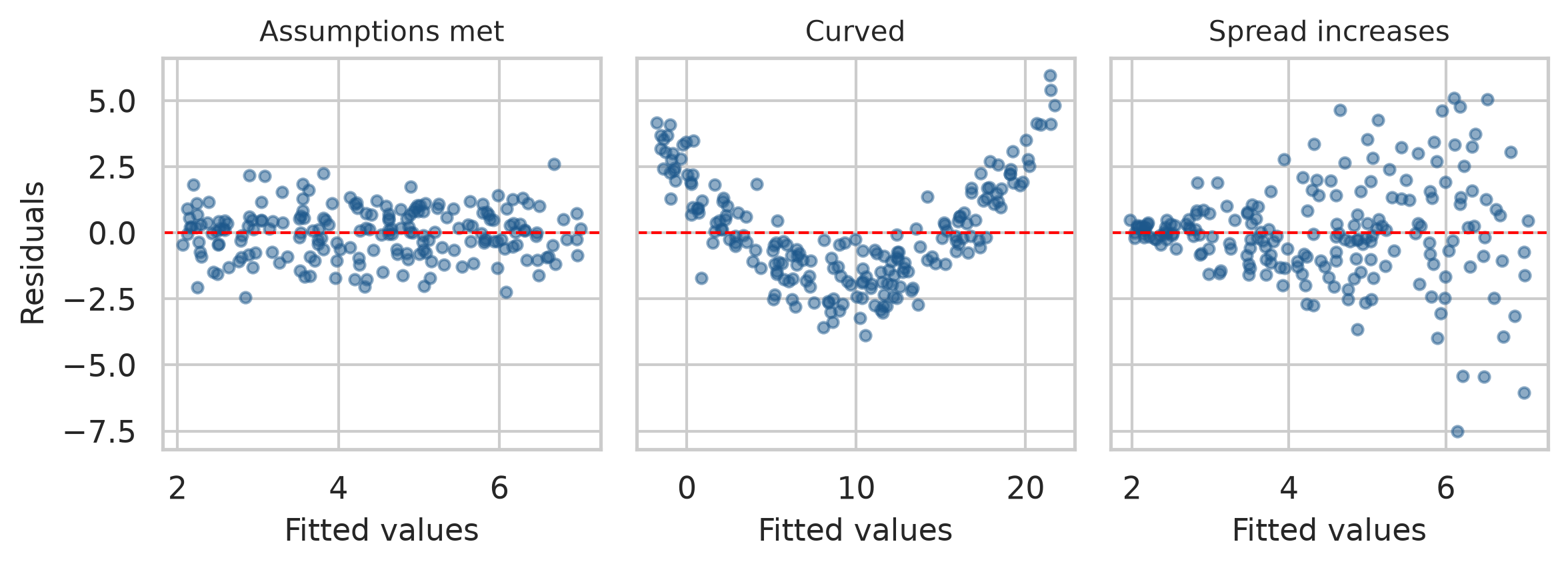
A U-shaped or curved pattern means that the model has missed a curve, and a squared term or a transformation may be needed. A funnel means that the spread is not constant, which makes standard errors, and therefore p-values and confidence intervals, unreliable. With these pictures in mind, the real model can be checked:
fig, axes = plt.subplots(1, 2, figsize=(8, 3.8))

# 1. Residuals vs Fitted
axes[0].scatter(gpa_model.fittedvalues, gpa_model.resid, alpha=0.4, s=20, color="#1d588c")
axes[0].axhline(0, color="red", linestyle="--", linewidth=1)
axes[0].set_xlabel("Fitted values")
axes[0].set_ylabel("Residuals")
axes[0].set_title("Residuals vs Fitted")

# 2. Normal Q-Q Plot
sm.qqplot(gpa_model.resid, line="s", ax=axes[1])
axes[1].set_title("Normal Q-Q")

plt.tight_layout()
plt.show()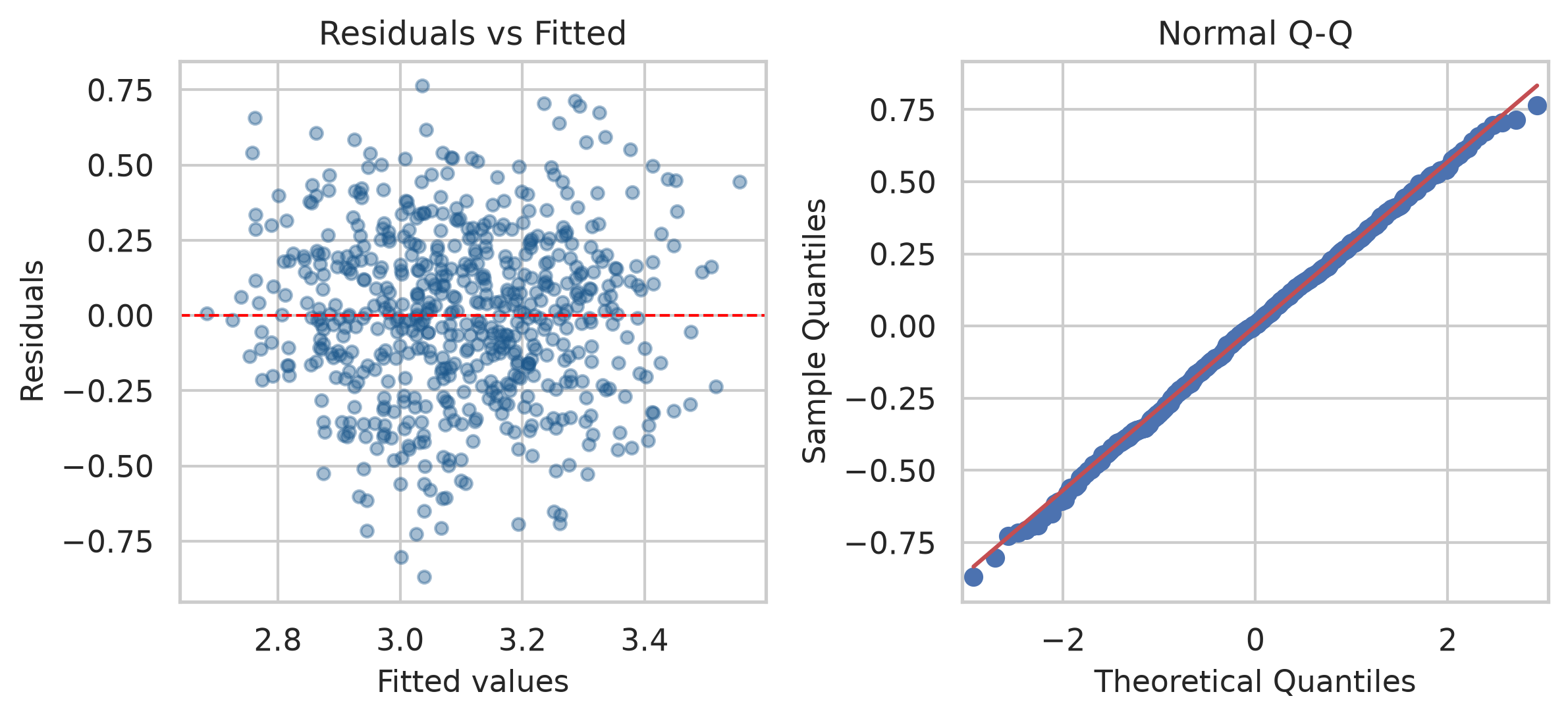
The left plot resembles the first simulated panel: a shapeless band around zero, with no curve and no funnel. In the right plot, the residuals follow the diagonal line, so they are close to normal. Both look good for the GPA model. Points far off the line in either plot would point to unusual cases worth looking at.
8.3.9 Reporting a regression
In Python, model summary tables and parameters provide all values needed for your thesis write-up:
# Extract key reporting metrics
r2 = gpa_model.rsquared
f_stat = gpa_model.fvalue
f_pval = gpa_model.f_pvalue
df_model = int(gpa_model.df_model)
df_resid = int(gpa_model.df_resid)
n_obs = int(gpa_model.nobs)

sleep_b = gpa_model.params["sleep_hours"]
sleep_ci = gpa_model.conf_int().loc["sleep_hours"]
TipWriting it up
A multiple regression of first-semester GPA on sleep, study hours, stress, and supervisor support explained 25% of the variance in GPA, F(4, 582) = 49.14, p < .001, N = 587. Holding the other predictors constant, each additional hour of sleep was associated with a GPA 0.11 points higher (95% CI [0.08, 0.13]). The hypothesis that more sleep goes with a higher GPA (Chapter 5) was therefore supported: the null hypothesis of a zero sleep coefficient was rejected.
8.4 Logistic regression
The third research question concerns a yes-or-no outcome: whether a student has considered dropping out. Linear regression is the wrong tool here, because it could predict probabilities below 0 or above 1, which make no sense. Logistic regression models the probability of a “yes” in a way that always stays between 0 and 1.
8.4.1 Odds and odds ratios
Logistic regression works with odds rather than probabilities. The odds of an event are the probability that it happens divided by the probability that it does not. The cross-tabulation from Chapter 7 shows how they are calculated:
jobs = pd.crosstab(students["employment"], students["considering_dropout"])
print(jobs)
considering_dropout No Yes
employment
Full-time job 72 25
None 265 42
Part-time job 173 23odds_full = jobs.loc["Full-time job", "Yes"] / jobs.loc["Full-time job", "No"]
odds_none = jobs.loc["None", "Yes"] / jobs.loc["None", "No"]
odds_ratio = odds_full / odds_none
print(f"Full-time odds: {odds_full:.2f}")
print(f"No job odds: {odds_none:.2f}")
print(f"Odds ratio: {odds_ratio:.2f}")Full-time odds: 0.35
No job odds: 0.16
Odds ratio: 2.19Among students with a full-time job, 19 have considered dropping out and 57 have not, which gives odds of about 0.33. Among students without a job, the odds are 0.15. The odds ratio compares the two: students with a full-time job have about 2.2 times the odds of considering dropout. An odds ratio of 1 means no difference, above 1 means higher odds, and below 1 means lower odds.
8.4.2 A model for dropout
In Python, statsmodels.formula.api.logit fits logistic regression. The outcome must be coded 0 and 1:
study["dropout"] = (study["considering_dropout"] == "Yes").astype(int)

dropout_model = smf.logit(
    "dropout ~ stress + support + financial_worry + C(employment) + C(study_mode)",
    data=study
).fit(disp=False)
print(dropout_model.summary())
Logit Regression Results
==============================================================================
Dep. Variable: dropout No. Observations: 562
Model: Logit Df Residuals: 555
Method: MLE Df Model: 6
Date: Sat, 24 Oct 2026 Pseudo R-squ.: 0.2553
Time: 00:43:50 Log-Likelihood: -173.92
converged: True LL-Null: -233.54
Covariance Type: nonrobust LLR p-value: 2.364e-23
==================================================================================================
coef std err z P>|z| [0.025 0.975]
--------------------------------------------------------------------------------------------------
Intercept -4.0186 1.232 -3.263 0.001 -6.433 -1.604
C(employment)[T.None] -0.5893 0.438 -1.346 0.178 -1.448 0.269
C(employment)[T.Part-time job] -0.5387 0.452 -1.191 0.234 -1.425 0.348
C(study_mode)[T.Part-time] 0.2764 0.367 0.752 0.452 -0.444 0.996
stress 1.2823 0.240 5.346 0.000 0.812 1.752
support -1.1102 0.204 -5.444 0.000 -1.510 -0.710
financial_worry 0.4537 0.122 3.731 0.000 0.215 0.692
==================================================================================================The coefficients are on the scale of log-odds, which is hard to interpret directly. Taking the exponential (np.exp) turns them into odds ratios and confidence intervals:
odds_table = pd.DataFrame({
    "odds_ratio": np.exp(dropout_model.params),
    "ci_lower": np.exp(dropout_model.conf_int()[0]),
    "ci_upper": np.exp(dropout_model.conf_int()[1])
}).round(2)
print(odds_table)
odds_ratio ci_lower ci_upper
Intercept 0.02 0.00 0.20
C(employment)[T.None] 0.55 0.24 1.31
C(employment)[T.Part-time job] 0.58 0.24 1.42
C(study_mode)[T.Part-time] 1.32 0.64 2.71
stress 3.60 2.25 5.77
support 0.33 0.22 0.49
financial_worry 1.57 1.24 2.00Holding the other predictors constant, each extra point of stress multiplies the odds of considering dropout by about 3.6 (OR = 3.60, 95% CI [2.25, 5.77]), and each extra point of financial worry by about 1.6 (OR = 1.57, 95% CI [1.24, 2.00]). Each extra point of supervisor support multiplies them by about 0.33 (95% CI [0.22, 0.49]), which cuts them by about 67%. The hypothesis stated in Chapter 5, that higher stress raises the odds of considering dropout, is strongly supported: the confidence interval for stress lies entirely above 1.
Something interesting has happened to employment. In Chapter 7, and in the unadjusted odds ratio above, students with full-time jobs had about twice the odds of considering dropping out. In this model, the confidence interval for employment includes 1 (comparing None vs Full-time, OR = 0.55, 95% CI [0.24, 1.31]; Part-time vs Full-time, OR = 0.58, 95% CI [0.24, 1.42]): once stress and financial worry are taken into account, having a job adds little on its own. The likely explanation is that a full-time job matters because of the stress and money pressure that come with it. This is the kind of insight multiple regression makes possible.
8.4.3 Predicted probabilities
Odds ratios are hard for many readers; predicted probabilities are easier. The model can predict the probability of considering dropout for two example students who are identical except for their stress and support:
examples = pd.DataFrame({
    "stress":          [2.5, 4.0],
    "support":         [4.0, 2.0],
    "financial_worry": [3.0, 3.0],
    "employment":      ["None", "None"],
    "study_mode":      ["Full-time", "Full-time"]
})
predicted_probs = dropout_model.predict(examples)
for i, prob in enumerate(predicted_probs, 1):
    print(f"Student {i}: {prob * 100:.1f}% chance of considering dropout")
Student 1: 1.1% chance of considering dropout
Student 2: 41.6% chance of considering dropoutA student with low stress and good support has about a 1% chance of considering dropout; a stressed student with little support, about a 42% chance. For a thesis’s recommendations, that contrast is more persuasive than any coefficient.
Whether the model can predict who will consider dropping out, and how that should be tested fairly, is a different question, about prediction rather than explanation. It is the subject of Chapters 11 and 12.
8.5 Common misconceptions
Regression output is easy to produce and easy to misread. Four misreadings are especially common.
- “A significant coefficient shows a cause.” Outside a randomised experiment, a coefficient is an association adjusted for the variables in the model, and only for those.
- “A low R-squared means the model is useless.” A predictor can have a real and important effect while explaining little of the total variation, as sleep does for GPA.
- “Each coefficient describes the predictor on its own.” In multiple regression, each coefficient is the effect holding the others constant, and it can change when predictors are added or removed, as caffeine’s did.
- “A significant ANOVA shows that all groups differ.” It shows only that at least one group differs from the others; post-hoc tests say which.
8.6 Chapter review
8.6.1 Summary
- ANOVA partitions variation into the part between groups and the part within them. The F statistic is their ratio, so the same group averages are convincing when groups are tight and unremarkable when they are spread out. \(\eta^2\) measures the size of the effect.
- One-way ANOVA tests whether three or more group averages differ with one test instead of many. Post-hoc tests, such as Tukey’s HSD, find which groups differ while controlling false alarms. Levene’s test checks equal spread; Kruskal-Wallis is the non-parametric alternative.
- Two-way ANOVA tests two main effects and their interaction. An interaction means the effect of one factor depends on the other; parallel lines in an interaction plot mean no interaction.
- Regression models the average outcome at each value of the predictors. A slope is the change in the average outcome for a one-unit change in the predictor; in multiple regression, holding the other predictors constant. R-squared is the share of variation explained.
- Categorical predictors are compared with a reference category. A confounder is a common cause of predictor and outcome; adding it to the model can remove a misleading association, but only confounders that were measured.
- Squared terms model curves; interaction terms let one predictor’s effect depend on another. Residual plots reveal missed curves (a U shape) and unequal spread (a funnel).
- Logistic regression models the probability of a yes-or-no outcome.
np.exp()of its coefficients gives odds ratios;.predict(new_data)gives probabilities.
8.6.2 Key terms
ANOVA, F statistic, between-group variation, within-group variation, eta squared, post-hoc test, Tukey’s test, Levene’s test, Kruskal-Wallis test, two-way ANOVA, main effect, interaction, interaction plot, linear regression, predictor, outcome, intercept, slope, residual, least squares, R-squared, adjusted R-squared, multiple regression, reference category, confounder, quadratic term, diminishing returns, centring, diagnostic plot, logistic regression, odds, odds ratio, log-odds, predicted probability.
8.7 Exercises
The playground has these and more, with hints and solutions.
- Test whether first-semester wellbeing differs between faculties with a one-way ANOVA, calculate \(\eta^2\), and, if the ANOVA is significant, run Tukey’s test.
- Fit a simple regression of first-semester wellbeing on sleep hours, and interpret the slope and R-squared.
- Add stress and support to the model from Exercise 2, and describe what happens to the slope of sleep and to R-squared.
- Add
study_modeto the model from Exercise 3. Name the reference category and explain what its coefficient means. - Fit a logistic regression of considering dropout on
burnoutscore alone (calculate it from the questionnaire first), report its odds ratio, and explain what it means. - Draw a diagram, like Figure 8.5, of a confounder that might explain an association in your own field, and describe how a regression could separate the two explanations.
8.8 Further reading
- Introduction to Modern Statistics (Çetinkaya-Rundel and Hardin 2024): chapters “Linear regression with a single predictor”, “Linear regression with multiple predictors”, “Logistic regression”, and “Inference for comparing many means”.
- Regression and Other Stories (Gelman et al. 2020) is an excellent next step, with a strong focus on interpreting and checking regression models in real research.
References
Çetinkaya-Rundel, Mine, and Johanna Hardin. 2024. Introduction to Modern Statistics. 2nd ed. OpenIntro. https://openintro-ims.netlify.app.
Cohen, Jacob. 1988. Statistical Power Analysis for the Behavioral Sciences. 2nd ed. Lawrence Erlbaum Associates.
Gelman, Andrew, Jennifer Hill, and Aki Vehtari. 2020. Regression and Other Stories. Cambridge University Press. https://doi.org/10.1017/9781139161879.