Lecture slides

Data Visualization

Data Visualization

A graph is an instrument and an argument

Chapter 4

Polla Fattah

By the end of today you can

  • explain why graphs are needed alongside numerical summaries;
  • tell exploratory graphs from explanatory ones;
  • explain why position and length are read more accurately than angle, area, or colour;
  • choose a graph from the question and the variables;
  • build graphs with Seaborn and Matplotlib from data, visual mappings, and axes;
  • judge whether a graph is honest, and improve a misleading one;
  • export figures at the size and resolution a thesis needs.

Summaries can hide almost anything

anscombe.groupby("dataset").agg(
    mean_x=("x", "mean"),
    mean_y=("y", "mean"),
    std_y=("y", "std")
)
Dataset mean x mean y std y correlation
I to IV 9.0 7.5 2.03 0.82

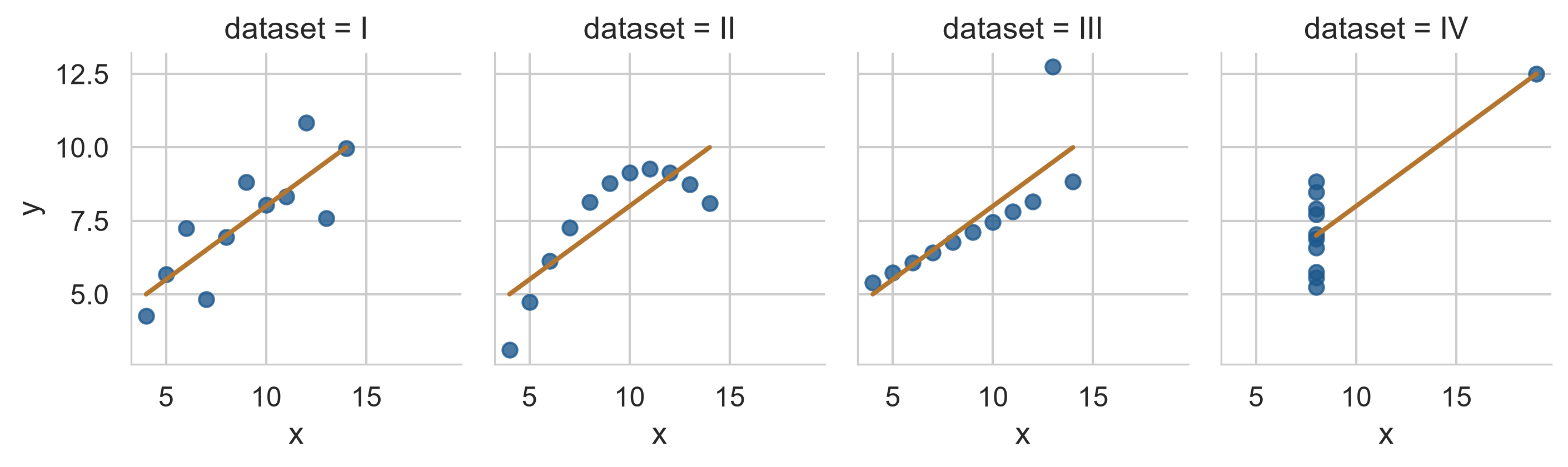
Anscombe’s four datasets share every numerical summary.

Four identical summaries, four different stories

A line, a curve, an outlier, and one point making the whole trend.

Look first

Anyone who analysed these data without looking would draw the same, wrong, conclusion from all four.

Many errors in data, and in reasoning about data, are found only by looking.

Exploring and explaining

Exploratory graph Explanatory graph
for the researcher the reader
purpose understand the data show a known finding
number many, quickly a few, carefully
polish none needed clear message and labels

A thesis contains a few explanatory graphs, chosen from many exploratory ones.

A graph turns numbers into visual properties

flowchart LR
    A["Position on a<br>common scale"] --> B["Length"] --> C["Angle<br>and slope"] --> D["Area"] --> E["Colour<br>shade"]

Cleveland and McGill’s experiments: judged most accurately on the left, least on the right.

Put the most important comparison into position or length.

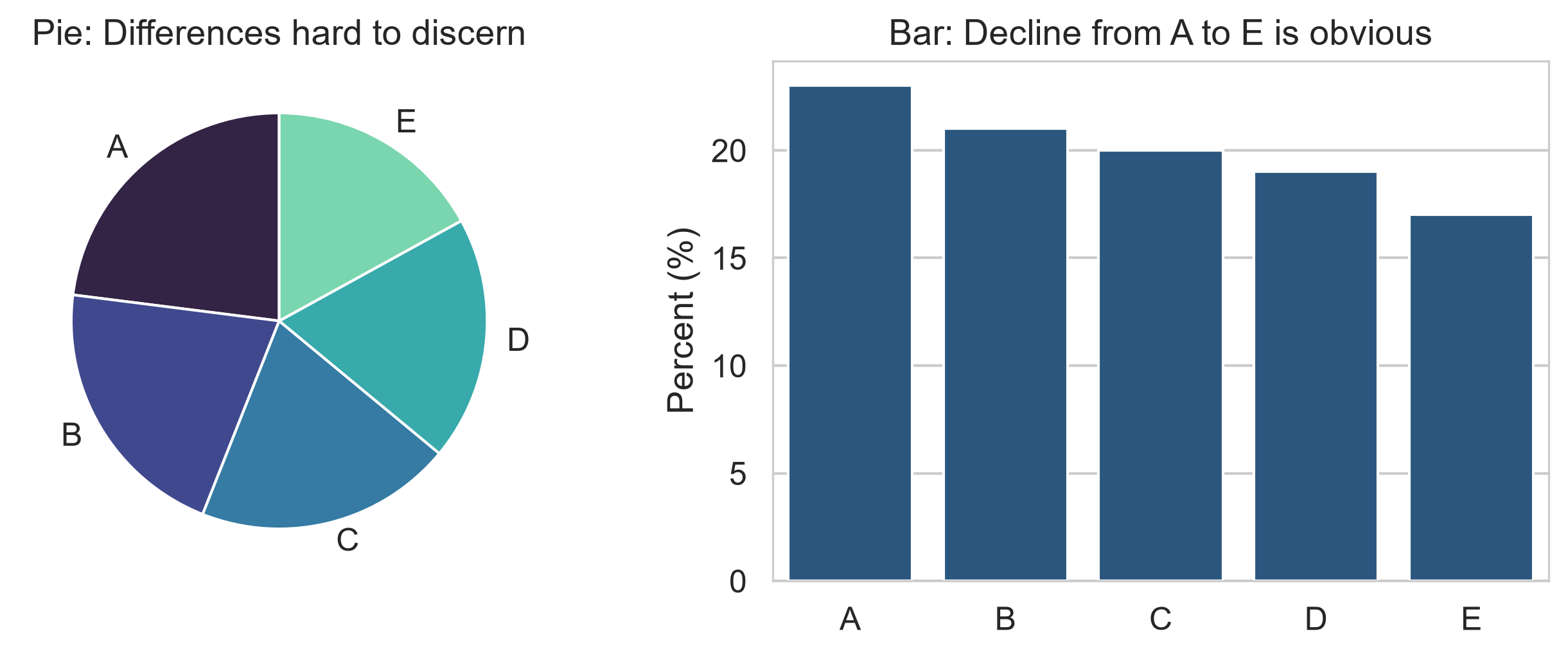
The same five numbers, two ways

In the pie the slices look equal. In the bars the decline from A to E is obvious.

Two more rules of thumb

  • put values to be compared next to each other on the same scale, within one panel;
  • use colour to separate a few categories, not to carry the main message.

Prefer bar charts and dot plots to pie charts, and scatter plots to bubble charts.

Choosing a graph

Question Variables Graph Seaborn tool
how are values distributed? one numeric histogram, KDE sns.histplot, sns.kdeplot
how many in each category? one categorical count bar chart sns.countplot
do groups differ? numeric by categorical box plot, strip plot sns.boxplot, sns.stripplot
how are two variables related? two numeric scatter, regression sns.scatterplot, sns.regplot
how does it change over time? numeric over time line chart sns.lineplot
how do many variables relate? several numeric heat map sns.heatmap

The anatomy of Python visualization

flowchart LR
    D["Data<br>Pandas DataFrame"] --> S["Seaborn<br>Statistical abstraction"] --> M["Matplotlib<br>Axes & Figure control"]

Seaborn creates statistical graphics with one concise call, while Matplotlib lets you customize titles, limits, and annotations.

Figure and Axes give the canvas

pilot = pd.DataFrame({
    "sleep": [6.5, 7.5, 5.5, 8.0, 6.0],
    "stress": [3.2, 2.1, 4.5, 1.8, 3.9]
})

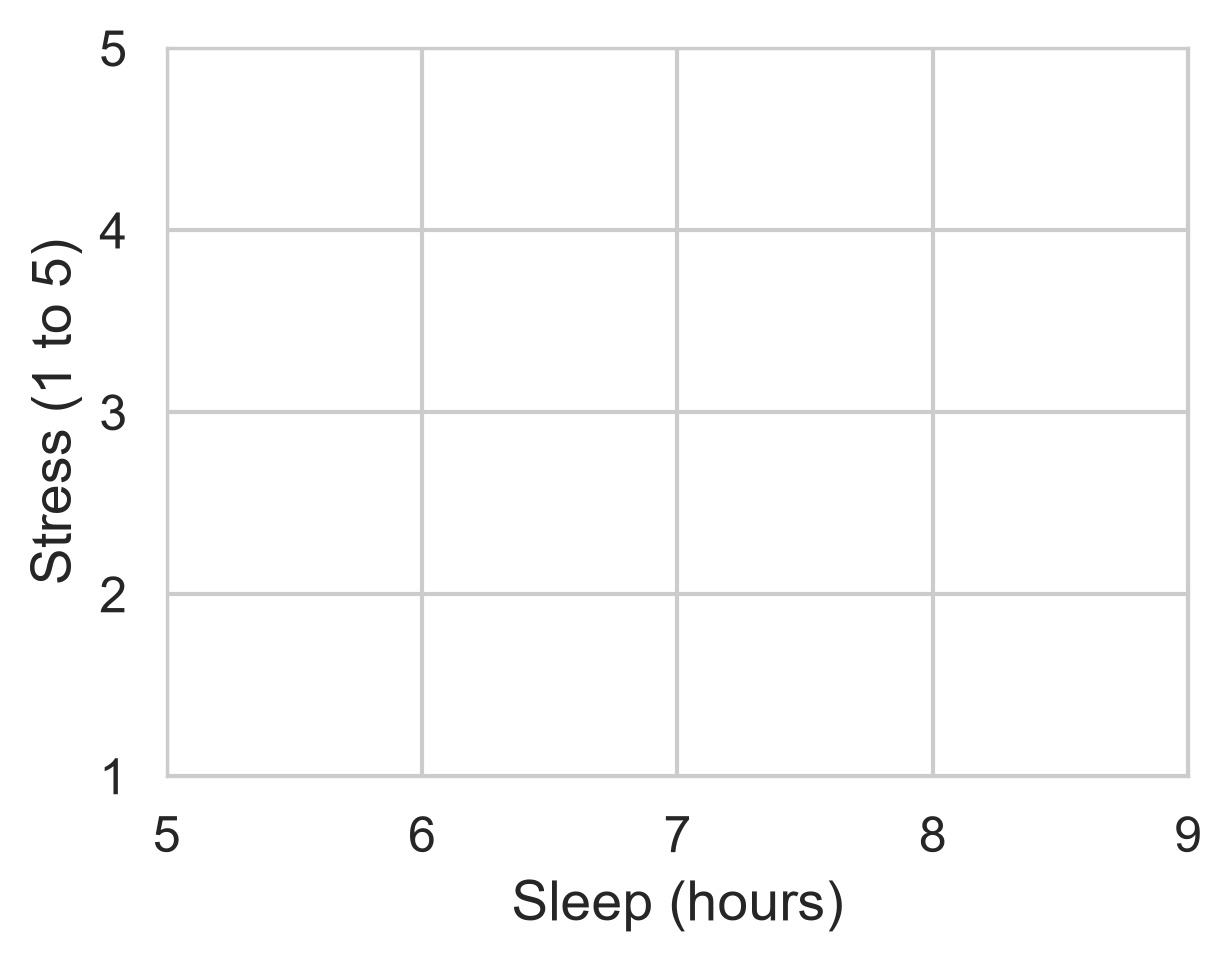
fig, ax = plt.subplots(figsize=(5, 3.5))
ax.set_xlabel("Sleep (hours)")
ax.set_ylabel("Stress (1 to 5)")
plt.show()

The axes exist, but nothing is drawn yet.
Seaborn draws the data onto the axes

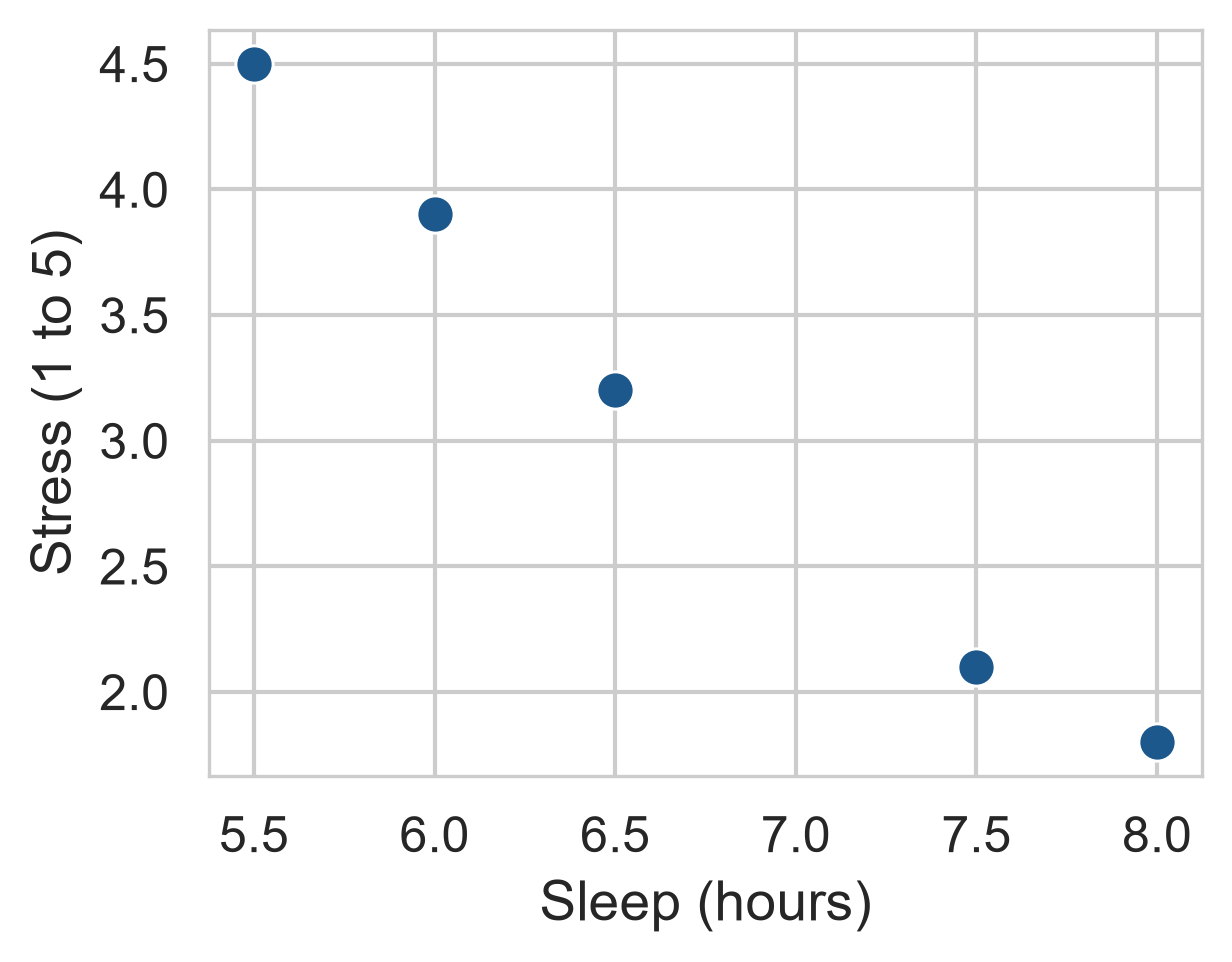
fig, ax = plt.subplots(figsize=(5, 3.5))
sns.scatterplot(
    data=pilot,
    x="sleep",
    y="stress",
    s=80,
    color="#1d588c",
    ax=ax
)
plt.show()

One point per row. Passing ax=ax connects Seaborn directly to the Matplotlib canvas.
One row per student

first_sem = (
    semesters[semesters["semester"] == 1]
    .merge(students, on="student_id")
)

Each student’s first-semester record, with their background information.

Most graphs are simplest with one row per case.

Histograms show a distribution

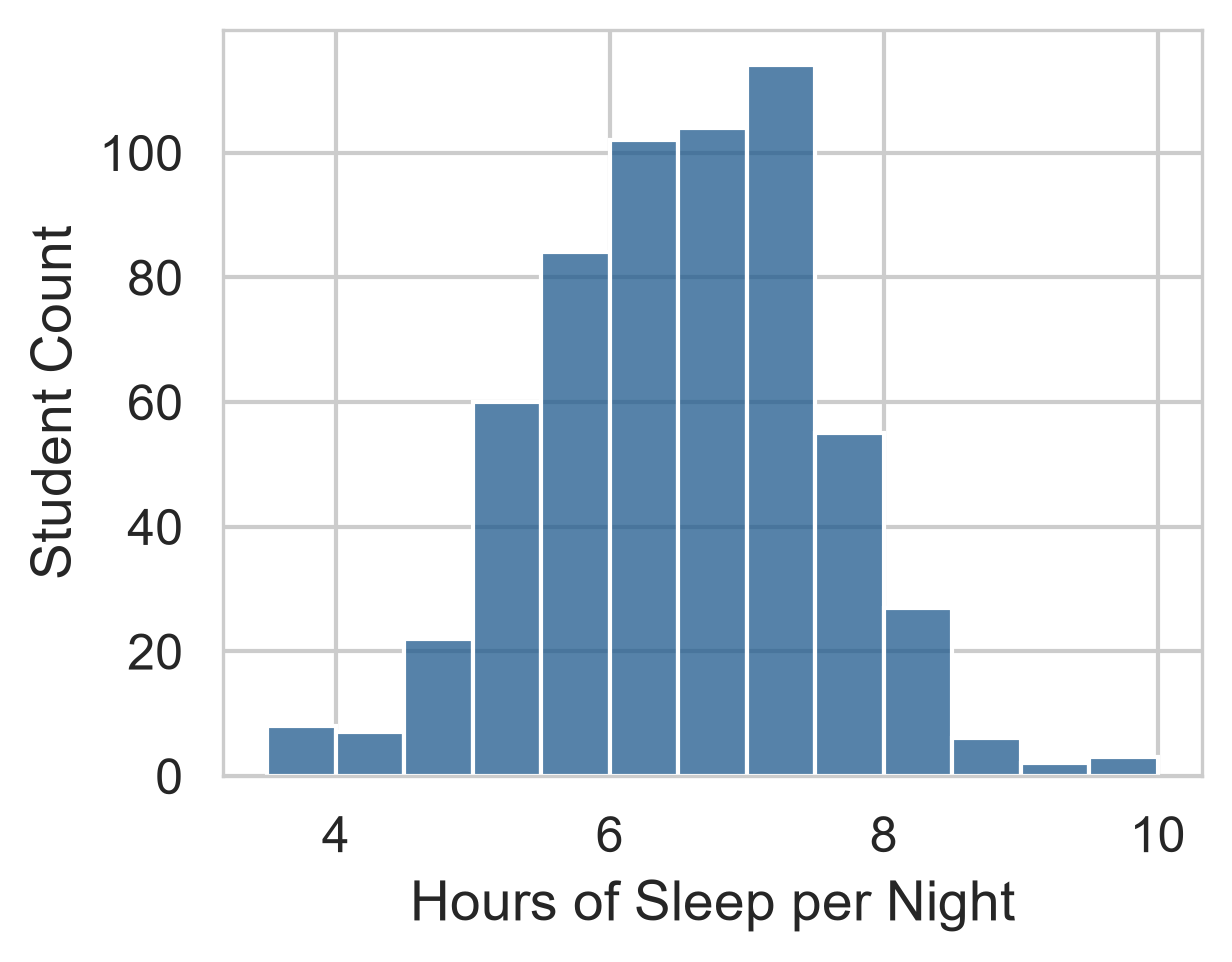
fig, ax = plt.subplots(figsize=(5, 3.5))
sns.histplot(
    data=first_sem,
    x="sleep_hours",
    binwidth=0.5,
    color="steelblue",
    edgecolor="white",
    ax=ax
)

Bell-shaped, centred a little above 6 hours.

r round(100 * (first_sem['sleep_hours'] < 7).mean())% of students sleep less than the recommended 7.
The binwidth changes the picture
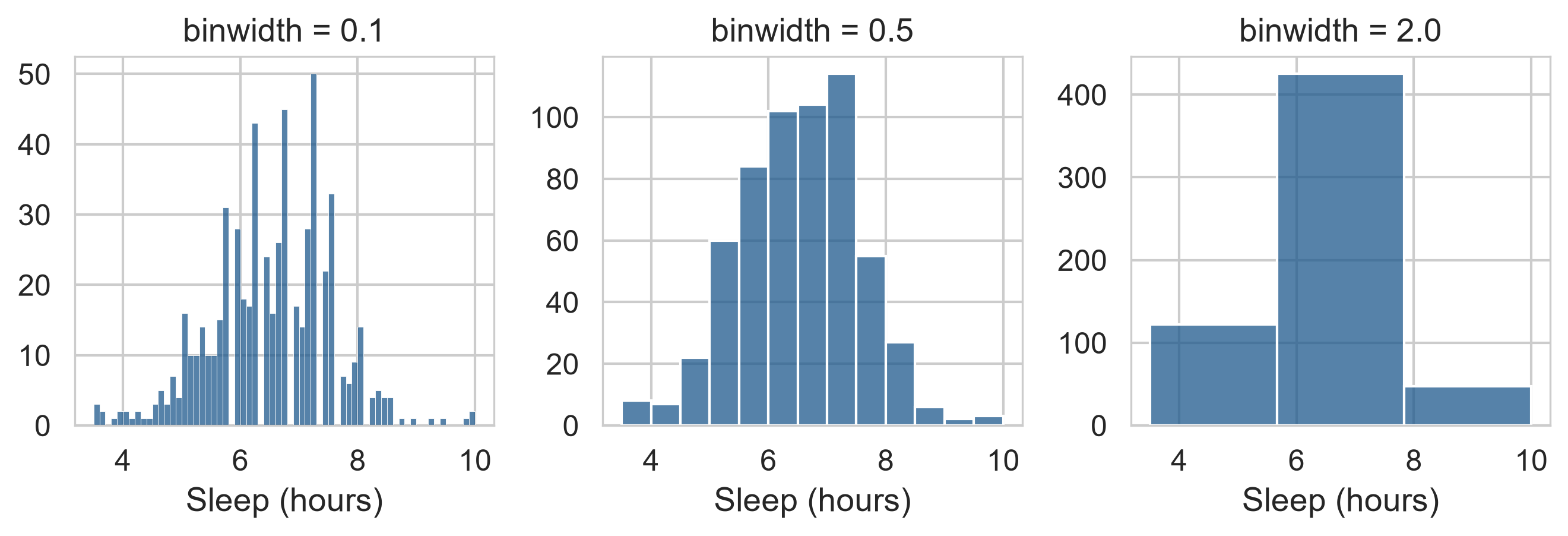
Too narrow is noisy, too wide hides the shape. Try a few widths.

Count charts count categories

fig, ax = plt.subplots(figsize=(5, 3.5))
sns.countplot(
    data=students,
    y="faculty",
    color="#1d588c",
    ax=ax
)

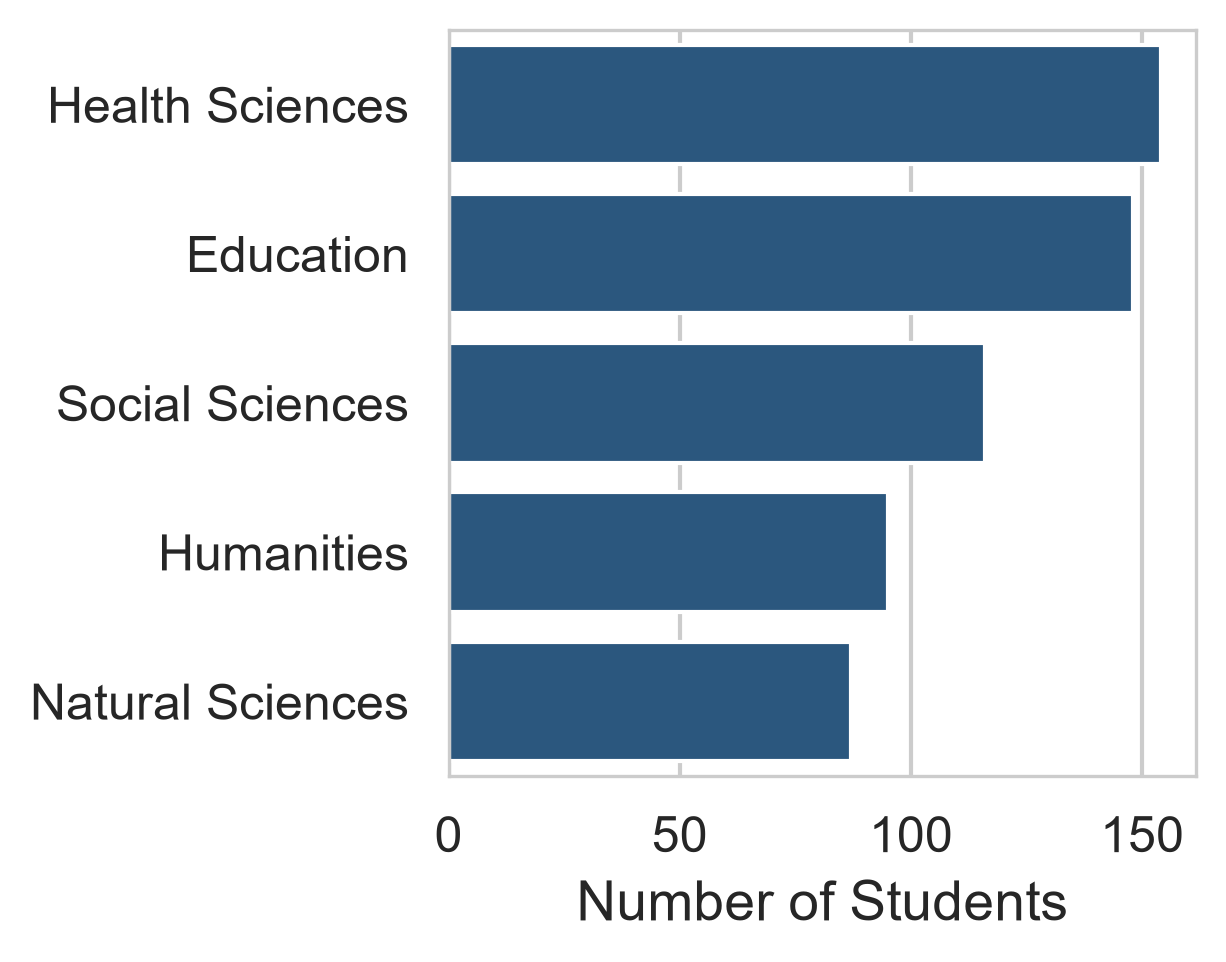
sns.countplot() counts rows automatically.

For precomputed values such as averages, use sns.barplot().
Box plots compare groups

fig, ax = plt.subplots(figsize=(5, 3.5))
sns.boxplot(
    data=first_sem,
    x="study_mode",
    y="wellbeing",
    color="#eaf0f7",
    ax=ax
)

Part-time students sit a little lower, but the boxes overlap considerably.
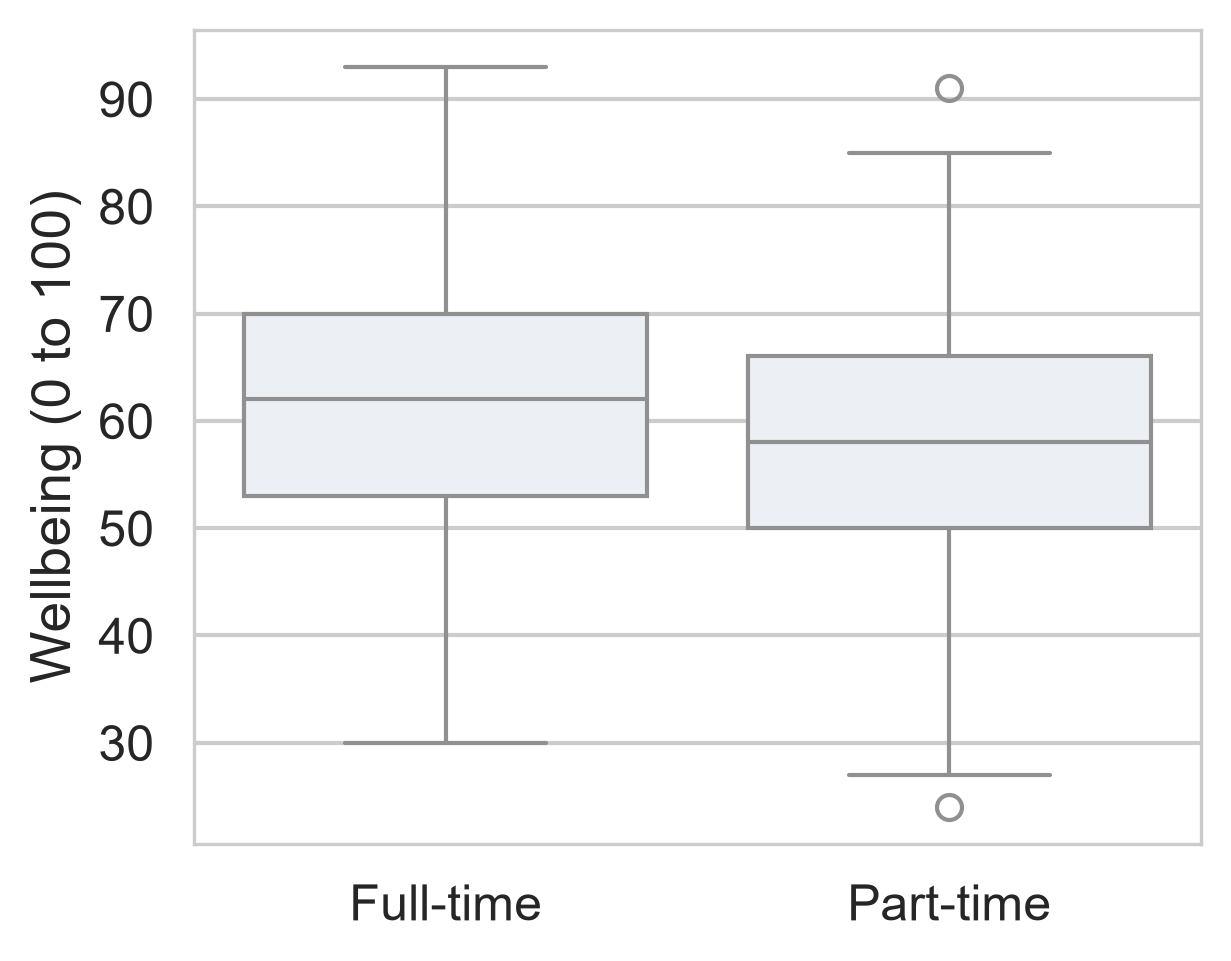
Reading a box plot

Part Shows
box the interquartile range (IQR, middle 50%)
line inside the median
whiskers typical range (\(1.5 \times \text{IQR}\))
points beyond outliers / extreme values

Whether the study-mode difference is larger than chance is a question for Chapter 8.

Scatter plots show relationships

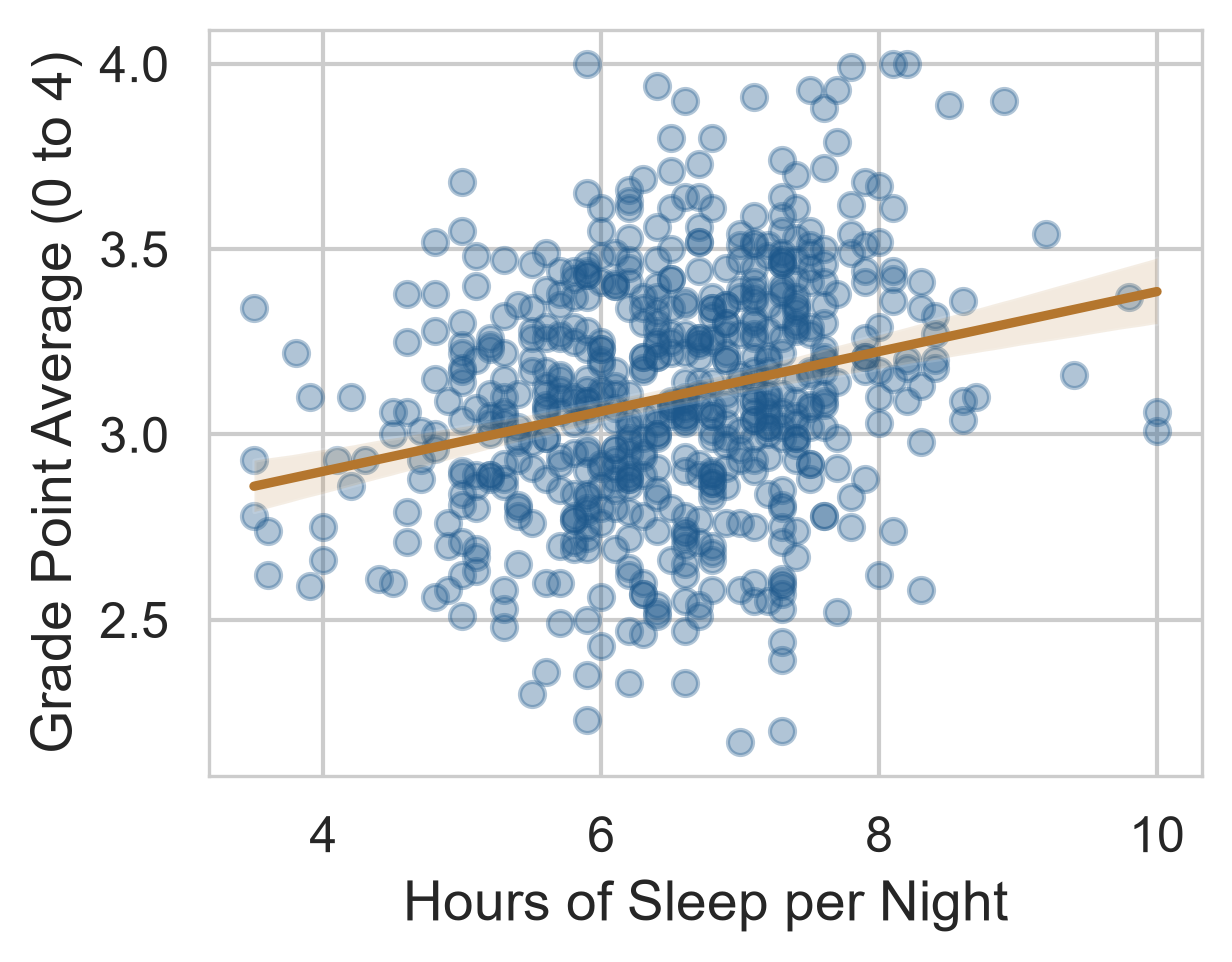
fig, ax = plt.subplots(figsize=(5, 3.5))
sns.regplot(
    data=first_sem,
    x="sleep_hours",
    y="gpa",
    scatter_kws={"alpha": 0.35, "color": "#1d588c"},
    line_kws={"color": "#b4762e"},
    ax=ax
)

alpha makes points transparent against overplotting.

The line rises gently, but points scatter widely.
Line charts show change over time

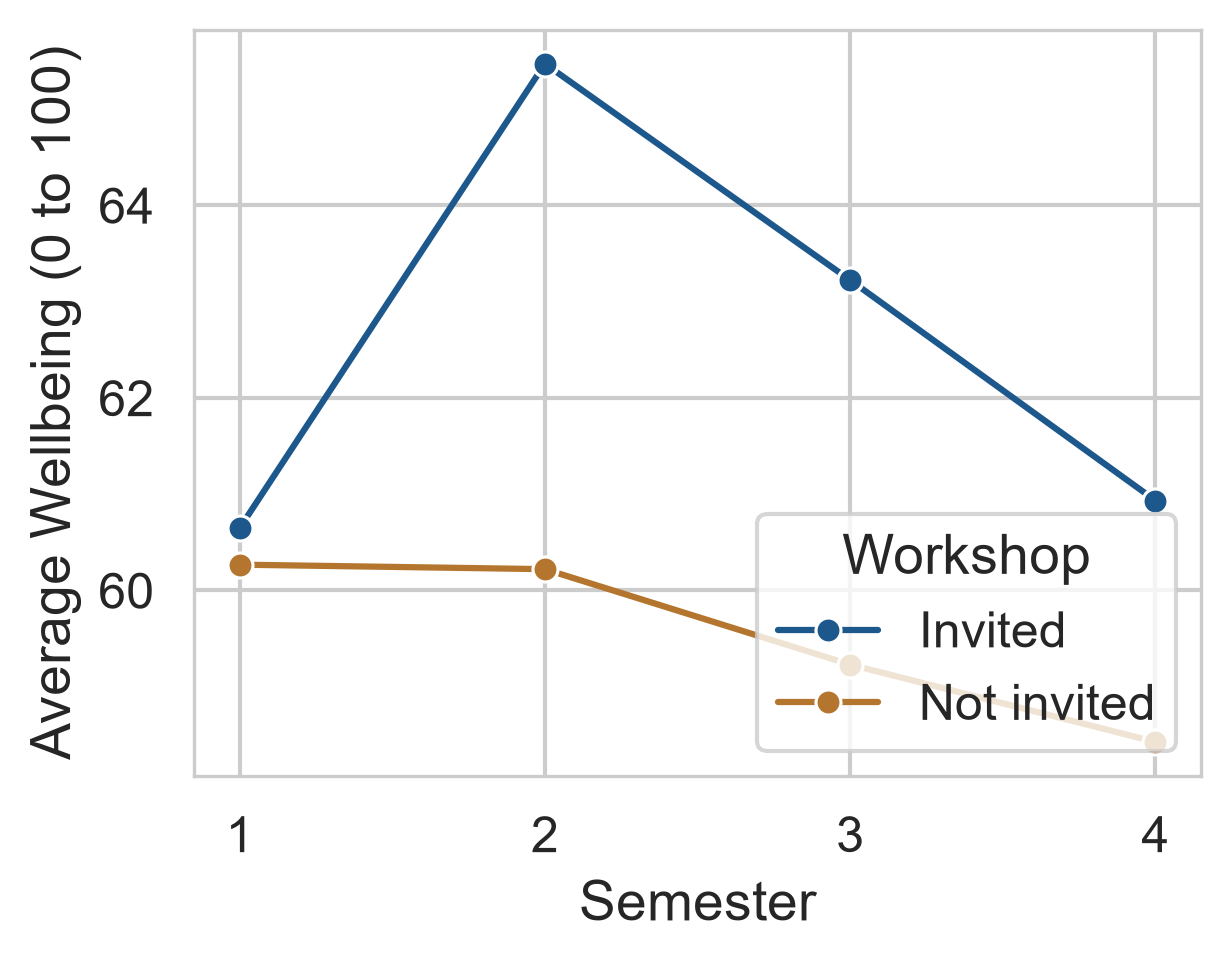
fig, ax = plt.subplots(figsize=(5, 3.5))
sns.lineplot(
    data=wellbeing_by_sem,
    x="semester",
    y="wellbeing",
    hue="workshop",
    marker="o",
    palette=["#1d588c", "#b4762e"],
    ax=ax
)

Shows the longitudinal trajectory across all four study periods.
Mapping (hue) vs Setting (color)

sns.lineplot(data=df, x="x", y="y", hue="group")   # mapped: color varies by group
sns.histplot(data=df, x="x", color="steelblue")   # set: one fixed color everywhere
Data Mapping (hue) Fixed Styling (color)
meaning depends on variable values uniform for the entire plot
legend created automatically no redundant legend

A common visualization mistake

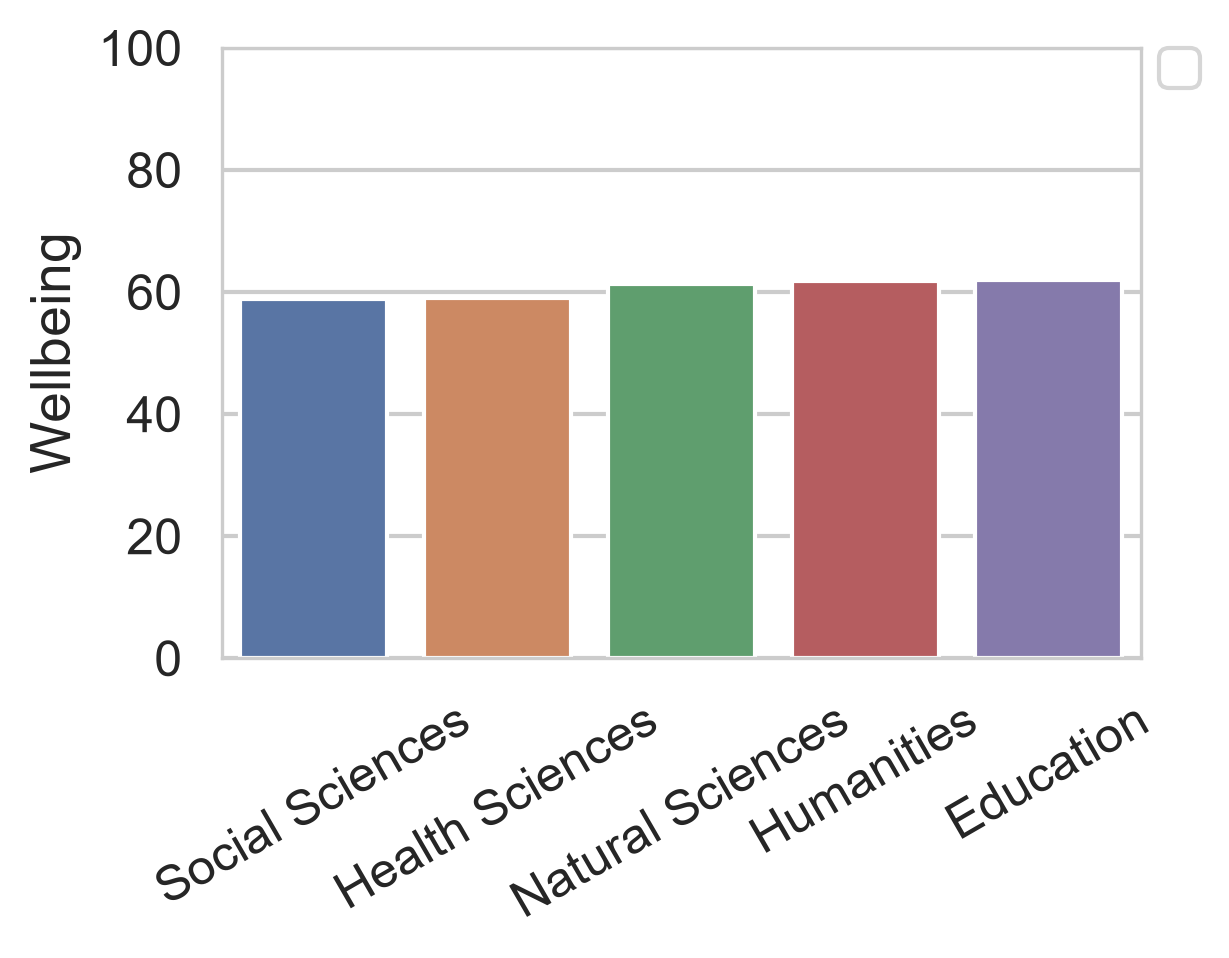
# Unnecessary mapping for one constant
sns.barplot(
    data=faculty_means,
    x="faculty",
    y="wellbeing",
    hue="faculty"  # redundant!
)

Using hue for categorical variables already labeled on the axis creates visual clutter and a useless legend.
From exploratory to explanatory

flowchart LR
    A["Descriptive Labels"] --> B["Honest Scales"] --> C["Accessible Palettes"] --> D["Targeted Annotations"]

Each addition is a purposeful design decision to aid reader comprehension.

Clear labels with measurement units

fig, ax = plt.subplots(figsize=(7, 4))
sns.lineplot(
    data=wellbeing_by_sem,
    x="semester",
    y="wellbeing",
    hue="workshop",
    marker="o",
    ax=ax
)
ax.set_title("Student Wellbeing Trajectory Over Two Years", fontsize=13, weight="bold")
ax.set_xlabel("Semester (Measurement Wave)", fontsize=11)
ax.set_ylabel("Mean Wellbeing Score (0 to 100)", fontsize=11)

Always include the scale range or physical units in parentheses.

Colour-blind-friendly palettes

  • Qualitative: palette="tab10" or palette="Set2" for unordered groups.
  • Sequential: palette="viridis" or palette="Blues" for numeric quantities.
  • Diverging: palette="vlag" or palette="coolwarm" centered on a neutral midpoint.

Roughly 8% of men and 0.5% of women have color vision deficiency; avoid rainbow/jet palettes.

Annotations give immediate reference

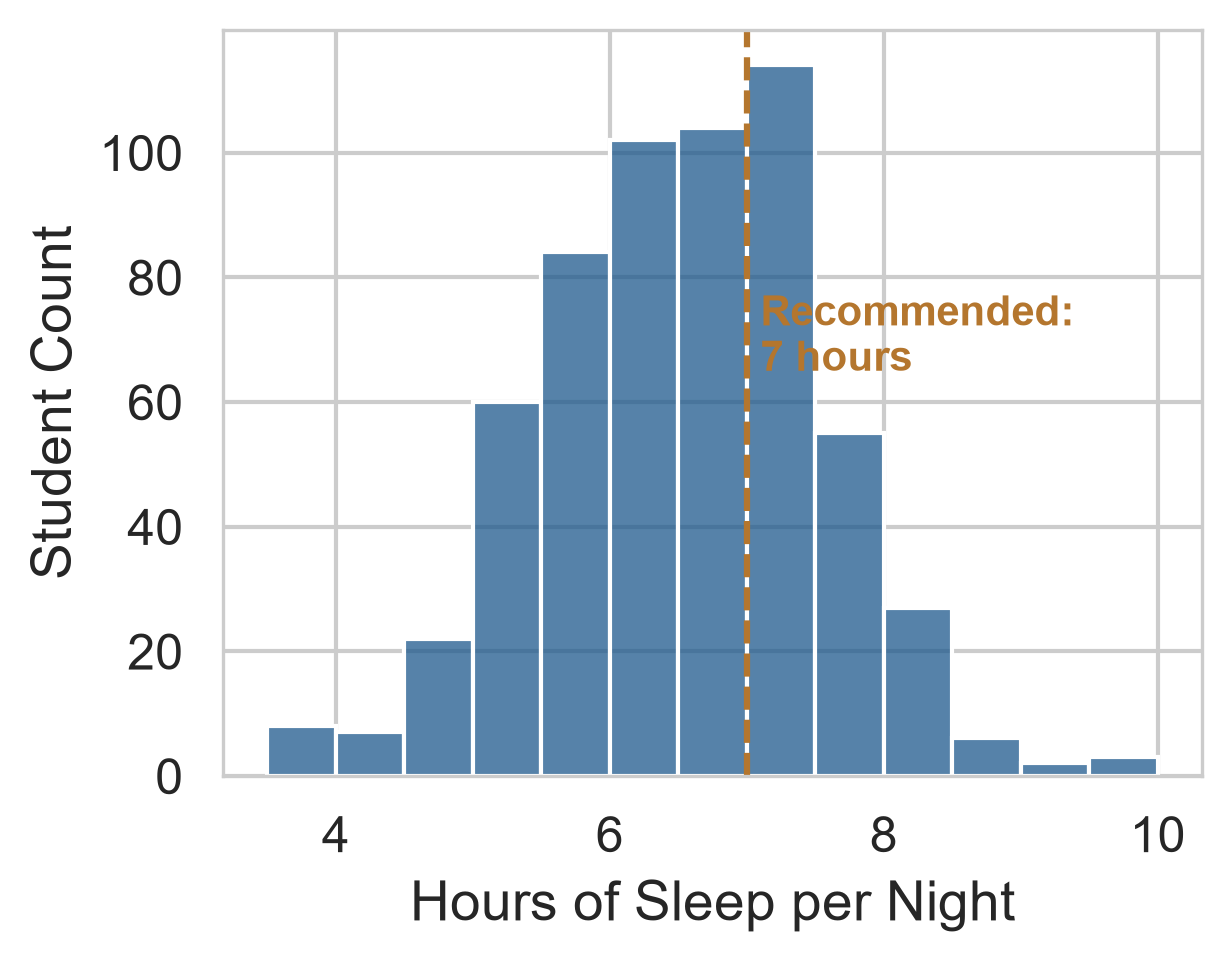
fig, ax = plt.subplots(figsize=(5, 3.5))
sns.histplot(data=first_sem, x="sleep_hours", binwidth=0.5, ax=ax)

ax.axvline(7, color="darkred", linestyle="--")
ax.text(7.1, 75, "Recommended: 7h", color="darkred")

Guides the eye directly to the clinical or theoretical threshold.
A graph can be accurate and still mislead

Most misleading graphs are not deliberate fraud—they arise from unexamined software defaults.

Design Choice Research Risk
Truncated bar axis Bar lengths exaggerate minute group differences
Squashed aspect ratio Artificially steepens or flattens trends
3D effects / Clutter Distorts perspective and distracts from data
Rainbow palettes False boundaries created by perceptual non-uniformity

Bar axes must start at zero

A bar represents quantity through physical length from the baseline.

If the axis is truncated, a bar twice as tall no longer indicates twice as much value.

Points, lines, and dot plots represent quantity through position, allowing zoomed views if clearly noted in the caption.

A misleading graph: truncated baseline
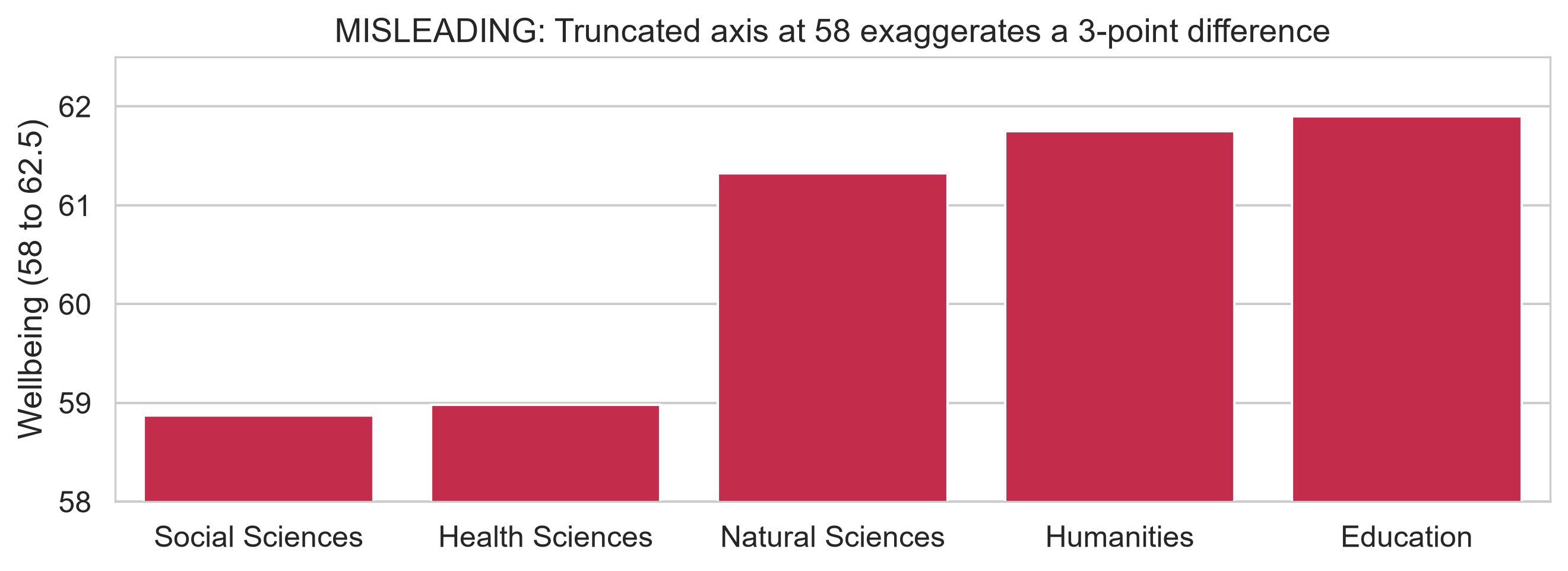
Education appears several times taller than Social Sciences, yet actual averages differ by only 3 points out of 100!

The same data, redesigned honestly
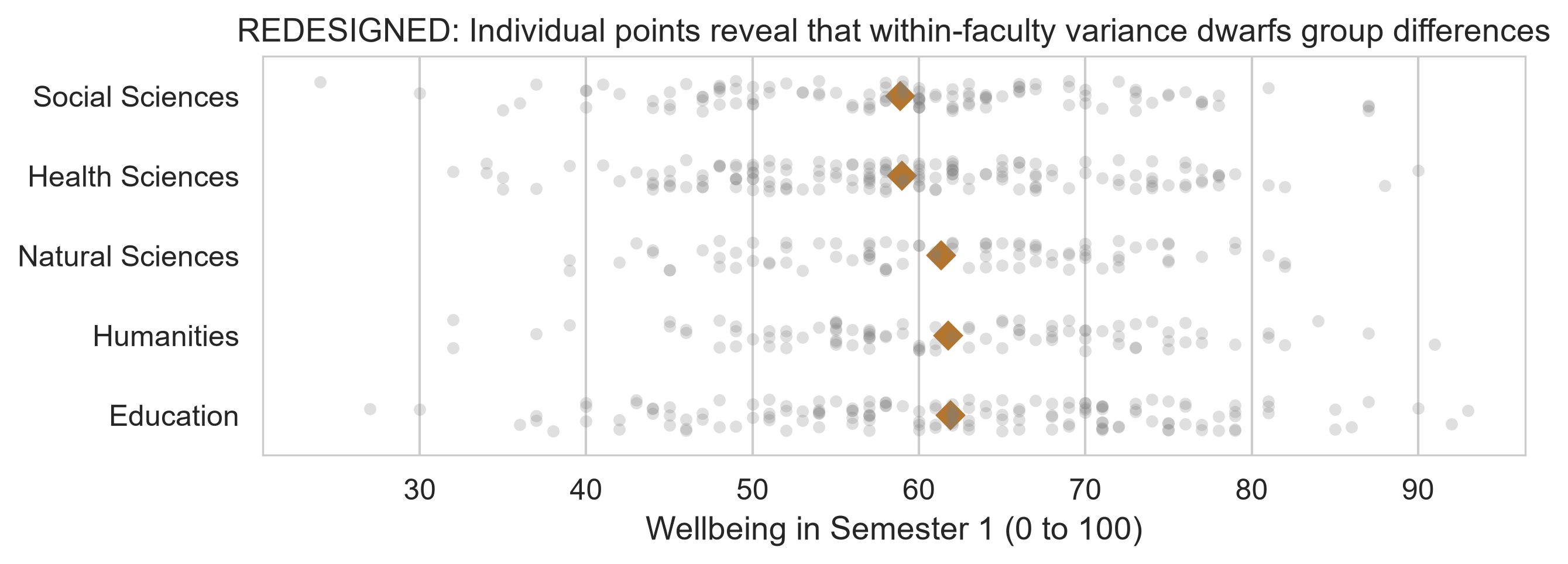
Differences between faculties are negligible compared to the substantial variation among individual students.

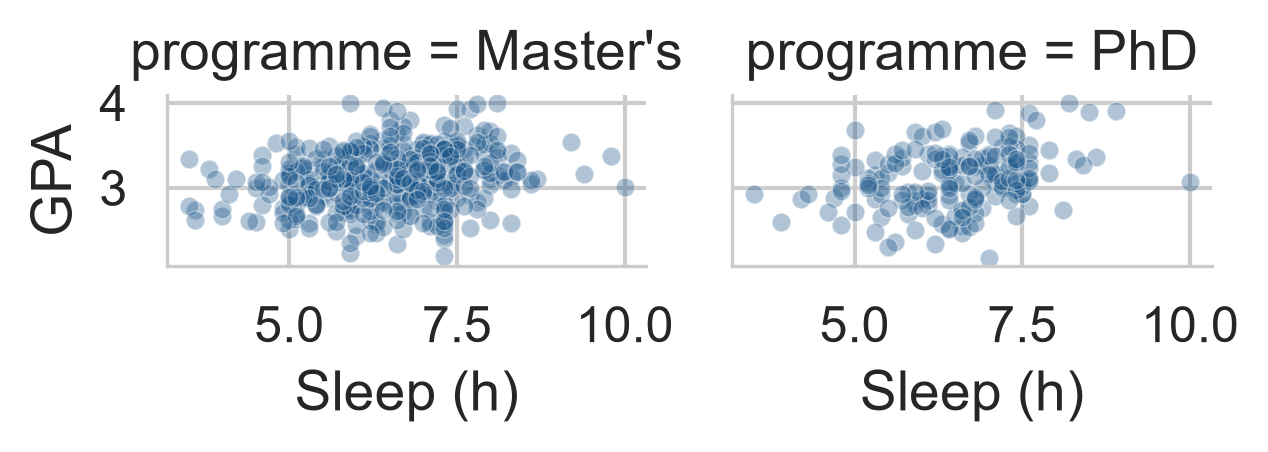
Facets: small multiples

g = sns.FacetGrid(
    first_sem,
    col="programme",
    col_wrap=3,
    height=2.8
)
g.map_dataframe(
    sns.scatterplot,
    x="sleep_hours",
    y="gpa",
    alpha=0.4
)

Identical shared axes enable rapid, accurate visual comparisons.
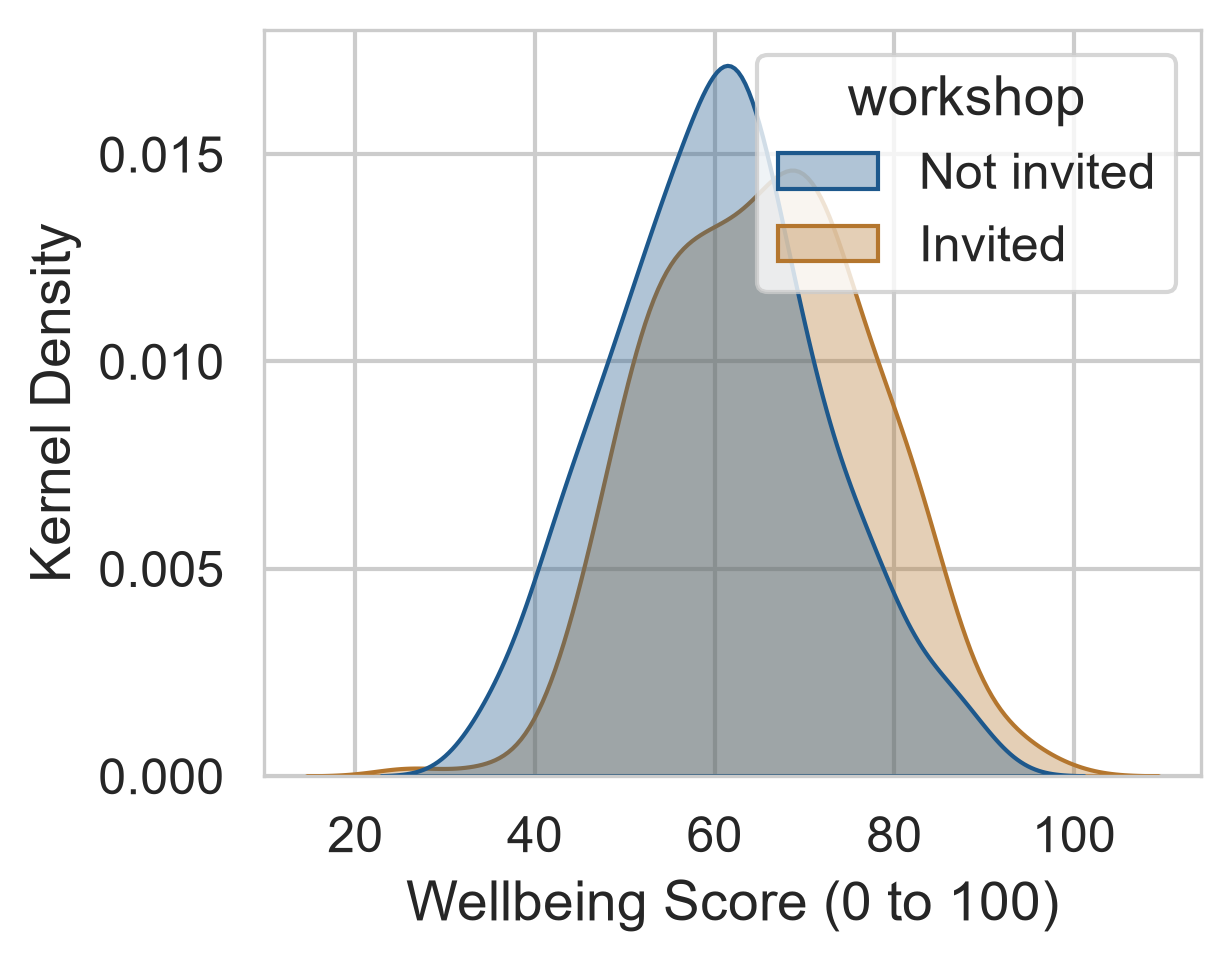
Density plots compare whole distributions

sem2 = (
    semesters[semesters["semester"] == 2]
    .merge(students, on="student_id")
)

fig, ax = plt.subplots(figsize=(5, 3.5))
sns.kdeplot(
    data=sem2,
    x="wellbeing",
    hue="workshop",
    fill=True,
    alpha=0.3,
    palette=[navy, copper],
    ax=ax
)

Shows that the entire distribution shifted upward, not just a handful of students.
Correlation heatmaps
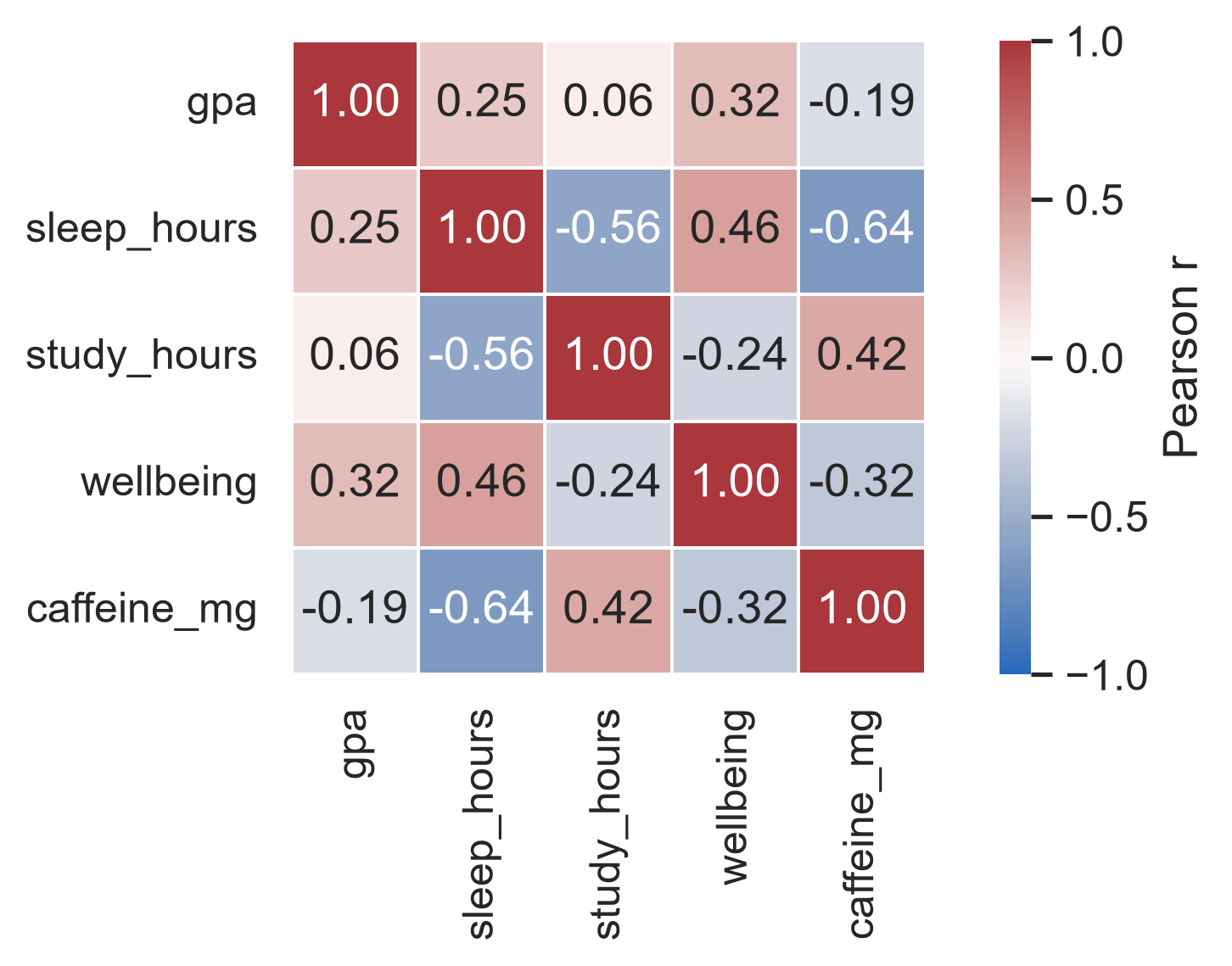
A diverging palette centered at 0 with overlaid numeric coefficients prevents misreading subtle color tints.

Exporting publication-ready figures

# High-resolution raster for thesis drafts
fig.savefig("figures/wellbeing.png", dpi=300, bbox_inches="tight")

# Scalable vector graphics for final submission
fig.savefig("figures/wellbeing.pdf", bbox_inches="tight")
Decision Recommended Practice
Width 8 cm (single-column) or 16 cm (full page width)
Resolution At least 300 DPI for raster formats
Format PDF or SVG for publication; PNG for web / slides
Font size Minimum 9–10 pt when rendered at final physical dimensions

Practical lab: the Chapter 4 playground

Work through the interactive Pyodide exercises in your browser, complete with hints and solutions:

  • A. Practise the chapter: Histograms, ordered count plots, box plots, scatter regression, and zero-baseline redesigns.
  • B. Go further: Dot plots, longitudinal scales, Anscombe’s quartet, jittered regressions.
  • C. Check your understanding: Core conceptual questions.
  • D. Do it yourself: Open-ended thesis visualization tasks.

All exercises also run locally in VS Code with the downloadable chapter04.zip.

Completion checklist

The chapter in one sentence

Inspect the distribution of your data first, then choose a visualization that encodes key comparisons into position or length while honestly conveying magnitude.

Next: Chapter 5

Moving from data collection to rigorous scientific enquiry:

  • Moving from a topic to a testable research question and operational hypothesis;
  • Constructs, measurement levels, reliability, and validity;
  • Observational vs experimental study designs;
  • Pre-registration and an analysis plan established before data inspection.

Questions & Discussion

Think of a published graph that influenced your thinking.

Would its conclusion remain compelling if the vertical axis were reset to its theoretical baseline?