This is a tour of my book Static Site Generators in the Age of AI, which is free to read at polla.dev/ssg-book. This post goes through what each chapter covers and why the chapters come in this order.
Many chapter titles name a tool: Hugo, HTML, CSS, Git, GitHub Pages, JSON, CI/CD. But the verbs carry the meaning: write, organise, understand, track, recover, check, maintain, migrate. Read in order, they follow a person growing from someone with a folder of notes into someone responsible for a living website. Each tool is introduced when it is first needed.
Why the subtitle says “maintaining”
The subtitle is Building and Maintaining Content with AI Agents. Many beginner guides end when the site first appears on screen. This book tries to also cover what comes after: keeping a site under control while it keeps changing, especially when an AI agent is making some of those changes.
The book assumes no prior HTML, Git, or command-line experience. One rule runs through it: the human remains responsible for what goes live.
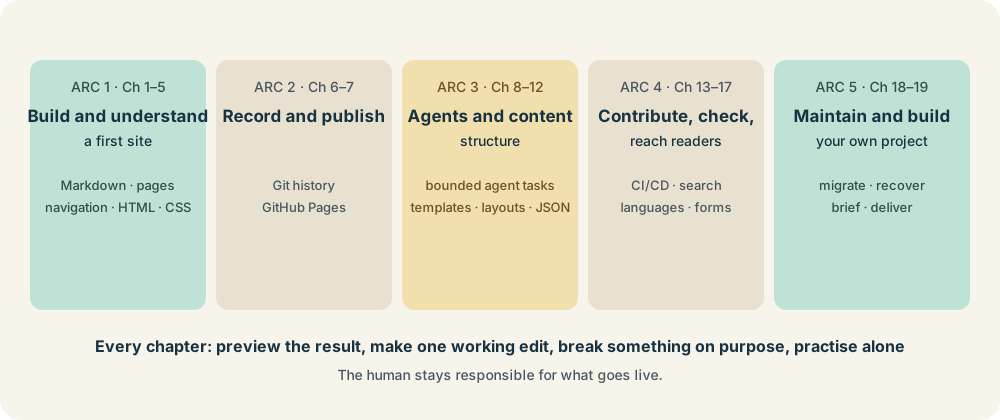
Arc 1: Build and understand a first site (Chapters 1–5)
1. Your First Hugo Website. The chapter opens with the idea that you already have something worth sharing, and it ends with Practise recovering from a mistake and Stop, restart, and preserve your work. The idea is that a first success is followed straight away by learning how to undo things.
2. Write and Publish Content Locally. The word locally matters here. Writing and publishing are separate acts: you can draft, preview, and even break an image reference on your own machine before anyone else sees it. One section is Display a command without running it, a small lesson in the difference between showing code and executing it.
3. Organise a Useful Website. Here the book moves from a single page to information design. Sections such as Decide what belongs where and Choose stable names, addresses, and organising tools make the point that URLs are promises to readers. A page you rename today is a link someone else will find broken tomorrow.
4. Understand the HTML Behind Your Pages. This chapter is what makes the later AI chapters possible. The title on screen is not just large text; the browser interprets structure. The last section, Judge an agent’s proposed change, then make your own, shows the purpose: readers learn HTML so they can read a suggestion, not so they can write everything by hand.
5. Practical CSS for Your Hugo Site. Section titles like Learn only the selectors you meet here reflect a choice: a beginner does not need all of CSS first. The visible result is small, with a quieter footer, more readable body text, and clearer heading spacing.
Arc 2: Record and publish (Chapters 6–7)
6. Track and Recover Your Hugo Site with Git. Recovery sits in the title next to tracking because I introduce Git as a safety net before I introduce it as a collaboration tool. The reader recovers from a deliberately poor CSS edit, so the first time they use Git to undo something, they are calm because the mistake was planned.
7. Publish Your Hugo Site with GitHub Pages. The section Distinguish the source address from the website address targets one of the most common beginner confusions: the repository is not the website. Another section, Recognise a failed build without publishing a mistake, shows that a pipeline which refuses to deploy is working as intended.
Arc 3: Agents and content structure (Chapters 8–12)
8. Work with an AI Agent on Your Hugo Site. The first agent task is very small: add one heading and three bullets to a Resources page. A good first task is one you can inspect completely. The chapter then has the reader give the project a short instruction file, ask the agent to inspect before it edits, and review the files, not just the summary. A summary describes what the agent believes it did. The files show what it did.
9. Give Your Hugo Content a Consistent Structure. Structure is requirements. A small shared front matter structure makes pages easier for people to compare, and it gives the agent concrete rules to follow. Archetypes, the reusable starter files, make the right thing the easy thing.
10. Use Hugo Templates to Display Your Content. The chapter opens with the case for templates in one sentence: change a project’s description once, and Hugo can use it on the project page and in the Projects list. The section Diagnose a context mistake covers a classic template problem, asking for a value in a place where it is not available.
11. Build Reusable Hugo Layouts. Reuse is taught by moving one familiar component first. Section 11.6, Check a failure that a successful build can miss, shows that a site can build without errors and still be wrong, which is why later chapters add checks.
12. Build a Resource Directory with JSON. A directory of resources is a small database. The reader can add a resource without changing the template, which is the practical meaning of separating data from presentation. The section Repair broken syntax, then check meaning separates two kinds of error: JSON that does not parse, and JSON that parses but says something wrong.
Arc 4: Contribute, check, and reach readers (Chapters 13–17)
13. Create and Maintain Content with AI Agents. The chapter begins by deciding what an agent may and may not contribute. It then follows a fixed order: put the source material where it can be read, agree what the article must contain, ask for a plan before a draft, and draft from the source only. The final test, Test your review on an unsupported claim, plants a claim that the source does not support and asks whether the reader catches it. This is how the book approaches editorial judgment.
14. Check Every Contribution with CI/CD. Three rules from earlier chapters become automated checks: directory flags must be real Booleans, internal links must stay relative, and pages must carry a description. Then the reader breaks a rule on purpose and lets the checks stop it. The closing lesson is to keep review separate from checks. Automation catches rule violations. It cannot decide whether the content is good.
15. Help Readers Find and Use Your Content. Titles, descriptions, the sitemap, the feed, and a search page built from the site’s own content. The chapter includes Diagnose a search that fails silently and closes by advising readers to use automated tools without trusting their scores. Accessibility and findability are things to test by hand: by keyboard, without JavaScript, at small widths.
16. Publish in Multiple Languages. The worked example is Kurdish Sorani, which runs right to left, so the chapter is more than a feature tour. The reader must find and fix the rule that assumes left to right in their own stylesheet, which shows how many layout assumptions hide in code that “works”. Two sections are about honesty: translate two pages, and be honest about the rest, and track which translations have gone stale.
17. Add Interactive Features Responsibly. A static site has no server program to receive a form submission, so the reader builds the form properly and then watches it fail to send. The working solution hands the message to the visitor’s own mail program. The section Why you cannot keep a secret in a static site teaches a security principle in one sentence: anything shipped to the browser is public.
Arc 5: Maintenance and original projects (Chapters 18–19)
18. Maintain, Migrate, and Recover. This chapter covers the “maintaining” part of the subtitle. The reader finds a page that now says something untrue, updates dependencies, retires a page without breaking its address, and then publishes a mistake on purpose to practise recovering after it is live. The chapter also covers credentials, licensing, privacy, and cost: the questions that outlast any single change.
19. Build Your Own Publishing Project. The closing chapter is about scope. Write a brief that says what you are not building. Choose features by what they cost to keep. Test the brief, and expect it to fail. The last agent task is to give an agent a project it has never seen, which checks whether your instructions and structure make sense to someone with no context.
The pattern in the chapters
Every chapter follows the same four moves: preview the result, make one early working edit, break something deliberately, then practise independently before saving a checkpoint. After nineteen repetitions, the hope is that the reader picks up a habit: make a small change, look at it, and know how to undo it.
That reflex is exactly what working with an AI agent requires. So the book is less a Hugo manual with an AI chapter attached, and more about reviewing changes, with a static site as the practice ground.
Read the book online at polla.dev/ssg-book. It is a draft in progress, and chapter details may change as I revise it.