Hands-on Playground
The companion repository for the book is publicly available on GitHub:
👉 github.com/polla-fattah/ssg-playground
The playground is a fully functional, tested Hugo website designed to accompany every chapter of Static Site Generators in the Age of AI. Whether you want to code along from scratch, compare your solution with a verified reference, or jump directly into an advanced chapter, the repository provides ready-to-run milestones for every step of your journey.
19 Branches: End-of-Chapter Milestones
The repository contains 19 dedicated branches (chapter-01 through chapter-19). Each branch preserves the completed, verified implementation at the end of that respective chapter:
Why this structure helps you learn
You do not need to start at Chapter 1 and build every feature manually just to practice an intermediate or advanced concept:
- Jump in anywhere: For example, if you want to start reading and practicing Chapter 6 (Track and Recover Your Hugo Site with Git), you can simply choose the
chapter-05branch. - Complete foundation included: The
chapter-05branch contains the full, working implementation of all preceding chapters (Chapters 1 through 5). - Zero friction: You immediately have a working project with valid templates, styling, and content, so you can focus entirely on Chapter 6’s new techniques.
- Self-correction and comparison: If something doesn’t look right in your own local code during Chapter 4, you can check out
chapter-04on GitHub to see how the reference implementation structured the HTML and layouts.
Browsing Branches on GitHub
You can browse any chapter’s code directly in your browser without installing Git or downloading files.
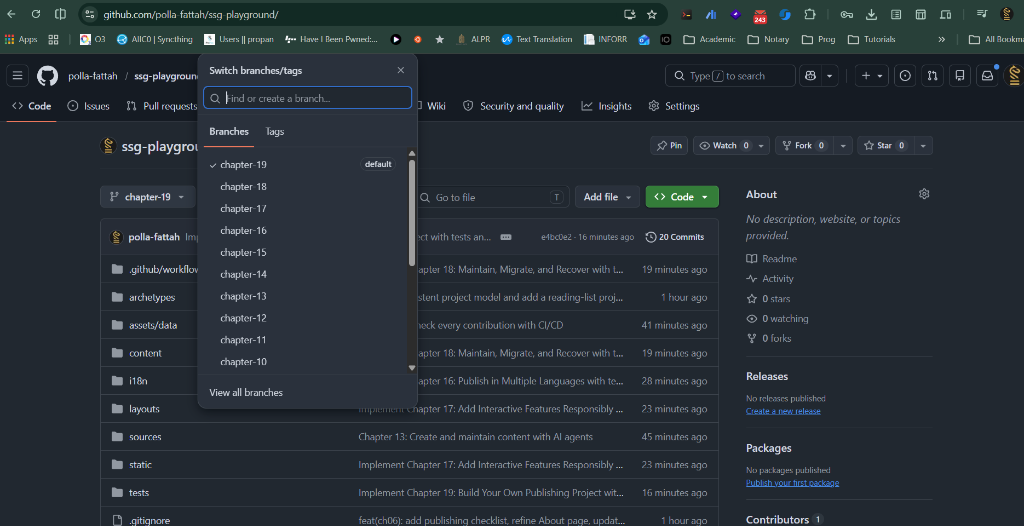
- Navigate to github.com/polla-fattah/ssg-playground .
- Click the branch dropdown menu at the top left of the repository file browser (as shown in the screenshot above; it defaults to
chapter-19). - Type or select the branch you need (e.g.
chapter-05). - GitHub immediately updates the file tree to show the exact state of the site at the end of that chapter.
- If you prefer to download a snapshot without using Git, click the green Code button and select Download ZIP.
Working Locally with Git
For the best learning experience, clone the repository to your computer and switch branches using standard Git commands.
1. Clone the repository
Open your terminal or command prompt and clone the repository:
2. View all available chapter branches
List all remote and local branches to see the available milestones:
You will see all 19 branches listed from remotes/origin/chapter-01 through remotes/origin/chapter-19.
3. Switch to a chapter branch (git switch)
Use git switch to check out the completed code for any chapter. For instance, to start working on Chapter 6, switch to the completed state of Chapter 5:
Git will automatically set up a local chapter-05 branch tracking origin/chapter-05.
4. Create your own practice branch (Recommended)
To practice the exercises without modifying the clean reference branch, create your own working branch based on that chapter milestone:
Now you can freely edit files, experiment, and commit your own work. If you ever want to see the official solution for Chapter 6, you can simply run git switch chapter-06.
5. Launch the local Hugo development preview
Once you have checked out your chosen branch, start Hugo’s local development server:
Open http://localhost:1313/ in your browser to view your live site. Changes made to Markdown files or templates will automatically reload in real time.
6. Run the automated chapter tests (Optional)
Each branch includes automated pytest checks in the tests/ directory verifying that the chapter’s features and requirements are met. You can run them locally with:
Chapter Branch Reference Table
Every branch in the repository corresponds directly to a chapter in the book:
| Branch | Book Chapter | Milestone Implementation |
|---|---|---|
chapter-01 | Chapter 1: Your First Hugo Website | Initial Hugo starter site, directory structure, home page, and baseline test suite. |
chapter-02 | Chapter 2: Write and Publish Content Locally | First article leaf bundle, page resources, responsive styling, and draft workflow. |
chapter-03 | Chapter 3: Organise a Useful Website | Multi-section architecture (Articles, Projects, Resources), shared navigation bar. |
chapter-04 | Chapter 4: Understand the HTML Behind Your Pages | Semantic HTML structure, accessible page landmarks, and structured footer layout. |
chapter-05 | Chapter 5: Practical CSS for Your Hugo Site | Practical CSS styles, responsive typography, spacing scale, and footer notes. |
chapter-06 | Chapter 6: Track and Recover Your Hugo Site with Git | Git tracking, publishing checklist, refined About page, .gitignore, and recovery. |
chapter-07 | Chapter 7: Publish Your Hugo Site with GitHub Pages | GitHub Actions CI workflow for GitHub Pages deployment and baseURL configuration. |
chapter-08 | Chapter 8: Work with an AI Agent on Your Hugo Site | AI agent guidelines (AGENTS.md), resources usage section, and agent verification. |
chapter-09 | Chapter 9: Give Your Hugo Content a Consistent Structure | Content archetypes, front matter metadata schema, and Reading List project bundle. |
chapter-10 | Chapter 10: Use Hugo Templates to Display Your Content | Dynamic Hugo templating, project metadata badges, and automated Projects list. |
chapter-11 | Chapter 11: Build Reusable Hugo Layouts | Reusable layout hierarchy: baseof.html, section templates, blocks, and partials. |
chapter-12 | Chapter 12: Build a Resource Directory with JSON | Data-driven resource directory loaded dynamically from JSON records (resources.json). |
chapter-13 | Chapter 13: Create and Maintain Content with AI Agents | Content creation prompts, automated maintenance workflows, and agent linting. |
chapter-14 | Chapter 14: Check Every Contribution with CI/CD | Automated CI/CD pipeline enforcing HTML validation, broken link checks, and pytest. |
chapter-15 | Chapter 15: Help Readers Find and Use Your Content | Search indexing, taxonomy navigation (tags/categories), and reader discovery aids. |
chapter-16 | Chapter 16: Publish in Multiple Languages | Multilingual Hugo setup (English, Kurdish, Arabic) with RTL support and switchers. |
chapter-17 | Chapter 17: Add Interactive Features Responsibly | Progressive client-side enhancements: dark mode switcher, interactive filtering. |
chapter-18 | Chapter 18: Maintain, Migrate, and Recover | Long-term maintenance, dependency upgrades, site backup/recovery protocols. |
chapter-19 | Chapter 19: Build Your Own Publishing Project | Capstone production project tying together all architecture, tests, and workflows. |
Getting stuck on an exercise?
Don’t worry! Check out the branch for your current chapter on GitHub or with git switch to inspect how the files should look, or check out the preceding chapter’s branch to reset to a clean working baseline.